Ranking well on Google is no easy task, and it gets even more challenging if you aim to rank high in multiple countries. By default, Google search displays local search results based on the user's location.
While getting geographically relevant results is best in most cases, other times you may need to target a specific location for SEO, ad verification, and web scraping. Google provides a few tools you can use manually, but if you need to check hundreds of ads or scrape dozens of websites, you will need some automation.
Luckily, all methods to get localized search results are easy. In this article, we will show you three ways to do a Google search for specific countries, starting with its free tools and finishing with proxies that allow scaling.
How Google determines your search location
Google determines your location using several bits of information. But first, it's worth noting that it also takes steps to protect user privacy, as exposing one's actual location online is risky.
To prevent that, Google estimates users' location by a general area that is larger than three square kilometers with at least 1,000 other users. This way, pinpointing exact coordinates for specific users is nearly impossible, although even the general area may violate privacy rights in some cases.
On the other hand, most of us enjoy delivery services or public transport apps that require accurate location data. Here's how Google determines it.
Firstly, you may willingly share this information via your smartphone’s GPS. But even if you don't, Google may check which Wi-Fi Network you are connected to, or triangulate your approximate location using mobile cell towers.
Another method is IP tracking, which is a very common online surveillance tool. An IP address is like your online home address, and each device has one. Whenever you browse a website, it checks your IP address to know where to send data. The issue is that an IP address is also linked to a specific geographical location.
Google checks IPs and shows local search results for IPs in different countries. What's more, online content availability also depends on the target country, like streaming service libraries or news sites.
That's why residential proxies and VPN services are so popular to mask the original IP address and substitute it with an alternative. By connecting to servers in different countries, you can bypass online geographical restrictions and get Google search results in a preferred location or enjoy more streaming options.
Another giveaway of your country is your Google account settings and browser language. These aren't as specific as Wi-Fi or GPS data, but they also determine which country's Google search results you will get.
Lastly, Google also checks your browsing habits. If you connect to the internet primarily from one country, and most of us do, Google considers it your residence. It can also get data from social media addresses or even pictures as a supporting factor.
There are more than a few things you can do to switch your virtual locations. However, Google itself and various third-party services make this very easy, and bypassing online geographical restrictions is popular among all internet users, whether tech-savvy or not.
How to do a Google search by country
You may have noticed that wherever you browse from, the Google search engine usually defaults to the .com top-level domain. But that's only a technicality to avoid confusing users with multiple endings, like .es for Spain, or .it for Italy. Although it displays .com, the Google search engine still offers you localized search results.
If your goal is only to get Google search results from different countries, for example, to inspect how well your website ranks there, you can use the built-in Google Chrome tools.
Change Google’s built-in settings
Let's start with the most straightforward method, which is to use specific keywords. Suppose we run a few coffee shops and would like to see whether Google ranks them. We start by typing 'best coffee shop' and notice in the picture below that Google immediately suggests searching in Vilnius, because we're currently browsing from there.
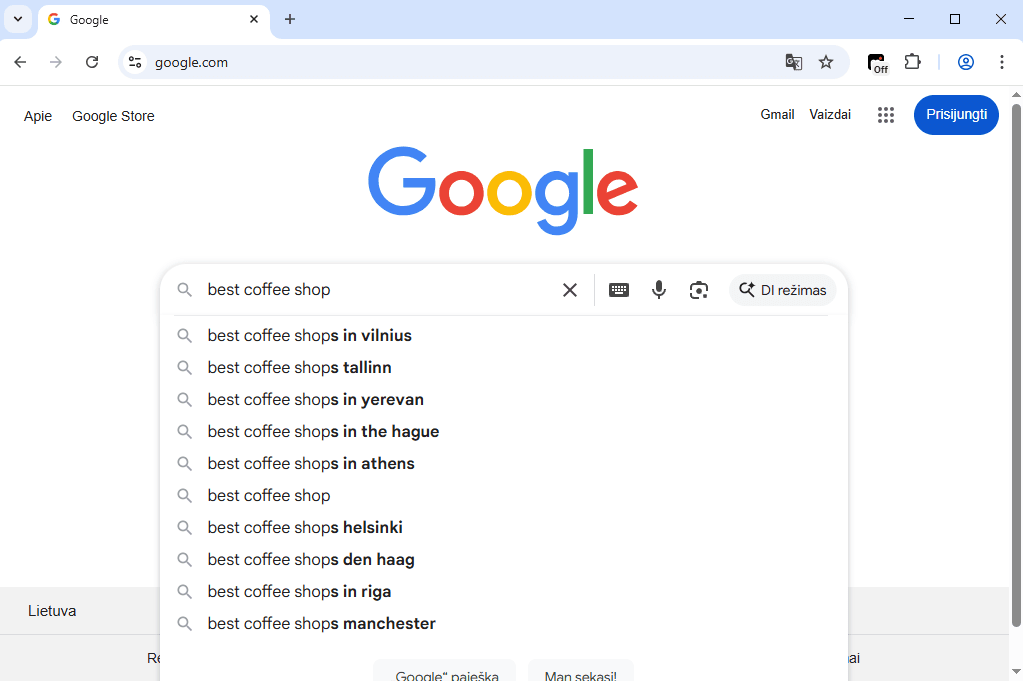
Notice that they start recommending other cities, like nearby Tallinn or Riga. So the easiest way is to simply append “in [specific city]” after your search query, like 'best coffee shops in New York'. Then you have to manually go over the Google search results to see whether your website or advertisement is there.
Although this method is completely free, it's also not 100% accurate and is time-consuming if you have to check more keywords. Modifying Google's advanced search settings is a better way to go.
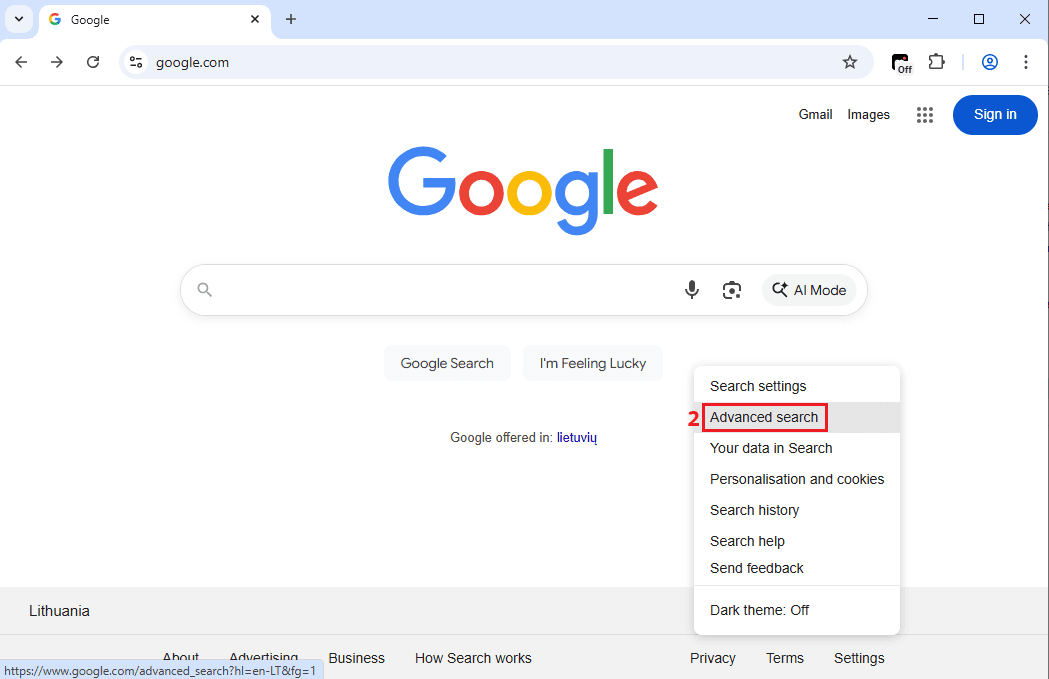
- Go to Google.com and click on 'Settings' (1) at the bottom right corner.
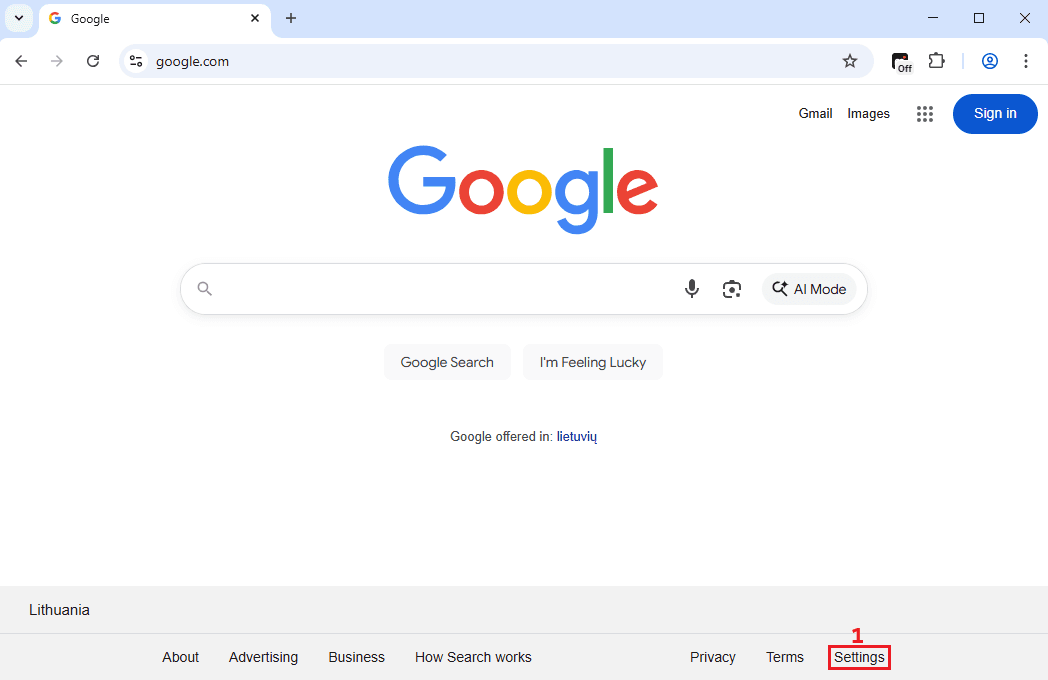
2. Choose the 'Advanced search' (2) option.
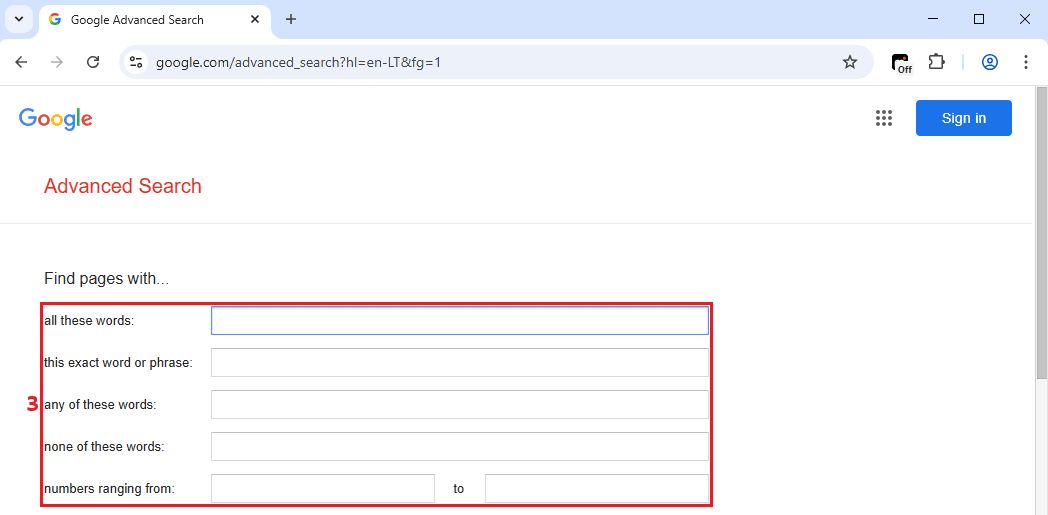
3. There, you can specify keywords and phrases (3).
4. Scroll down to specify language and region options (4) and click 'Advanced search' (5).
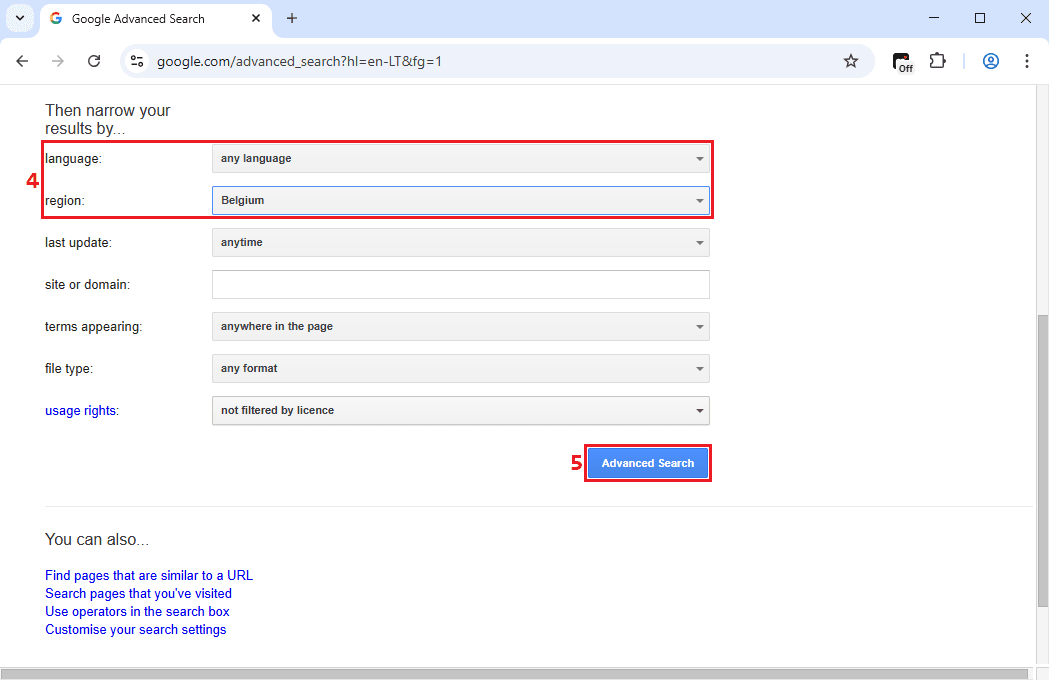
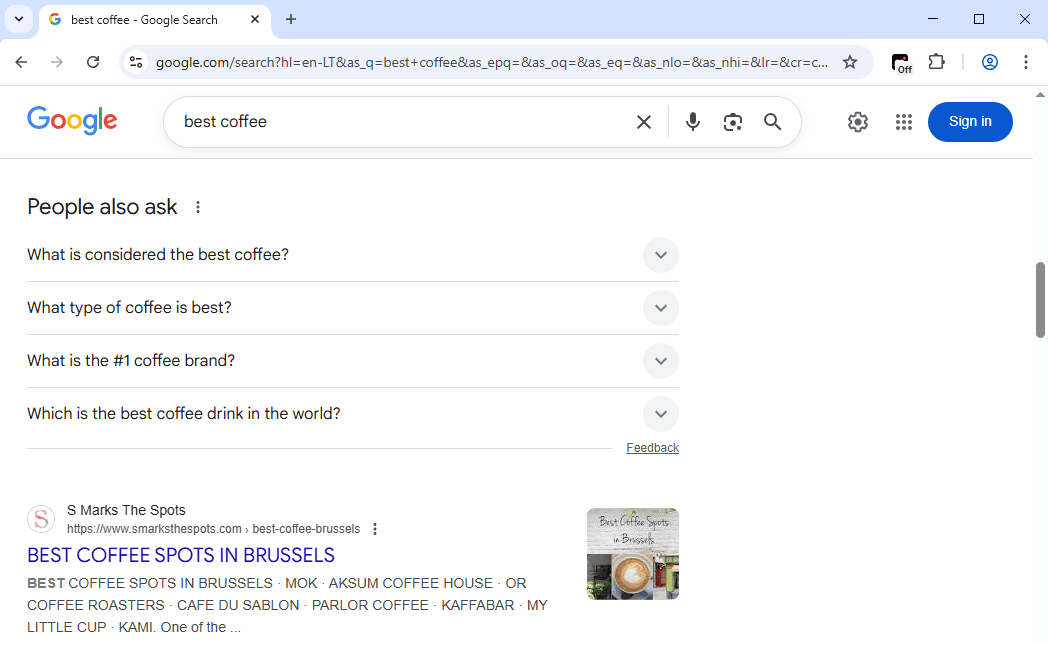
Here, you can pinpoint the desired Google search results location. We chose Belgium and searched for the 'best coffee' keyword. Notice in the image below that Google is now displaying 'best coffee spots in Brussels', so we successfully switched virtual regions in the advanced search option.
Use SERP tools
Although Google's advanced search allows switching online regions, it is also very limited. Let's take a look at a few third-party tools that offer more flexibility.
One of them is I Search From website. Firstly, it lets you specify the country and language to get local Google search results.
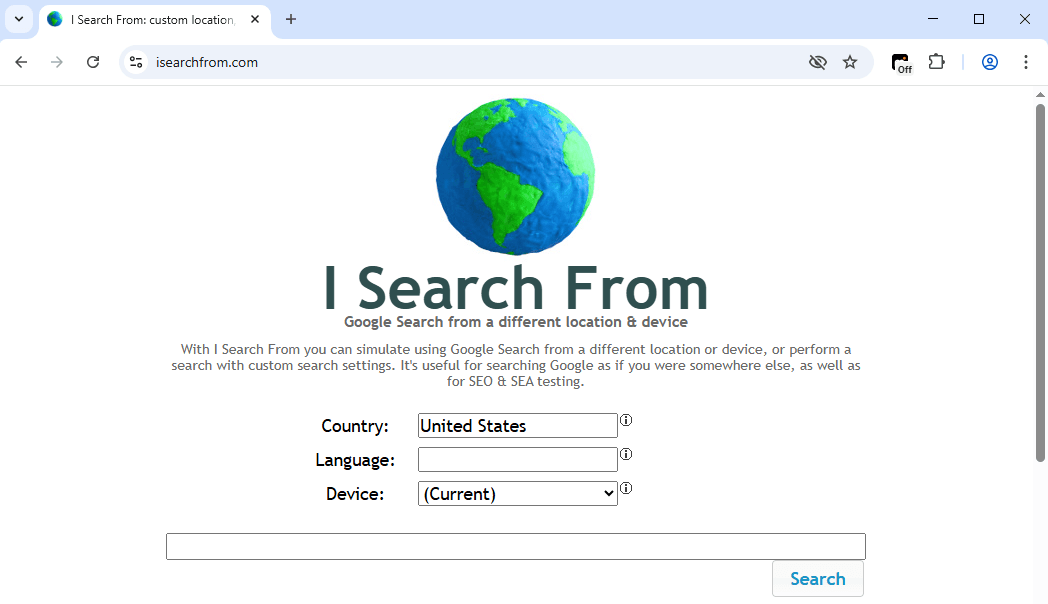
Scroll down to find city targeting options and additional options like personalized search. We chose to search for the best coffee in New York, United States.
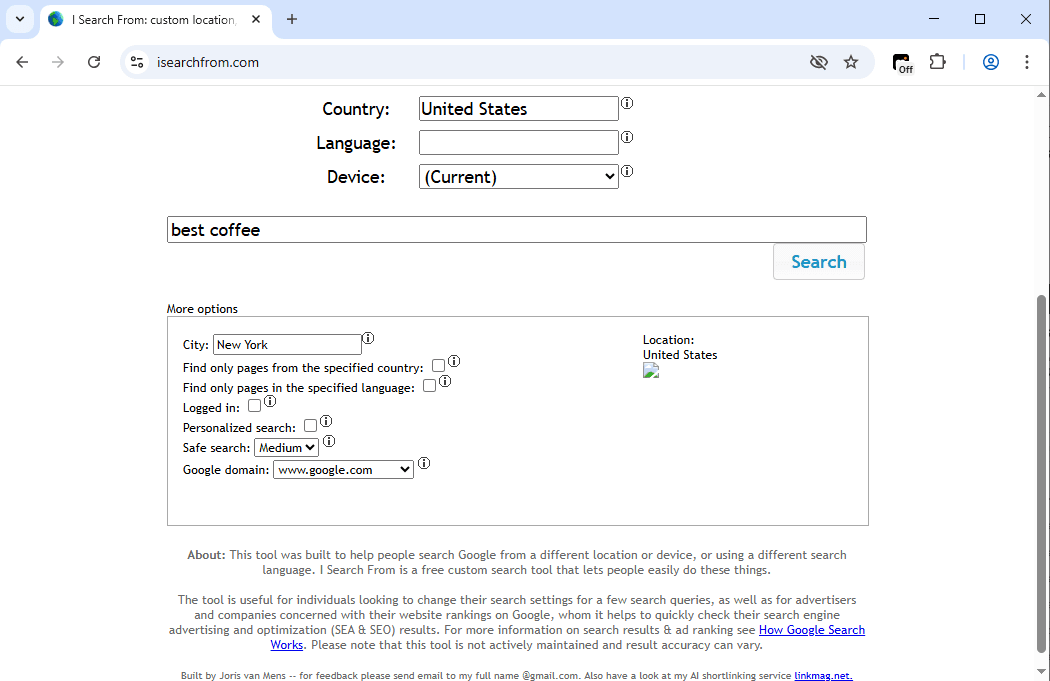
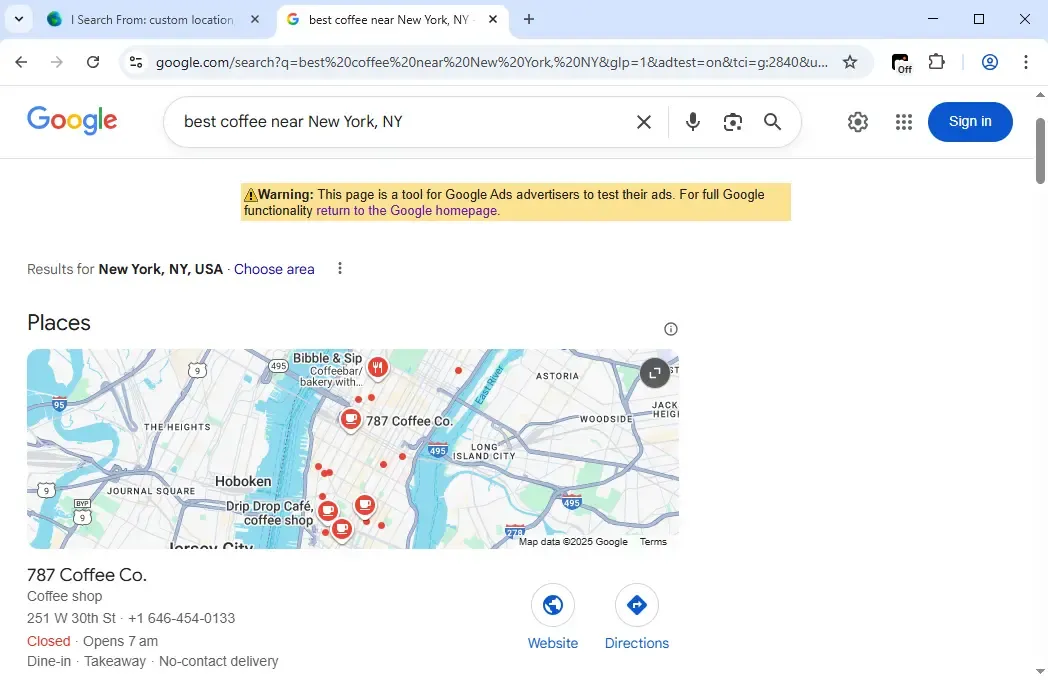
This tool offers a few more options compared to Google's advanced search. Spoofing smartphones is also beneficial for rank tracking on these devices, as an increasing number of people use these devices as their primary internet access. Notice from the results below that Google is now displaying New York local search results for the best coffee.
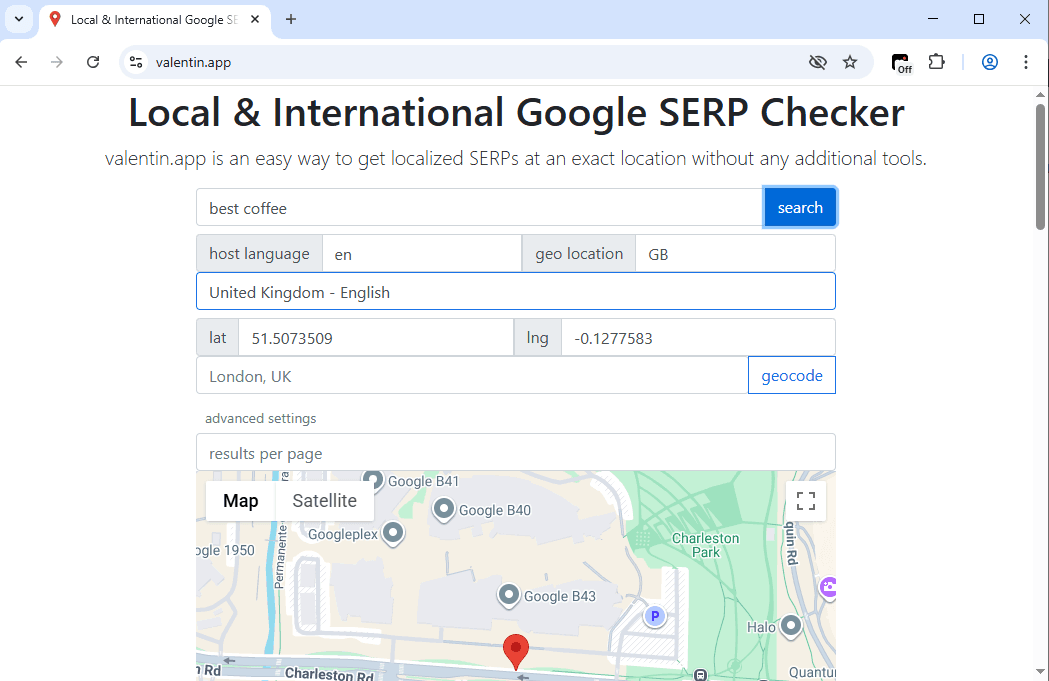
Let's check another free tool to give you some more options. The Valentin.app website has advanced search settings that allow you to specify latitude and longitude coordinates, so this search is very precise.
These are widely available and free consumer-centric tools. However, SEO professionals or data analysts need many more features, like keyword volume data and difficulty rating, associated keywords, and competitor strategy analysis, to name a few.
The SEO Search Simulator Google Chrome extension by Nightwatch is a very simplified version, but it's a step in the right direction. Here, you can also input a search query, choose a country, and name a specific URL to find. See the results for the best coffee in the UK below.
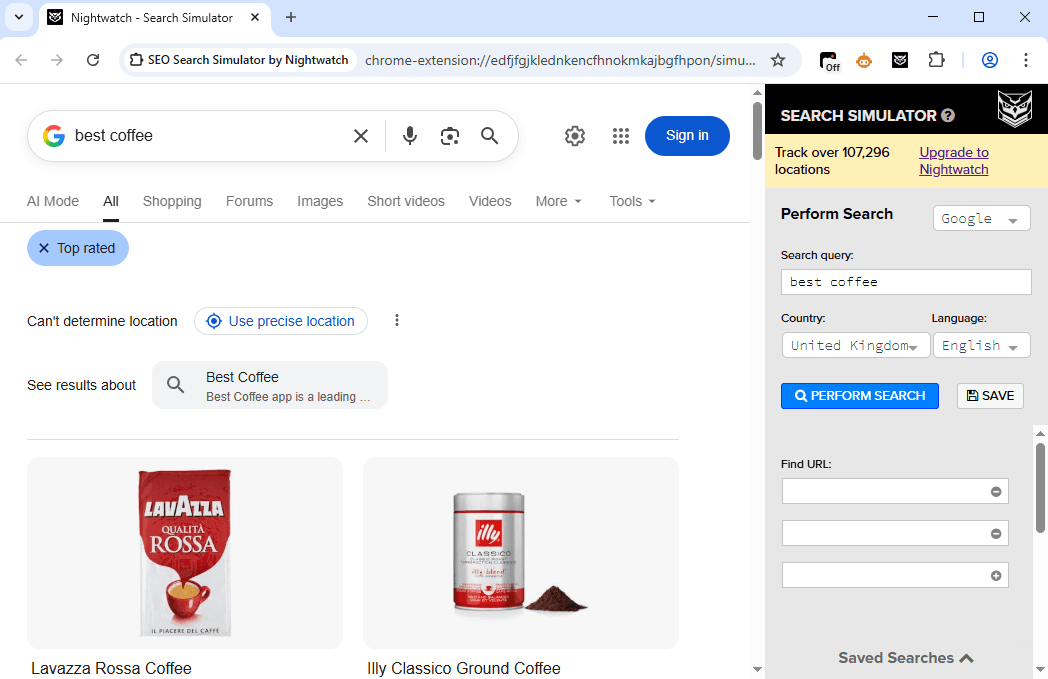
Notice that you can upgrade it to a paid version, which also has a 14-day free trial. That's where the real magic begins, as it offers site audits for existing and missing keywords, website rank tracking, and includes YouTube and Bing rank trackers, all displayed in an intuitive dashboard.
If you're doing SEO and require Google search results in different countries, we highly recommend exploring SEO tools further. For example, Ahrefs has a galaxy of useful keyword data and in-depth country targeting options. Semrush is an all-in-one solution that focuses on pay-per-click (PPC) marketing, but we'll leave it up to you to explore more options.
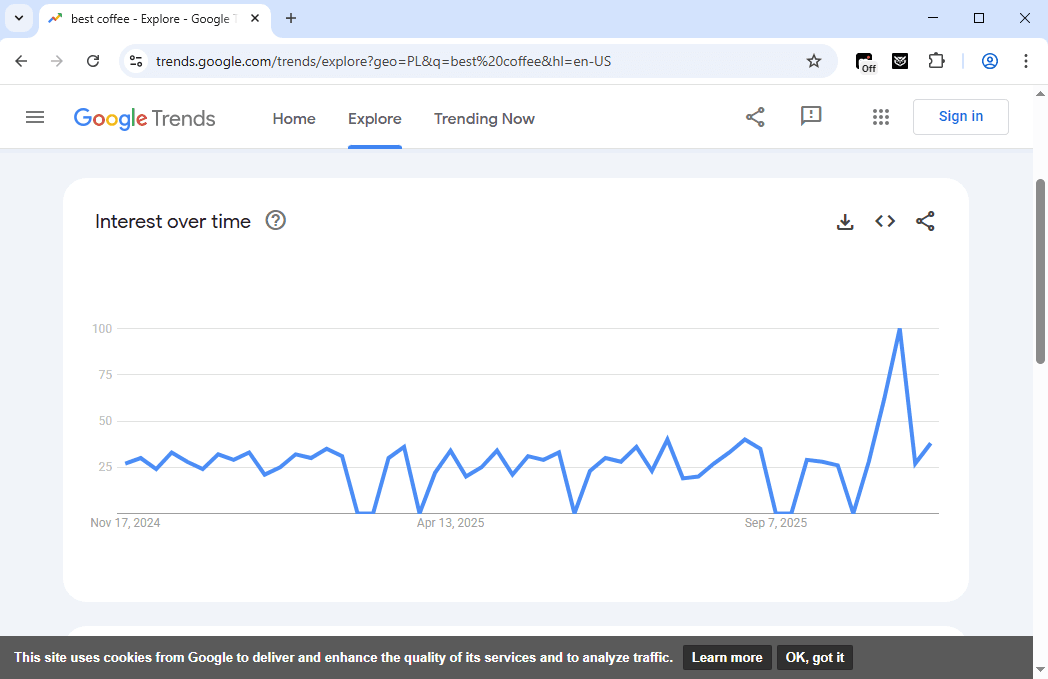
Before we proceed, we also want to mention Google Trends. If you want to learn what people are googling about your brand or the industry you're competing in, Google Trends lets you select a country and shows how interests change over time.
For example, here's the best coffee search volume in Poland during the last year. Looks like Poland needs some help waking up in chilly autumn mornings!
Use a VPN
VPNs and proxies switch virtual regions and target locations similarly. They both offer servers in different countries that users can connect to. However, while VPN services are more cybersecurity-oriented, proxies excel at IP rotation for data gathering, like scraping SERP.
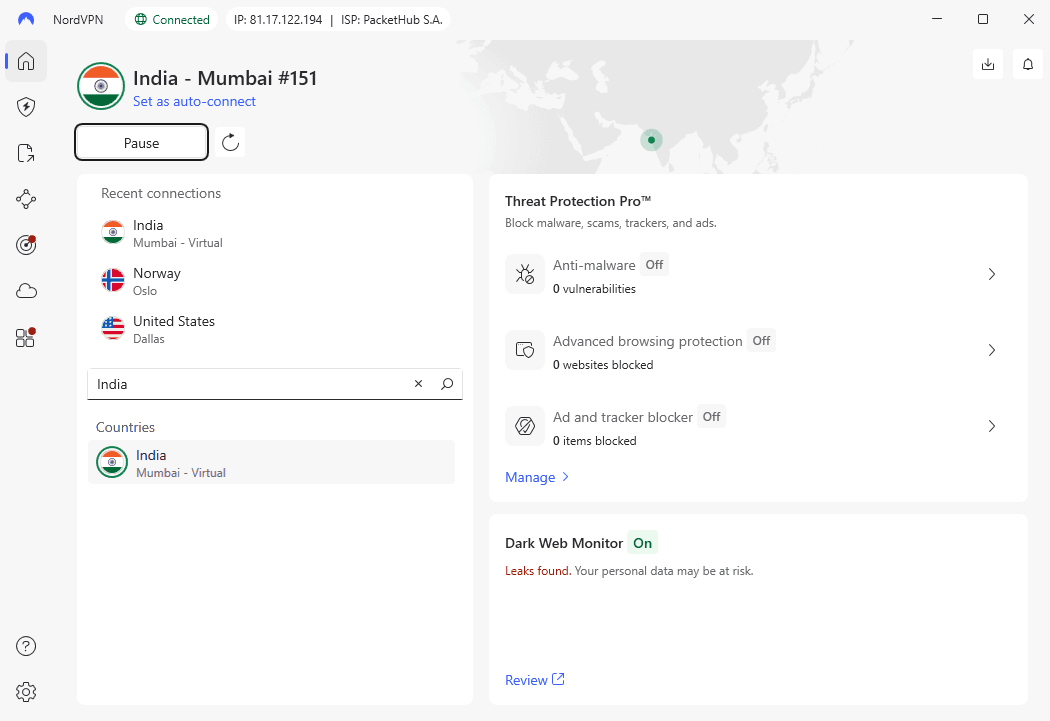
Let's see how to switch regions using VPNs to get localized search results. We will use NordVPN as an example, but most consumer-centric VPNs work similarly.
1. After subscribing and installing your VPN, launch its application and find the server list.
2. Connect to a server in a desired country.
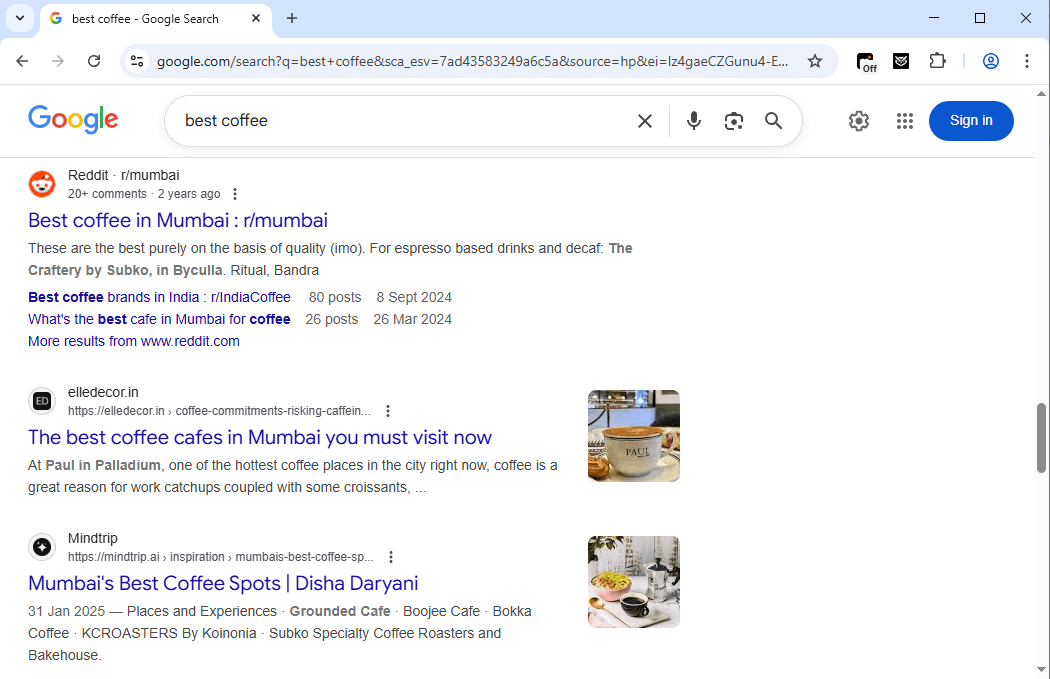
3. Go to Google.com, preferably logged out or in incognito mode, and type your keyword.
In our case, Google immediately recommends the Reddit group for the best coffee in Mumbai because we have an IP address from India.
But as we mentioned, VPNs excel at cybersecurity, essentially for traffic encryption and online privacy protection. Many VPNs prioritize connection speed retention, so they are also a great choice to unblock streaming service libraries.
You will, however, run into shortcomings if you aim to use VPNs for web scraping or other scalable tasks. VPNs typically provide thousands of servers, while proxies count their pool in tens of millions. So if you need IP rotation to scrape Google search results, then you should use a proxy.
Use a proxy
Proxies are the best to switch between regions quickly, so they are compatible with web automation tools. We've written a guide on how to use Python's Selenium for web scraping, where proxy servers are used for IP rotation to avoid data restrictions.
If you’re looking for a reliable partner for all your global searches, look no further. At MarsProxies, we offer over a million residential proxies in exactly 190 countries, so we'll show you how to use them to target location.
Here's the easiest way to do it using our free Google Chrome extension.
1. Subscribe to our services and purchase a selected amount of traffic.
2. Log in to your account.
3. On the left side, click on the 'Residential' (1) option.
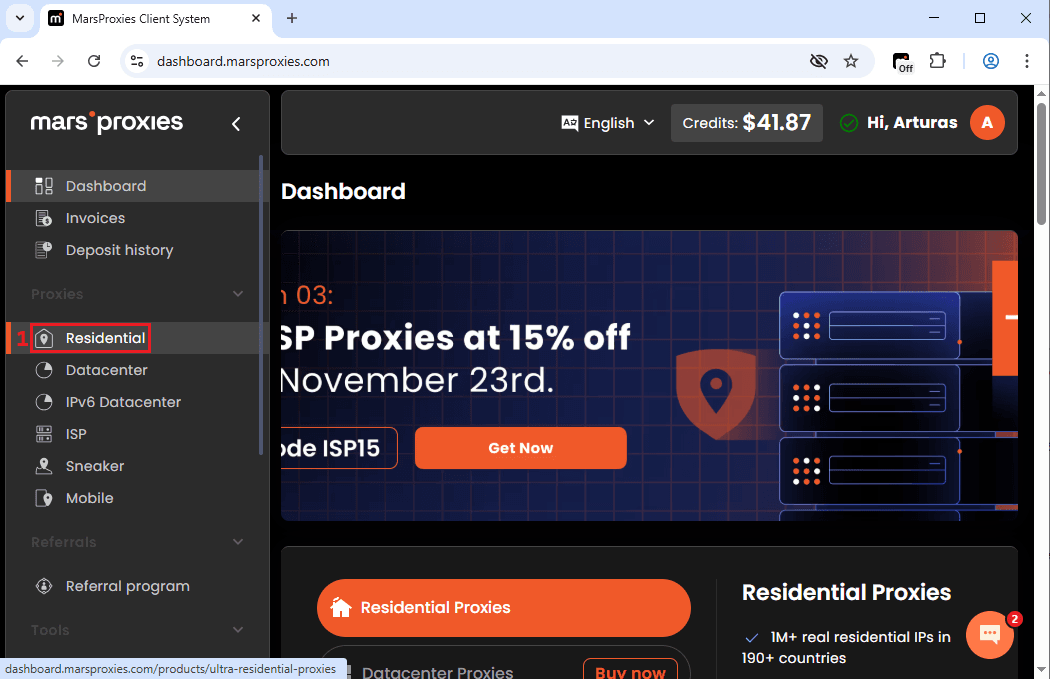
4. Fill in the required fields (2): choose the target country, the target sticky or randomized IP, the protocol type, and the hostname. We will connect to a rotating HTTP proxy in Hong Kong.
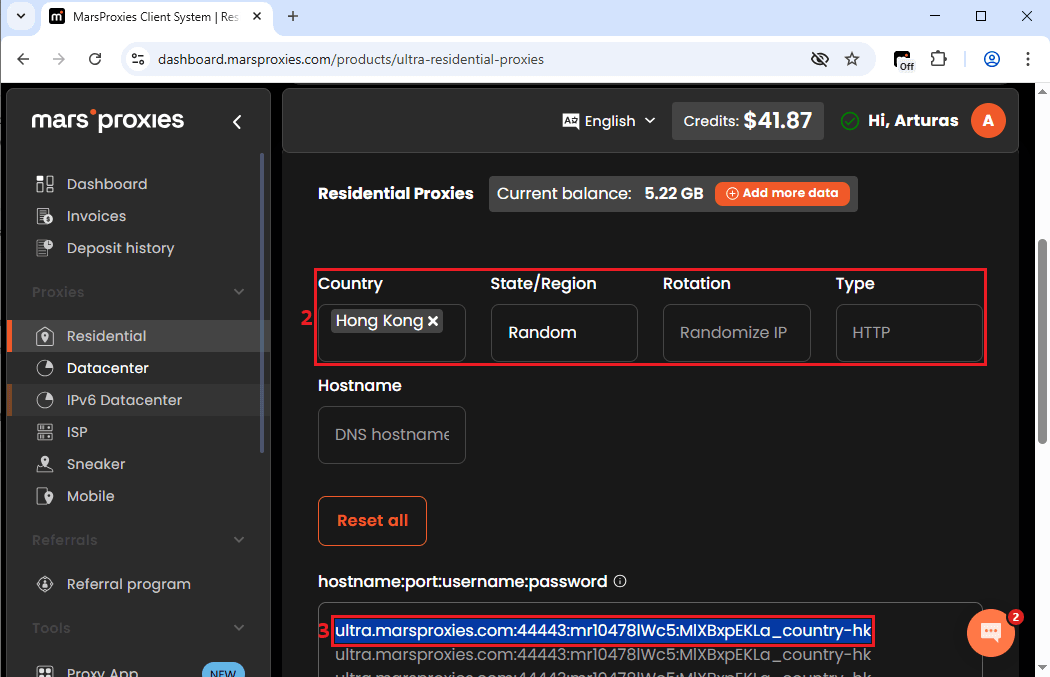
5. Notice the highlighted proxy string (3) in the picture above. You will have to copy yours and paste it into the MarsProxies extension.
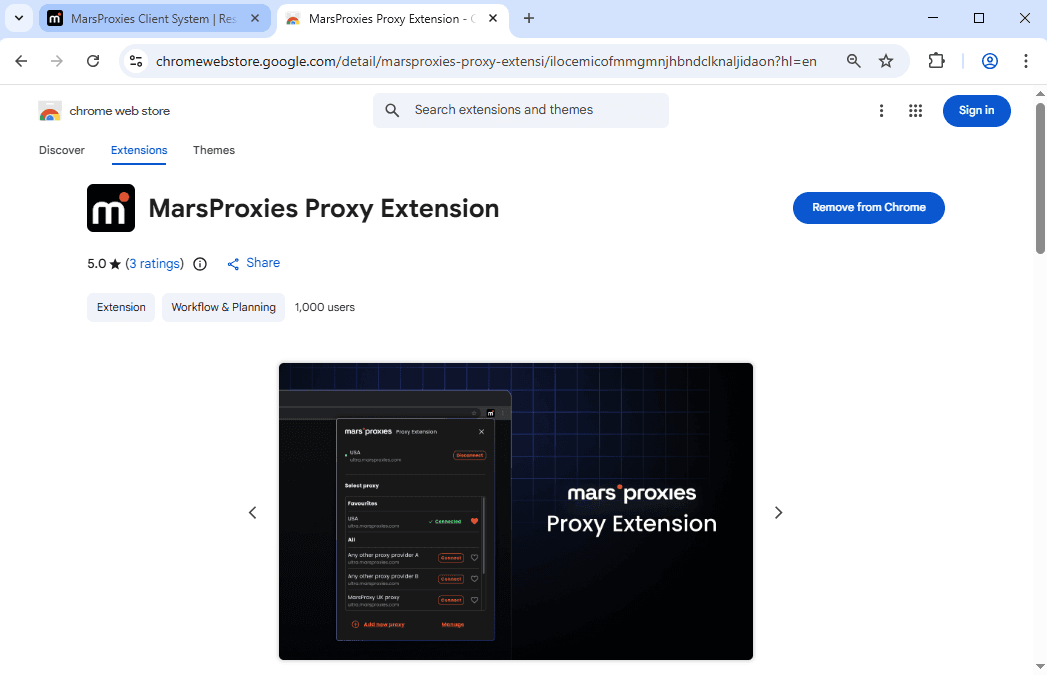
6. Add our Google Chrome proxy extension from the Google Store.
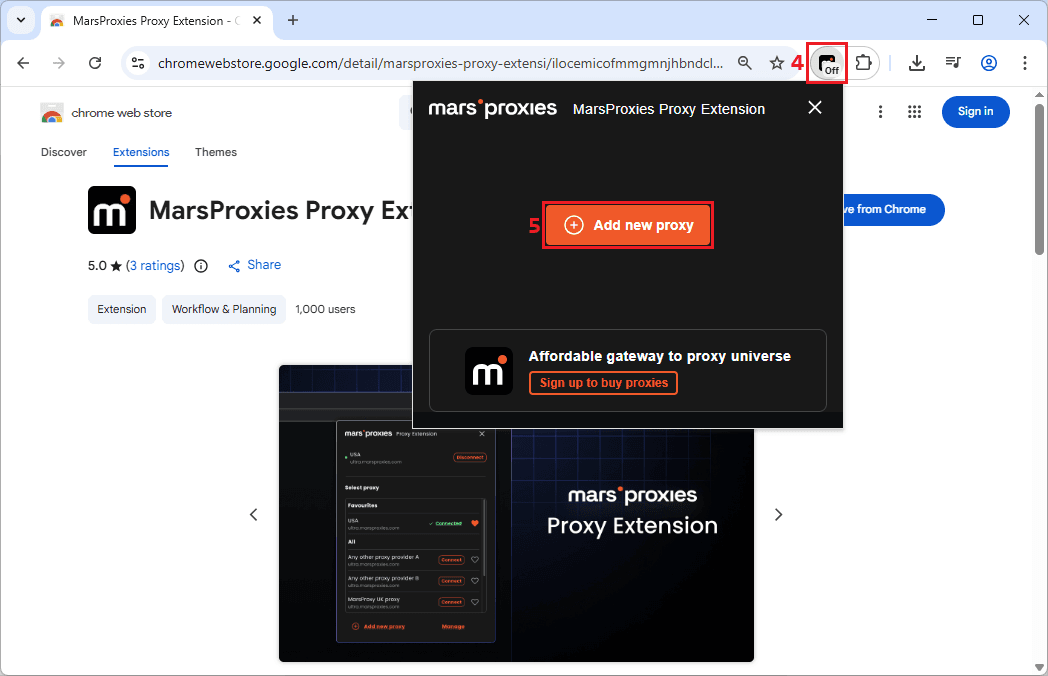
6. Left-click on the MarsProxies extension icon (4) and choose 'Add new proxy' (5).
7. Now, name (6) your proxy connection and paste the proxy string from step 4 into the 'Hostname/IP' (7) field. Click the 'Save' (8) button to save your profile.
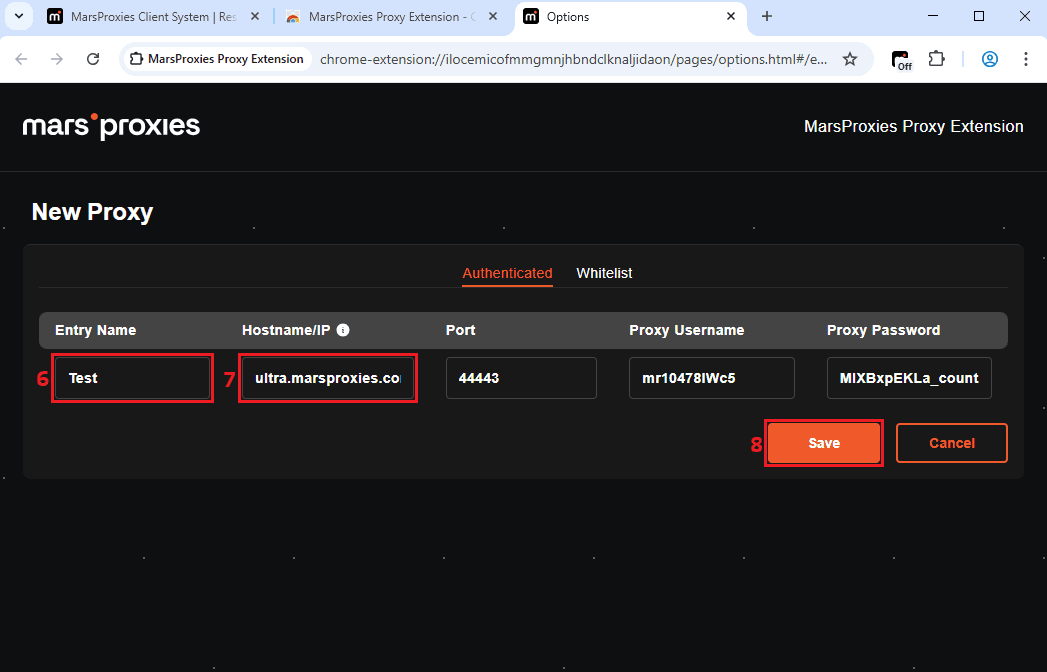
8. Left-click on the MarsProxies extension icon (9) again and click 'Connect' (10). The green dot means that the connection is successful.
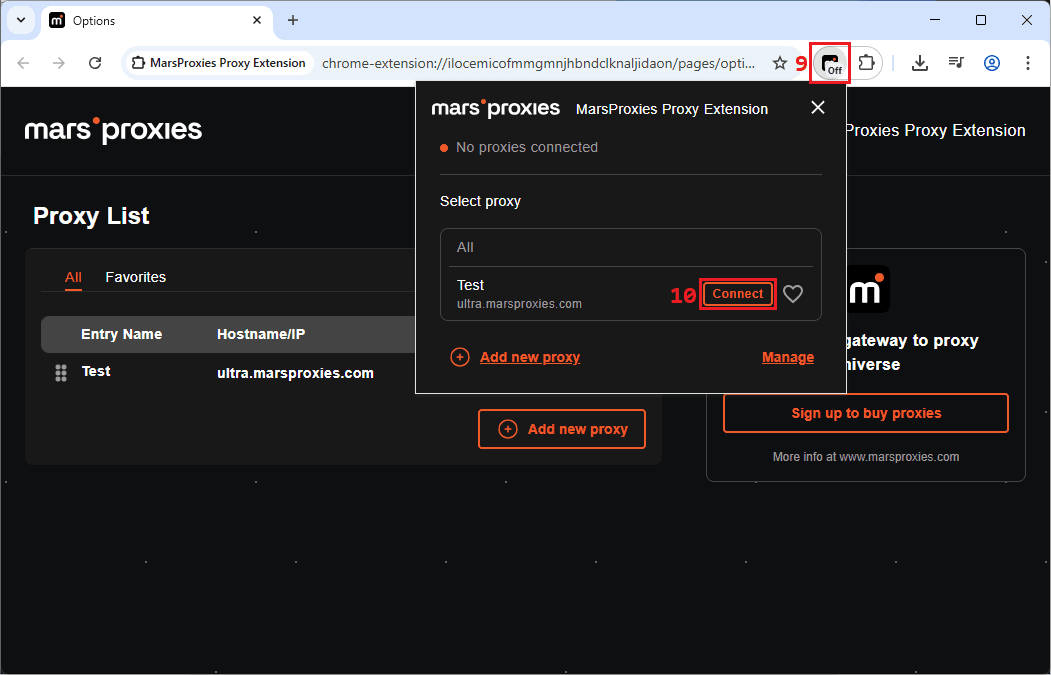
That's it. To make sure your proxy works correctly, visit IPLeak or any similar site.
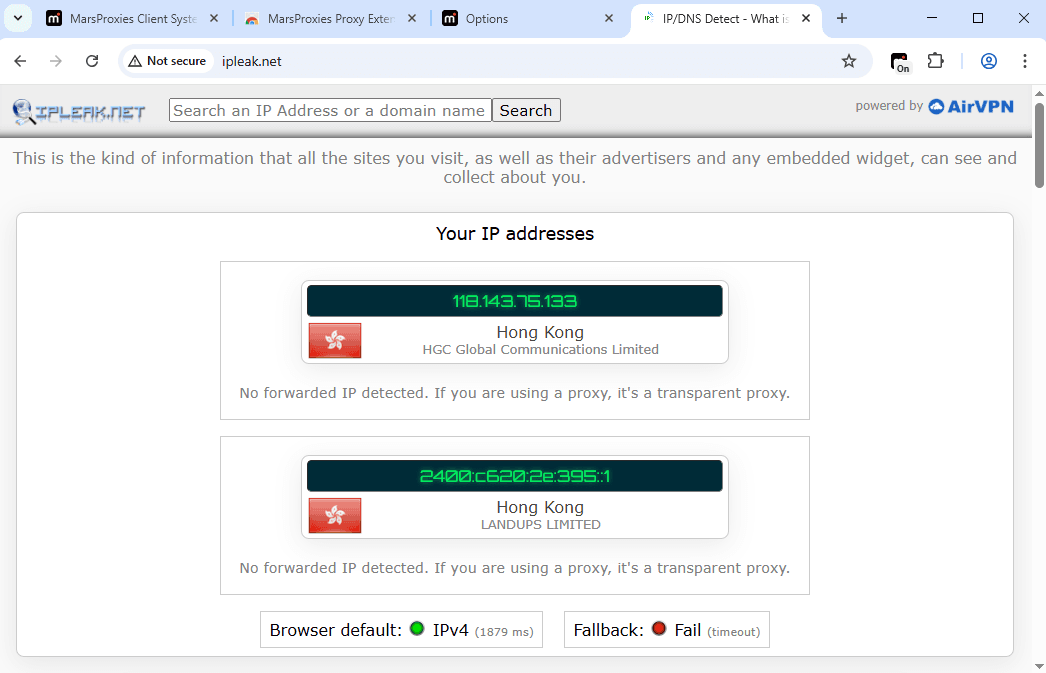
Our IP address was successfully changed, and we can now get Google search results from Hong Kong. Keep in mind that most residential proxies are rotating by default, and you can choose specific IP rotation intervals per your demands.
Also, unlike VPNs, residential proxies mimic a genuine person browsing (while most VPN servers are located in datacenters). This way, you can get location-specific rank trackers as a local person would. When scraping such data, proxies make sure it’s as accurate as possible, as Google search results are tailored to that country throughout.
If you create multiple profiles in our extension, you can switch between different countries with a single click. And if you know your way around coding, you can customize further by setting an HTTP request delay function to avoid anti-bot detection.
How to check how your site ranks in another country
Now that we've figured out how to get Google search results for a specific country, here's how to check whether you're ranking there.
The easiest way is by simply Googling your brand in a selected country. Go through the Google search results looking for your website, but keep in mind that the first page is tough to get to. If you can't find yours, try adding additional keywords, like the city you operate in or a unique selling point that people may be searching for.
For SEO specialists, using dedicated SEO tools is unavoidable. We're familiar SEO specialists have a wide range of preferred choices, but Ahrefs is considered a top-notch software by many. By inspecting our website on their free traffic checker tool, we can see where most of our users come from.
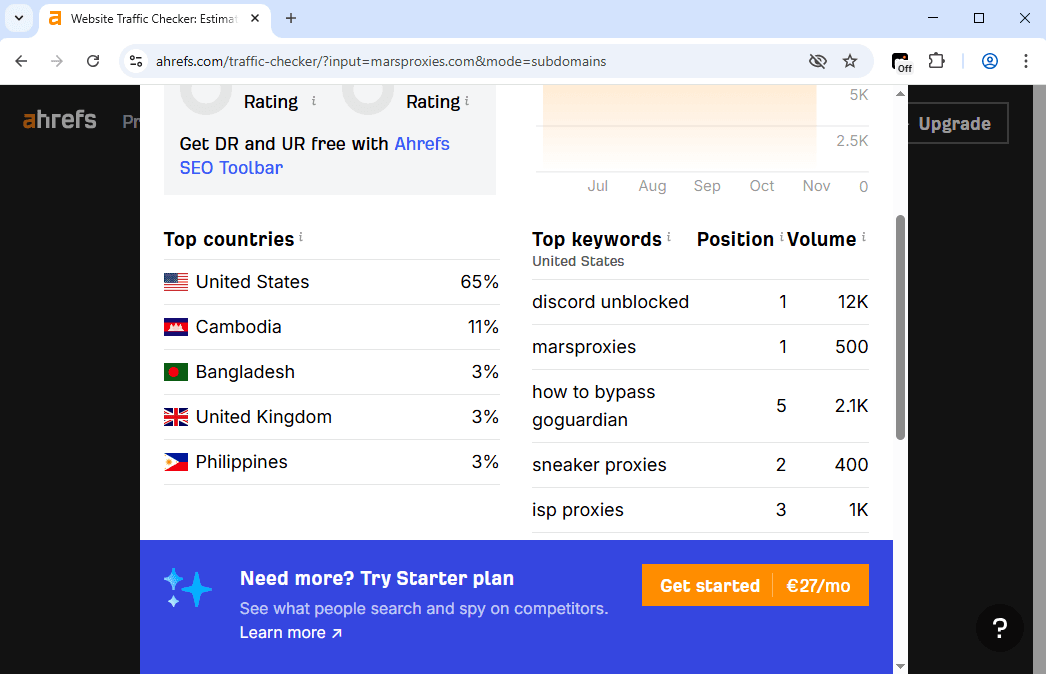
This way, we know which markets to focus on. And the paid Ahrefs version has many more benefits, like broken backlink identification, content gap, and referring domain data, organic keywords, competitor keywords, and many more. Ahrefs also displays location-specific rank trackers' performance over time, so that you can make future predictions and target relevant keywords.
And if you're a web scraping professional or a data analyst, head straight to our proxy recommendation. Millions of proxy servers ensure that your data gathering is scalable. Their servers are located worldwide, so you can target a country or a target location at the city level.
Lastly, residential proxies excel at imitating a real user, so they are challenging to block. You can scrape Google search results without worrying about IP detection and bans. Keep in mind that the Google search engine also scrapes the web for accurate rank tracking, so it's a widespread practice.
Conclusion
More and more brands are competing globally in our virtually connected market. Which, in turn, makes localized Google search results very valuable. If you know what local consumers are searching for, you can localize your ads, increase SEO relevancy, or identify new lucrative investment opportunities.
We discussed three ways to target country or switch between different countries. For casual internet users, we recommend using Google search with built-in advanced settings. You can also subscribe to a VPN, which should be your priority choice if you require additional online privacy protection alongside local search results.
But if you're running a business and want to expand and scale worldwide, proxies are irreplaceable. They can target a location and rotate IPs to scrape data faster and with a strong layer of online anonymity. And if you have any questions or know a method to get local Google search results we haven't discussed, drop by our Discord community to share thoughts.
Does Google use the same ranking algorithm in every country?
No, Google operates different ranking algorithms in different countries. While its core algorithm is single and global, the ranking factors are local. For example, Google will prioritize queries made in the native language for local results, then consider search intent, and then local relevancy.
Can search results differ even if two users are in the same country?
Yes, Google search results are almost always different for two users, even if they are from the same country. Google search is highly personalized, and even if you are not signed into a Google account, it can collect data from your browser or device to display different results than those of other users.
Will Google show translated content when searching from another country?
Yes, Google often translates content when searching from another country. It often translates the title link and the short description to give users an idea of what the backlink stores. It will then offer to translate the website content if the user clicks on it.
What’s the difference between using a country‑specific domain (e.g. google.fr) vs a VPN/proxy?
The difference is that using a specific target country domain is a weak indication of location for Google. A genuine IP address for a target location is a much stronger geographical indicator to display local Google search results.
Is it safe or allowed by Google’s policies to use proxies or VPNs to test search results?
That depends. Using a VPN or a proxy to inspect Google search results in other countries is perfectly legal. However, automating Google search scraping may be a violation of its terms of service and spam policies. We strongly recommend reviewing Google's data sharing policies before scraping it.