How to Bypass reCAPTCHA v3 [2026 Guide]
Google introduced reCAPTCHA v3, an invisible CAPTCHA that operates quietly in the background. Unlike v2, it no longer shows a visible challenge you can solve. Instead, it assigns a risk score based on user behavior to determine if an action is legitimate.
But, how do you bypass something you can’t even see?
In this blog, we’ll break down how reCAPTCHA v3 works, why an invisible reCAPTCHA is harder to bypass, and the practical methods you can use to bypass reCAPTCHA v3.
That said, bypassing CAPTCHAs for illegal or malicious purposes violates ethical and legal standards. This tutorial is for educational purposes only, and we encourage you to review the Terms of Service of your target websites to avoid legal issues.
What is reCAPTCHA v3 and why is it difficult to bypass?
ReCAPTCHA v3 is Google’s most advanced invisible CAPTCHA. It runs silently in the background, monitoring things like your mouse movements, clicks, typing rhythm, and even your browser and device characteristics to decide if you’re human.
Instead of showing a visible CAPTCHA, which can be solved manually or with a reCAPTCHA solver, reCAPTCHA v3 evaluates each interaction behind the scenes and immediately blocks any request that fails this test.
How is v3 different from v2?
ReCAPTCHA v3 shifted the focus from defeating bots to analyzing risk. Google is no longer claiming that it is differentiating between human and non-human traffic or bots; it is delivering a risk score between 0.0 and 1.0, along with other metadata, to your backend.
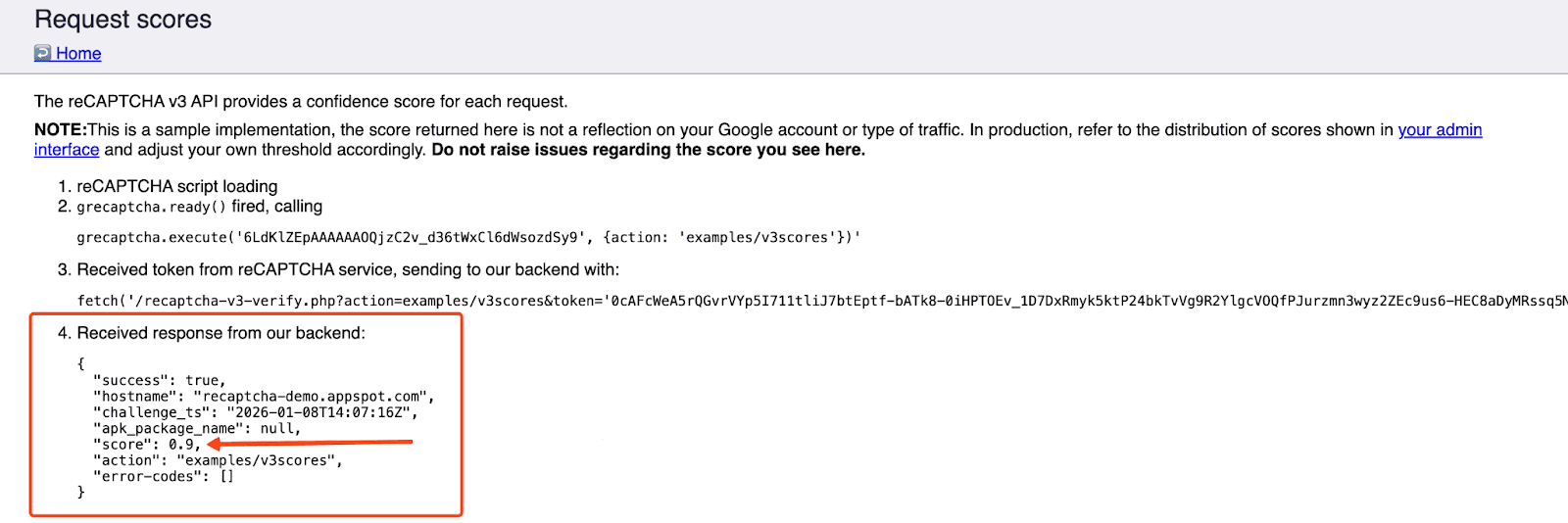
- 0.0 = Highly likely to be a bot
- 1.0 = Likely a legitimate user
The website receives this score and decides whether to let the user through or require further verification.
Why it’s difficult to bypass v3
Here’s why bypassing v3 is so challenging:
- No visible challenge to solve - there’s no puzzle or pop-up, so your scraper must look human enough to earn a good score.
- Website owners control the threshold - each site sets its own passing score, so what works on one site may fail on another.
- No clear feedback on failure - you don’t see an error, so requests get blocked or redirected silently.
- Environment-wide evaluation - reCAPTCHA v3 scores your entire session using behavior, fingerprinting, and IP reputation.
Methods to bypass reCAPTCHA v3
Here are some of the most effective methods and tools to make your scraper look natural from every angle so you can get around reCAPTCHA v3:
1. Use real browsers and stealth automation tools
The first rule of a successful reCAPTCHA bypass is to make your automation behave as much like a real user as possible. This means using a real browser rather than basic HTTP requests.
Tools like Selenium, Puppeteer, or Playwright allow JavaScript rendering, which is super important when trying to get around reCAPTCHA v3 without relying on a reCAPTCHA solver.
However, running these tools in their default mode is not enough. Google can easily detect regular automation patterns, such as the navigator.webdriver flag or missing browser features. That’s why developers use stealth layers like:
- puppeteer-extra-plugin-stealth (Puppeteer)
- undetected-chromedriver (Python/Selenium)
- Stealth mode plugins for Playwright
These tools hide automation fingerprints by spoofing plugins, canvas data, headers, and more. Stealth scripts and fingerprint spoofing are usually implemented with JavaScript in the browser context to better mimic a real user environment.
You should also add human-like interactions, such as small delays, scrolling, and typing speed variations, to help reduce detection.
Pros:
- Most realistic human simulation
- Highest chance of earning a good reCAPTCHA score
- Supports full JavaScript execution
Cons:
- CPU and memory heavy
- Needs constant updates to stay ahead of detection
- Slower than simple request-based scraping
2. Bypassing CAPTCHA with residential proxies
ReCAPTCHA v3 also makes decisions based on your IP and ASN from your HTTP request.
If the IP has a history of bad behavior or is a known data center/cloud server, it’s more likely to flag the traffic as a bot. To improve your odds of a successful reCAPTCHA bypass, use high-quality residential IPs.
Keep in mind, a clean IP won’t save a bot that behaves like a bot, but they prevent IP-based blocking and give your bot a better starting reputation.
Many CAPTCHA-solving providers also encourage using your own proxy for v3 tasks because IP quality significantly affects the returned score.
Pros:
- Real-user IPs boost trust
- Helps avoid IP-based blocking
- Works well with browser automation
Cons:
- Not enough on their own
- Low-quality IPs hurt reputation
3. Use CAPTCHA-solving services
If your setup still gets low scores, you can try a dedicated captcha solver. There are many CAPTCHA-solving companies and services that claim to automatically solve reCAPTCHA v3.
Platforms like 2Captcha, CapSolver, and Anti-Captcha provide APIs that can automatically solve reCAPTCHA v3 by generating a valid token on their own browser farms.
These services can be very effective as a backup when your own setup fails to earn a high enough score, but they’re not perfect, especially for large-scale scraping.
Pros:
- Easy to integrate through simple API calls
- Great fallback when your reCAPTCHA v3 score is too low
- Supports many CAPTCHA types, including reCAPTCHA v2 fallbacks
Cons:
- Costs can add up
- Requires setup and API key management
- Still dependent on your IP quality
4. Combining multiple techniques
No single technique will magically bypass reCAPTCHA v3 in every situation. The most reliable setups combine every tool in the toolbox.
A stealth browser alone may still be suspicious if the IP is bad. A proxy alone won’t help if the browser behavior is robotic. A solver alone may get you through, but it can quickly get expensive. But together, these techniques overlap and strengthen each other, creating a setup that looks and behaves far more like a real user.
Note: Check out our detailed guide on the 10 best tips for bypassing CAPTCHA.
Pros:
- Covers the weaknesses of any single method
- More stable for long-term scraping
Cons:
- More complex to build and maintain
- Resource-heavy
How to bypass reCAPTCHA v3
You should make your scraper blend in and behave less like a script and more like a real person.
Requirements
Before you begin, ensure you have met or installed the following requirements:
- Python 3.9+
- Playwright (for browser automation)
- BeautifulSoup + lxml (for parsing)
- High-quality residential proxies from MarsProxies
- Basic familiarity with Python
Set up your virtual environment
Download and install Python from the official Python website if you haven’t already done so before proceeding to create a virtual environment.
python -m venv venv
Activate the Python virtual env by running the following commands:
# for Windows
venv\Scripts\activate

# macOS / Linux
source venv/bin/activate
Install your libraries
pip install playwright beautifulsoup4 lxml
Creating a virtual environment gives you an isolated environment to install all the tools you need. Playwright will also automatically download Chromium, Firefox, and WebKit browsers.
Step 1: Confirm reCAPTCHA v3 is in use
Here’s how to check if your target site actually uses reCAPTCHA v3:
- Open the site in Chrome
- Open DevTools (press F12)
- Go to the Network tab
- Reload the page
- Filter network results for reCAPTCHA
If the site uses reCAPTCHA v3, you’ll typically see requests to URLs like:
https://www.google.com/recaptcha/api.js?render=...
If nothing appears, the site is probably not using reCAPTCHA v3 on that page. For this demo, we’ll be scraping Lulu and Georgia’s furniture sale section.
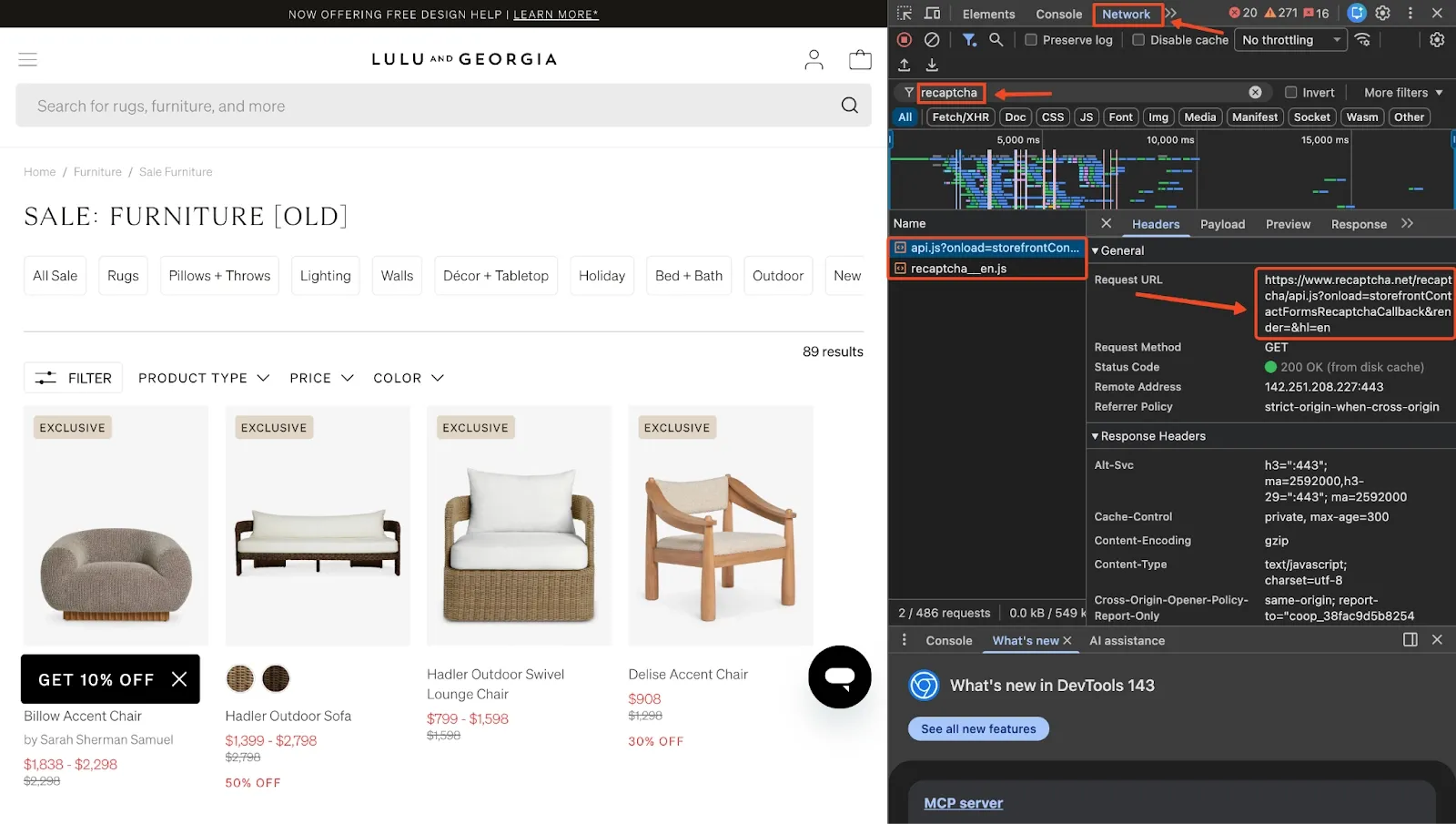
After checking the network logs, you’ll notice that the page loads reCAPTCHA scripts after refreshing. This confirms that the site is using reCAPTCHA v3, so our browser automation needs to behave naturally and route through clean residential IPs.
Step 2: Import your libraries and define core variables
Start by importing the modules you’ll need and defining the URL to scrape.
import asyncio
import random
from playwright.async_api import async_playwright
from bs4 import BeautifulSoup
Next, define your target page:
TARGET_URL = "https://www.luluandgeorgia.com/collections/sale-furniture-1"
This is the page we confirmed earlier that contains reCAPTCHA v3 requests. We’ll be scraping the furniture items that appear in the sale section.
At this stage, your project now has a clear entry point and all of the shared dependencies needed for the rest of the scraper.
Step 3: Add residential proxies (MarsProxies recommended)
To avoid low reCAPTCHA scores, you need a high-quality residential IP. ReCAPTCHA v3 is extremely sensitive to IP reputation, and clean residential proxies give you a better starting score.
Add your proxies to the script.
PROXIES = [
    "mr10478lWc5:[email protected]:44443",
    "mr10478lWc5:[email protected]:44443",
    "mr10478lWc5:[email protected]:44443",
]
Then create a helper to return a randomized proxy in Playwright’s required format:
def get_proxy():
    proxy = random.choice(PROXIES)
    auth, server = proxy.rsplit("@", 1)
    user, pwd = auth.split(":", 1)
    host, port = server.split(":")
    return {
        "server": f"http://{host}:{port}",
        "username": user,
        "password": pwd,
    }
This ensures each scraping session comes from a real residential IP instead of a datacenter address that Google can immediately flag.
Step 4: Add stealth and basic human behavior
Now you want to make the browser look less like automation and more like a real user’s environment. This is where stealth patches and simple behavior simulation come in.
async def apply_stealth(page):

    await page.add_init_script("""
        Object.defineProperty(navigator, 'webdriver', { get: () => undefined });
        Object.defineProperty(navigator, 'plugins', {
            get: () => [
                { name: 'Chrome PDF Plugin' },
                { name: 'Chrome PDF Viewer' },
                { name: 'Native Client' }
            ]
        });
        Object.defineProperty(navigator, 'languages', { get: () => ['en-US', 'en'] });
        window.chrome = { runtime: {} };

        const originalQuery = window.navigator.permissions.query;
        window.navigator.permissions.query = (params) => (
            params.name === 'notifications'
                ? Promise.resolve({ state: Notification.permission })
                : originalQuery(params)
        );
    """)
This function hides the navigator.webdriver property so that the page is less likely to detect browser automation. Then we also add some fake plugins and languages to resemble a regular Chrome install.
After that, you can simulate a bit of “messy” human interaction:
async def simulate_human(page):
    # Random mouse movements
    for _ in range(random.randint(2, 4)):
        await page.mouse.move(
            random.randint(100, 800),
            random.randint(100, 500)
        )
        await asyncio.sleep(random.uniform(0.1, 0.3))

    # Scroll down gradually
    for _ in range(3):
        await page.evaluate(
            f"window.scrollBy(0, {random.randint(200, 400)})"
        )
        await asyncio.sleep(random.uniform(0.3, 0.7))
    # Small pause and scroll back up
    await asyncio.sleep(random.uniform(0.6, 1.6))
    await page.evaluate("window.scrollTo(0, 0)")
    await asyncio.sleep(random.uniform(0.3, 0.5))
You are not trying to perfectly mimic a real person here; just avoid the robotic pattern of loading the page, instantly scraping, and closing the browser with zero interaction, which is exactly the sort of behavior reCAPTCHA v3 is trained to flag.
Step 5: Parse products from the rendered HTML
Once the page has loaded and dynamic content has rendered, you can safely grab the HTML and extract product data. On this Lulu and Georgia page, items are rendered as Algolia search results.
def parse_products(html, limit=5):

    soup = BeautifulSoup(html, "lxml")
    products = []
    product_cards = soup.select("ol.ais-Hits-list li.ais-Hits-item section.productCard")

    for card in product_cards[:limit]:
        product = {}
        name = card.select_one("h3.TileTitle")
        if name:
            product["name"] = name.get_text(strip=True)
        designer = card.select_one("h4.TileSubtitle")
        if designer:
            product["designer"] = designer.get_text(strip=True)
        sale_price = card.select_one("section.text-bright-red")
        if sale_price:
            product["sale_price"] = sale_price.get_text(strip=True)
        orig_price = card.select_one("section.text-dark-gray.line-through")
        if orig_price:
            product["original_price"] = orig_price.get_text(strip=True)
        discount = card.select_one("span.productCard__message--discount")
        if discount:
            product["discount"] = discount.get_text(strip=True)
        if product.get("name"):
            products.append(product)
    return products
Here, we use CSS selectors and BeautifulSoup to target each product card and extract key fields such as name, designer, sale price, original price, and discount.
To get these selectors, you can simply inspect the page in your browser, hover over the elements you care about (titles, prices, links), and copy their classes or structure.
Step 6: Put it all together in the main scraper
At this point, you have all the building blocks, so we can now combine everything into one script:
import asyncio
import random
from playwright.async_api import async_playwright
from bs4 import BeautifulSoup

TARGET_URL = "https://www.luluandgeorgia.com/collections/sale-furniture-1"

# Residential Proxies
PROXIES = [
    "mr10478lWc5:[email protected]:44443",
    "mr10478lWc5:[email protected]:44443",
    "mr10478lWc5:[email protected]:44443",
]
def get_proxy():
    """Get random proxy in Playwright format."""
    proxy = random.choice(PROXIES)
    auth, server = proxy.rsplit("@", 1)
    user, pwd = auth.split(":", 1)
    host, port = server.split(":")
    return {"server": f"http://{host}:{port}", "username": user, "password": pwd}


async def apply_stealth(page):
    # Apply stealth scripts to bypass bot detection.
    await page.add_init_script("""
        Object.defineProperty(navigator, 'webdriver', { get: () => undefined });
        Object.defineProperty(navigator, 'plugins', {
            get: () => [
                { name: 'Chrome PDF Plugin' },
                { name: 'Chrome PDF Viewer' },
                { name: 'Native Client' }
            ]
        });
        Object.defineProperty(navigator, 'languages', { get: () => ['en-US', 'en'] });
        window.chrome = { runtime: {} };

        const originalQuery = window.navigator.permissions.query;
        window.navigator.permissions.query = (params) => (
            params.name === 'notifications'
                ? Promise.resolve({ state: Notification.permission })
                : originalQuery(params)
        );
    """)

async def simulate_human(page):
    """Simulate human-like behavior with mouse movements and scrolling."""
    # Random mouse movements
    for _ in range(random.randint(2, 4)):
        await page.mouse.move(random.randint(100, 800), random.randint(100, 500))
        await asyncio.sleep(random.uniform(0.1, 0.3))

    # Scroll down gradually
    for _ in range(3):
        await page.evaluate(f"window.scrollBy(0, {random.randint(200, 400)})")
        await asyncio.sleep(random.uniform(0.3, 0.7))

    await asyncio.sleep(random.uniform(0.6, 1.6))

    # Scroll back up
    await page.evaluate("window.scrollTo(0, 0)")
    await asyncio.sleep(random.uniform(0.3, 0.5))

def parse_products(html, limit=5):
    """Parse top products from HTML using correct Algolia selectors."""
    soup = BeautifulSoup(html, "lxml")
    products = []

    # Find products in search results
    product_cards = soup.select("ol.ais-Hits-list li.ais-Hits-item section.productCard")

    for card in product_cards[:limit]:
        product = {}

        # Product name
        name = card.select_one("h3.TileTitle")
        if name:
            product["name"] = name.get_text(strip=True)

        # Designer
        designer = card.select_one("h4.TileSubtitle")
        if designer:
            product["designer"] = designer.get_text(strip=True)

        # Sale price (red text)
        sale_price = card.select_one("section.text-bright-red")
        if sale_price:
            product["sale_price"] = sale_price.get_text(strip=True)

        # Original price (strikethrough)
        orig_price = card.select_one("section.text-dark-gray.line-through")
        if orig_price:
            product["original_price"] = orig_price.get_text(strip=True)

        # Discount
        discount = card.select_one("span.productCard__message--discount")
        if discount:
            product["discount"] = discount.get_text(strip=True)

        if product.get("name"):
            products.append(product)

    return products

async def scrape():

    print("\n  Running scraper...")
    proxy = get_proxy()
    # Random viewport for fingerprint variation
    viewport = random.choice([
        {"width": 1920, "height": 1080},
        {"width": 1366, "height": 768},
        {"width": 1536, "height": 864},
    ])

    async with async_playwright() as p:
        # Launch browser with stealth settings
        browser = await p.chromium.launch(
            headless=False,
            channel="chrome",
            args=["--disable-blink-features=AutomationControlled", "--no-sandbox"]
        )

        context = await browser.new_context(
            viewport=viewport,
            user_agent="Mozilla/5.0 (Macintosh; Intel Mac OS X 10_15_7) AppleWebKit/537.36 (KHTML, like Gecko) Chrome/120.0.0.0 Safari/537.36",
            locale="en-US",
            timezone_id="America/Los_Angeles",
            proxy=proxy,
            ignore_https_errors=True,
        )

        page = await context.new_page()
        await apply_stealth(page)

        print(f" Navigating to: {TARGET_URL}")

        try:
            await page.goto(TARGET_URL, wait_until="domcontentloaded", timeout=60000)

            # Wait for products to load
            await page.wait_for_selector("ol.ais-Hits-list", timeout=30000)

            # Simulate human behavior
            await simulate_human(page)
            print("Page loaded successfully!")
            html = await page.content()

            # Parse products
            products = parse_products(html)
            print(f"\n Found {len(products)} products:")

            for i, prod in enumerate(products, 1):
                print(f"{i}. {prod['name']}")
                if prod.get('designer'):
                    print(f"   {prod['designer']}")
                if prod.get('sale_price'):
                    print(f"   Price: {prod['sale_price']}")
                if prod.get('original_price'):
                    print(f"   Was: {prod['original_price']}")
                if prod.get('discount'):
                    print(f"   {prod['discount']}")
                print()

            return products

        except Exception as e:
            print(f"Error: {e}")
            return []

        finally:
            await browser.close()
            print("Browser closed")
if __name__ == "__main__":
    asyncio.run(scrape())
Make sure you replace the username and password placeholders with your actual residential proxy credentials. If you do not have any yet, you can sign up at MarsProxies and follow along.
Once run this file, you should see a short list of sale furniture items printed in your terminal.
Running scraper...
Navigating to: https://www.luluandgeorgia.com/collections/sale-furniture-1
Page loaded successfully!

 Found 5 products:
1. Billow Accent Chair
   by Sarah Sherman Samuel
   Price: $1,838 - $2,298
   Was: $2,298

2. Hadler Outdoor Sofa
   Price: $1,399 - $2,798
   Was: $2,798
   50% OFF

3. Hadler Outdoor Swivel Lounge Chair
   Price: $799 - $1,598
   Was: $1,598

4. Delise Accent Chair
   Price: $908
   Was: $1,298
   30% OFF

5. Koppel Accent Chair
   Price: $698
   Was: $998
   30% OFF

Browser closed
The whole flow is designed to look more like a normal shopping session and less like a bot that lands, scrapes, and disappears in a millisecond.
How to handle token collection, fingerprinting, and fallbacks
ReCAPTCHA v3 often triggers grecaptcha.execute() automatically when a user clicks a button or visits a page. If you’re still getting blocked, you have two options.
Option 1: Let the site handle it
If the token is injected during form submission (e.g., into a hidden g-recaptcha-response field), your Playwright script can simply click the same button a user would. The browser will trigger token generation and handle it internally.
Option 2: Inject manually (advanced)
If you need full control, you can inject the token manually:
const token = grecaptcha.getResponse(); // within the browser
In Playwright, use page.evaluate() to run that script, retrieve the token, then set it into the appropriate input field. Most scrapers don’t need this unless the token is used in an AJAX request and the form doesn’t inject it automatically.
Fallback Tips
Even with the best setup, you might occasionally get a low score and get blocked. Here’s what to do when that happens:
- Rotate to a new proxy session
- Change user agents and screen size
- Introduce longer waits and slower typing
- Retry with backoff (don’t hammer retries instantly)
Remember: reCAPTCHA v3 doesn’t show you why a request was blocked. Sometimes you have to infer and adjust.
Risks, Limitations, and Legal Considerations
Bypassing reCAPTCHA v3 is an ongoing cat-and-mouse game, and it comes with several risks and limitations worth keeping in mind. Websites constantly update their detection systems, Google frequently improves reCAPTCHA’s scoring model, and what works today may not work in a few months from now.
Even with residential proxies and a realistic browser environment, there is always a chance of low scores, unexpected blocks, or full IP bans if the site detects unusual behavior.
There is also the legal side of things. While scraping publicly accessible data is often allowed under the right conditions, bypassing access controls like CAPTCHAs can raise serious compliance issues depending on the website’s Terms of Service and your local laws.
If you’re unsure where the boundaries are, you can always review our full breakdown on the legal side of web scraping on the MarsProxies blog.
Conclusion
Bypassing reCAPTCHA v3 is certainly possible, but it’s far from easy. Since reCAPTCHA v3 scores users silently in the background, your scrapers need to look, move, and behave like a real person while running on clean IPs.
By combining Python or JavaScript browser automation, stealth techniques, human-like interaction patterns, high-quality residential proxies, and reCAPTCHA solvers as a fallback, you can significantly improve your success rates against reCAPTCHA v3.
As always, remember to use these techniques responsibly and within the legal boundaries of the sites you interact with.
If you have any questions about using reliable residential IPs for your scraper, contact our 24/7 customer support team. You can also join our Discord community for more tips from other proxy users.
Can you always bypass reCAPTCHA v3 reliably?
Not always. You can improve your chances, but there is no method that guarantees a perfect score every time.
How do I know if my bypass attempt was successful and that I received a valid score or token?
Success is usually measured by whether the website lets you proceed. If the page loads normally, your request is accepted, and you aren’t redirected, challenged, or blocked, then your session likely received a high enough score.
Do residential proxies guarantee a successful bypass of reCAPTCHA v3?
No, residential proxies don’t guarantee success, but they significantly improve your chances. Using residential or mobile proxies gives you clean IPs with better reputation, which helps reCAPTCHA assign higher scores.
Are there free or open-source tools that can help bypass reCAPTCHA v3?
Yes, tools like Playwright and Selenium, available in Python and JavaScript, are all open-source browser automation frameworks. But keep in mind that free tools alone won’t bypass reCAPTCHA v3 unless your setup still looks human and runs on good IPs.
Will I need to solve CAPTCHA challenges?
No, reCAPTCHA v3 doesn’t require selecting images or clicking checkboxes. It scores behavior instead, so the challenge happens behind the scenes without user interaction.