Key takeaways:
- The 520 error is a Cloudflare-specific code that happens when the origin server returns an empty, malformed, or otherwise unexpected response.
- The most common causes of 520 errors are server crashes, blocked Cloudflare IPs, oversized cookies, and other issues.
- Fixing and preventing 520 error requires ensuring ample resources for the origin server, correct server settings setup, large headers, unblocking Cloudflare IP addresses, and others.
The Error 520 “Web Server Is Returning an Unknown Error” appears as a generic catch-all message that doesn't help much when troubleshooting. Other HTTP errors you might encounter are more specific, but this one involves a broader checklist of possible causes.
It's a common source of headaches for those web scraping, automating tasks, or managing a website. Since it's typically caused by the origin web server, administrators have most of the tools to solve it.
Still, understanding the causes and solutions of the 520 error can help all parties manage Cloudflare infrastructure more effectively.
What is Cloudflare error 520?
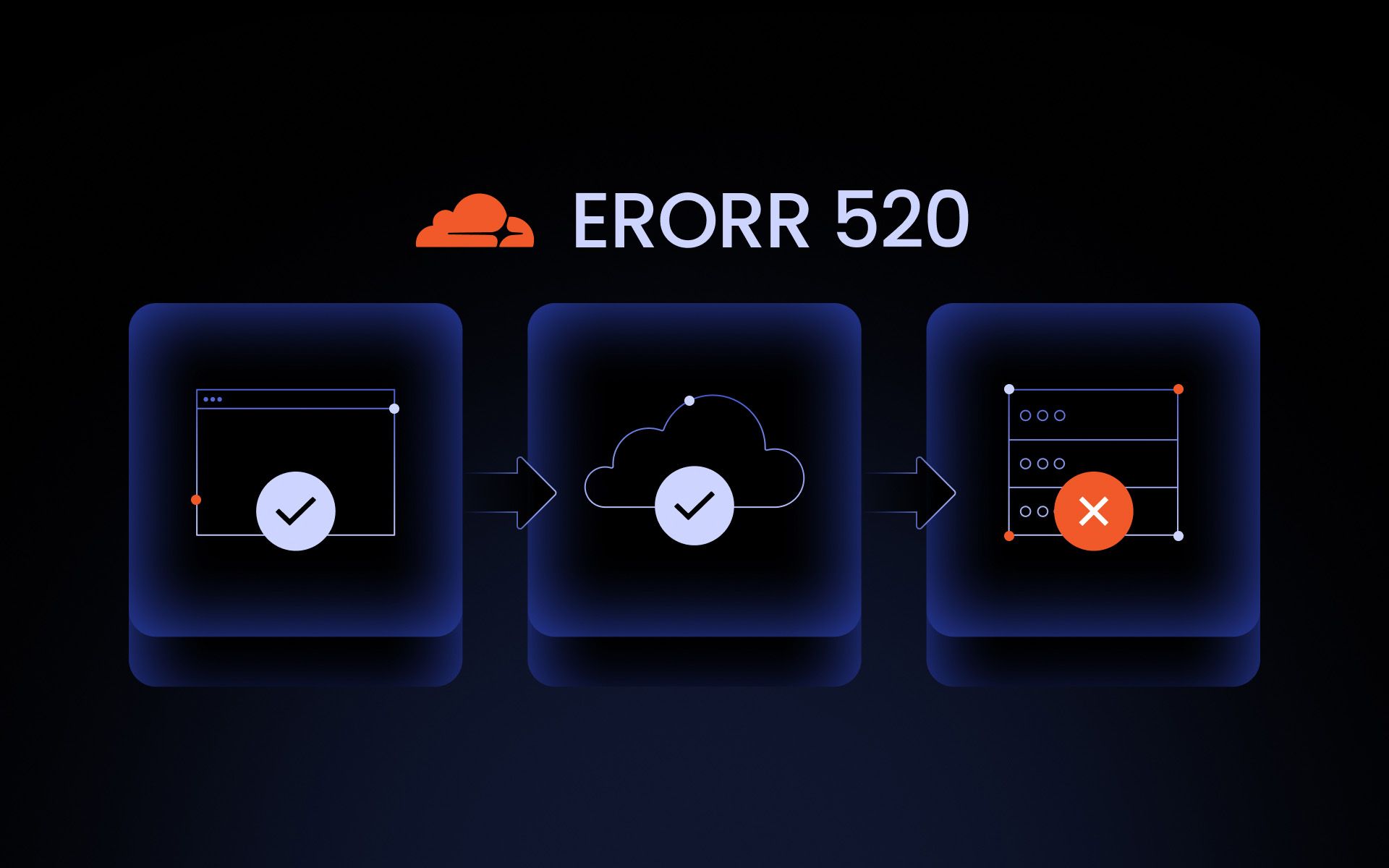
When a visitor opens a Cloudflare‑protected site, the request first goes to Cloudflare, which then forwards it to the origin server. Cloudflare expects the origin web server to return a valid HTTP response. When that response is missing, broken, or non‑HTTP, Cloudflare cannot pass it through and instead shows a 520 page.
Error 520 signals that the origin web server returned an unexpected, unknown, or empty response. It's a special error that isn't listed among other HTTP status codes, as it occurs only when the website is using Cloudflare's infrastructure in front of its origin server.
A good way to think about error 520 is as a placeholder for when something goes wrong with the connection between Cloudflare and the origin server. The connection between the user's browser and Cloudflare servers is fine, but the issues are in the origin web server.
Other 5xx error codes are defined in the HTTP standards and can be generated by any server or proxy, not just Cloudflare. They can also indicate problems on the path between the browser and Cloudflare. Other providers use different messages to indicate an empty response or rely on standard HTTP response headers in error logs.
Common causes of Cloudflare error 520
Generally, error 520 indicates an issue between Cloudflare and the origin server. The exact reasons aren't in the server logs, but can be broken down into six major causes that must be investigated first.
Server crashes or resource overload
Origin web servers may crash or kill processes mid-request, often due to running out of resource capacity, such as CPU or RAM. For this reason, Cloudflare may receive malformed or no response, resulting in a 520 “unknown error” instead of a normal connection or another 5xx code.
Firewall or security tools are blocking Cloudflare
Server-side firewall settings, rate limiters, or security plugins may mistakenly block or limit Cloudflare IP addresses. When the connection between the origin server and Cloudflare is tampered with, there is a risk of unexpected or broken responses, which creates recurring 520 errors.
Malformed or empty HTTP responses
When the server sends an empty or malformed HTTP response header, Cloudflare treats it as an unknown error. This falls under the 520 status code umbrella, and it can be a variety of crashes, misconfigurations, or bugs. In many cases, server logs reflect the related causes for malformed HTTP responses.
Oversized cookies or headers
Oversized headers, especially cookie headers, may cause error 520. Such headers become malformed and may be rejected or responded to incorrectly. Currently, official Cloudflare documentation states that it supports headers of up to 128 KB. If this is the reason for the 520 error, clearing cookies and cache might help.
SSL/TLS or HTTP/2 misconfigurations
Problems in the HTTPS layer, like mismatched settings and incomplete certifications, may cause connections between Cloudflare and the origin server to reset or fail mid-response. In such cases, a 520 error is sometimes displayed as a catch-all error in the Cloudflare dashboard and for the visitors.
Application or CMS-Level errors
Bugs in application code or badly written plugins and CMS extensions are common causes of the web server crashing before sending a full response to Cloudflare. This results in malformed or empty replies that Cloudflare treats as an unexpected response labeled as a 520 error.
How to fix Cloudflare error 520
You're unlikely to have administrator access while web scraping, automating tasks, or browsing the web. Your only options are to retry the connection, clear cookies, and try to connect with a different IP address.
If you have access to the settings of the origin web server or can contact the website owners, follow the steps below.
Step 1: Check your origin server’s status
The first thing to do is to confirm whether the origin web server is functioning as expected. Restart web services and check the CPU, RAM, and other resource usage. If the server crashes, hangs, or restarts under load, stabilize it before troubleshooting further.
Step 2: Bypass Cloudflare to isolate the problem
If all seems well with the origin server so far, it's helpful to isolate the problem. Temporarily switch DNS records to DNS only or pause the proxy so traffic goes directly to your server.
- If an unknown error 520 persists when Cloudflare services are turned off, the issue is the origin web server.
- If the website fails only when Cloudflare services are turned on, the likely problems are with the proxy, DNS, or bypass Cloudflare edge-specific settings.
Step 3: Review server error logs
Investigate website error logs more carefully, looking for crashes, other 5xx errors, or stack traces around the time the 520 error occurred. Fixing underlying app or server issues usually converts the 520 error into some standard HTTP status code or enables a successful connection.
Step 4: Update firewall, WAF, or security plugin settings
Ensure all Cloudflare IP address ranges are allowed by your firewall settings, including Web Application Firewalls (WAF) and various security plugins. An effective strategy might be to start looking into recently made changes or newly installed security tools.
Step 5: Reduce or correct problematic headers/cookies
Check the size of your headers and determine which ones might be problematic, considering the 128 KB limit Cloudflare imposes. Completely clearing or at least trimming tracking cookies, session data, and plugin-added headers is likely to help. They are common culprits creating incorrect or missing response headers.
Step 6: Verify SSL/TLS and HTTP settings
SSL mismatches or expired certificates can sometimes trigger 520 errors if the origin server drops the connection, resulting in missing response headers. Faulty HTTP/2 or TLS configurations can also be a cause of the 520 error. As a diagnostic step, temporarily disable HTTP/2 in the Cloudflare dashboard to see whether protocol-level issues are the cause.
Step 7: Disable conflicting plugins, themes, or custom code
Test the website by temporarily disabling non‑essential CMS plugins, themes, and custom middleware. Disable each of them in turn and test the connection with enough load to recreate the problem. Once the problematic code is found, patch, replace, or reconfigure it.
If none of these steps resolve the issue, contact your hosting provider for troubleshooting assistance. Make sure to share the specific error details, such as the full error code, the time when the problem occurred, and the URL that resulted in the error.
How to prevent Cloudflare error 520
Web scraping or automation setups can implement rate limiting and automatic request delays to mitigate possible 520 errors. This is helpful in cases when empty response issues happen due to server overload. It isn't a foolproof method, as most 520 prevention options lie with the website administrator.
- Keeping server resources stable. Monitor the origin server load, especially CPU and RAM. If your website is seeing more traffic, you must implement optimization measures or increase resources to prevent the site from crashing and prematurely disconnecting from Cloudflare.
- Maintaining compatible SSL/TLS and HTTP settings. Set up SSL mode correctly in the Cloudflare dashboard, keep certificates valid, and ensure HTTP/2 and TLS settings are compatible.
- Avoiding excessive cookies or header bloat. Limit the size and number of cookies and custom headers, so requests always fall within the safe header size limits of 128 KB. Double-check your header size before adding new plugins or making other changes that might increase the header size.
- Testing updates in staging. New CMS settings, plugins, themes, server updates, or other changes must be tested in a staging environment before deployment. It ensures that potential crashes or other issues that can produce 520 errors are spotted early in error logs.
- Allowing Cloudflare IP ranges. Blocked IPs might not show up clearly in the error logs; it's best to do it manually. It's recommended to whitelist Cloudflare's IP addresses in firewalls, WAFs, and other security tools so that Cloudflare services wouldn't be blocked.
Conclusion
Without access to the origin web server admin or Cloudflare dashboard, ordinary website visitors don't have many options to solve 520 errors. Yet, knowing the common causes, fixes, and 520 prevention methods used by the administrators helps everyone to surf the web more efficiently.
Can an ISP issue cause Cloudflare Error 520?
Yes, Internet Service Provider (ISP) issues can contribute to Cloudflare 520 error, but only indirectly. 520 indicates that Cloudflare received an empty, malformed, or unexpected response from the origin web server. Connectivity problems with the origin server or intermediary ISPs may contribute to abnormal response headers that cause a 520 error.
Does clearing cookies help fix Cloudflare Error 520?
Yes, clearing cookies and cache can sometimes help fix the 520 error, but it's not a guaranteed or permanent fix. It helps in cases of request headers exceeding Cloudflare limits. However, most commonly, the fix lies with the website owner addressing origin server issues like misconfigurations, firewalls, or too large or missing response headers.
Can server overload cause a 520 error?
Origin web server overload is a common cause of the Cloudflare 520 error. When the origin server gets too busy, it may respond improperly, crash, or fail to complete requests. Cloudflare sees such unexpected responses and returns a 520 unknown error instead of a normal HTTP response header.
Can DNS problems lead to Error 520?
End-users' local DNS problems usually affect whether the visitor reaches Cloudflare at all, so the 520 error doesn't appear. However, misconfigured, incorrect, or outdated DNS on the origin server can cause Cloudflare's 520 Error. Wrong DNS records may cause the Cloudflare server to connect to incorrect or non-responsive servers that return unexpected, invalid, or empty responses.
Can Error 520 occur even when Cloudflare is off?
The 520 error is a unique code to Cloudflare signaling that their servers received an empty, malformed, or unexpected response from the origin server. If it's disabled, the user connects directly to the origin web server, so any problem should show a standard HTTP error. If you see a 520 page, the Cloudflare proxy is still operating.