Shadowrocket is a highly popular rule-based proxy management client for iOS. In 2023, it was the most-downloaded paid app on the Apple App Store, primarily used to get around geographical content blocks. It supports proxies that perform encryption, so it can also be used for secure browsing.
You can also find Shadowrocket for Android devices, but with a small twist. The Android version is a clone by different developers, which aims to offer the same features present in the iOS app. It is freemium, uses ads for monetization, and may share some user data, so we advise using it cautiously.
Nevertheless, we will show you how to use both versions to mask your IP address and route internet traffic through a MarsProxies proxy server.
What is Shadowrocket, and how does it work?
Shadowrocket proxy utility app works by routing your device's traffic through a proxy server. On iOS, it can reroute HTTP(S), TCP, and UDP traffic, and also display outgoing requests from your device to inspect app and background process behavior. It can even decrypt HTTPS traffic, giving you a lot of control over your smartphone.
It supports VPN-like features, like data encryption. But keep in mind that this is not a VPN client and, for the iOS version, you have to bring your own list of proxy servers.
Shadowrocket has successfully implemented split-tunneling on iOS, which is still unavailable on numerous commercial VPN apps. You can separate traffic using three rules:
- Forward traffic to specific domains and URLs through a proxy server, while other programs use the standard mobile connection.
- Route by IP address, sending international requests through a proxy server, leaving your home country traffic as it is.
- Route specific port or protocol traffic through a proxy server, leaving the rest untouched.
Additional Shadowrocket iOS features include an ad blocker, IPv6 protocol support, kcptun, cloak, gost, and V2Ray plugin support, network usage statistics, and more. It is highly customizable, but that also requires some technical skills to use it to the fullest. Shadowrocket for iOS costs $2.99.
The Shadowrocket for Android version we tried was developed by Cross Ltd. You can use it for free with over 500 available servers. But you will have to deal with slower speeds and ads, which you can remove by paying for a subscription (starting from €1.5 in Europe).
Regarding features, it also offers IPv6 support, data routing settings similar to the iOS app, supports Vmess, Trojan, VLESS, Shadowsocks, and Socks protocols, and speed monitoring. It does not encrypt data, and some of the user data is shared with third parties.
Some user reviews also outline a negative premium subscription experience. According to them, it doesn’t turn off ads, and the paid premium servers aren't really different from the free ones.
We recommend trying out the free version first. Like most freemium software, you have to take the good with the bad. If that doesn't sit right with you, you can try a different Android proxy server.
What you need before setup
Setting both apps up is quick and easy. Keep in mind that they both have a learning curve to master advanced features. Still, you can connect to a proxy server within minutes using our guide below. Here's what you need to prepare before setup.
MarsProxies account
We tested both apps with our proxies and got connected without any issues each time. If you need to bypass geographical restrictions, our residential proxies offer global routing and non-expiring traffic.
We also offer ISP, datacenter, and mobile proxies. If you need an alternative proxy client to Shadowrocket, check out our Android proxy app and iOS proxy app. Once you register for our services and order your proxies or traffic, you will get proxy credentials that you can start using with Shadowrocket.
Proxy credentials
Shadowrocket requires a proxy server address, port number, username, and password if you have authentication enabled. If you choose us as a proxy provider, you will get residential proxy credentials in the following format:
host:port:username:password
For example
ultra.marsproxies.com:44443:shadowrocketest:shadowrocketpass_country-us
Port number
44443 (HTTP/S) or 44445 (SOCKS5)
Username
shadowrocket
Password
shadowrocketpass_country-us
These are the credentials for a residential proxy in the United States. You can simply copy these credentials to Shadowrocket following the guide below, and you'll be connected in no time.
Shadowrocket app
Of course, you need the Shadowrocket app to manage proxies and route traffic through them.
You can get Shadowrocket for iOS from the Apple App Store.
For Android devices, you can download it from the Google Play Store.
How to set up MarsProxies in Shadowrocket on iOS
1. Open Shadowrocket and tap ‘Add Server’ (1).
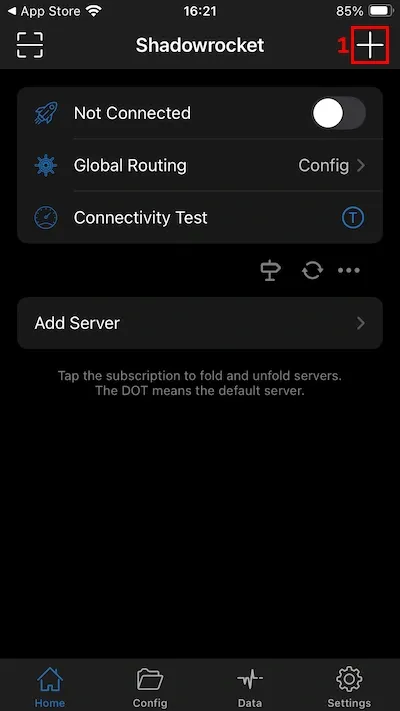
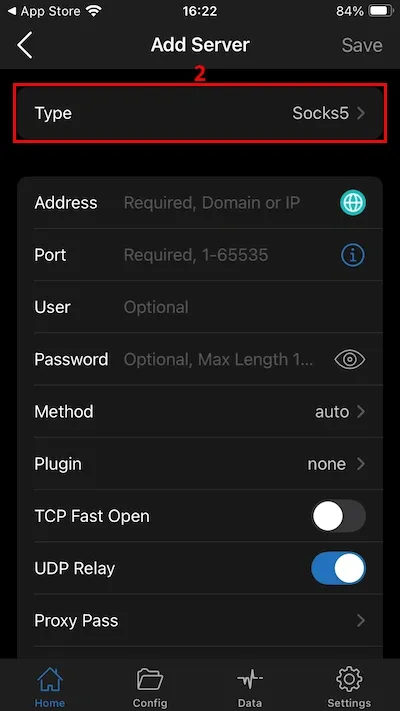
2. Tap on ‘Type’ (2) and select the proxy type - Socks5, HTTP, or HTTPS. We’ll go with Socks5.
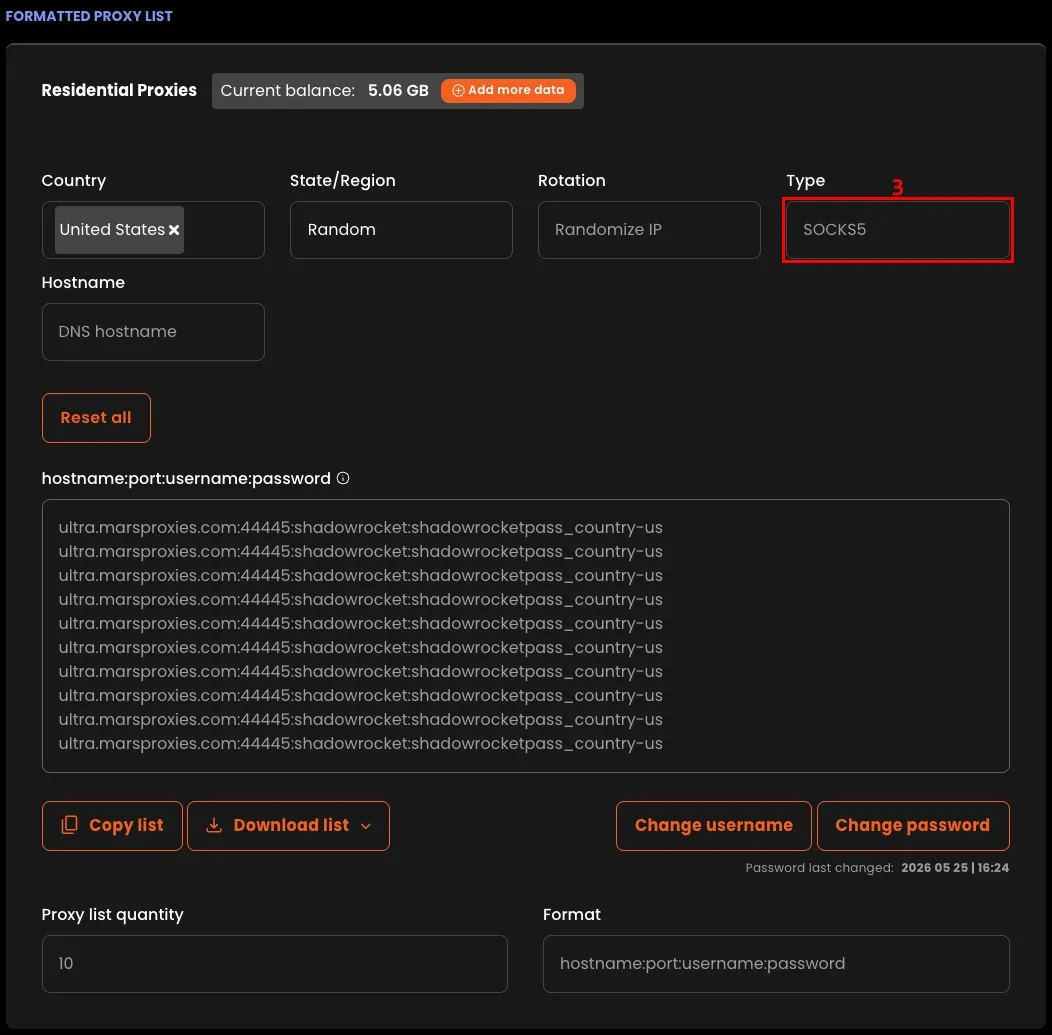
3. Configure your proxies in the MarsProxies dashboard. Make sure to choose the correct protocol (3).
4. Paste your proxy credentials (4) into Shadowrocket and tap ‘Done’ (5).
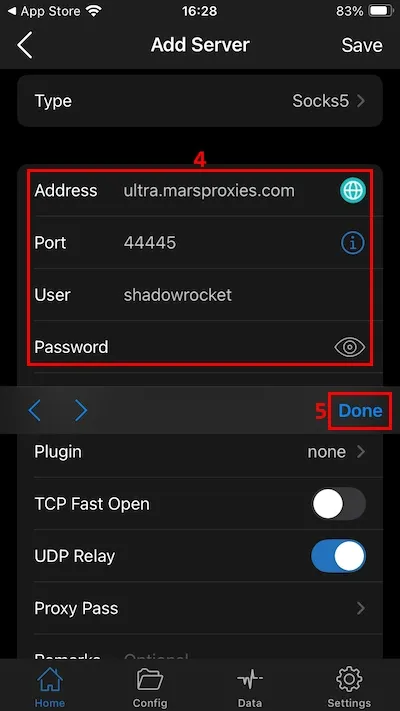
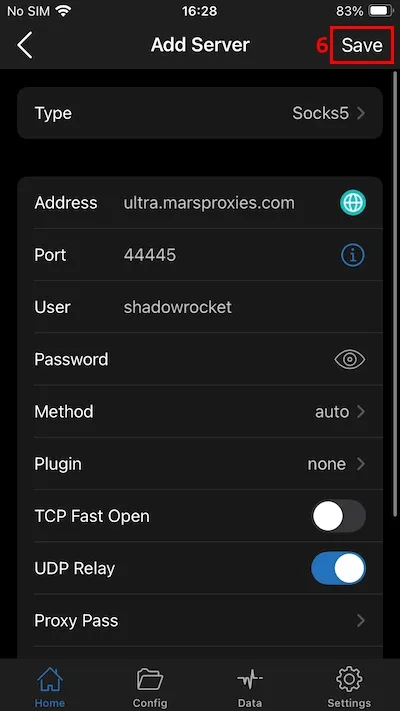
5. Tap the ‘Save’ (6) button to save your settings.
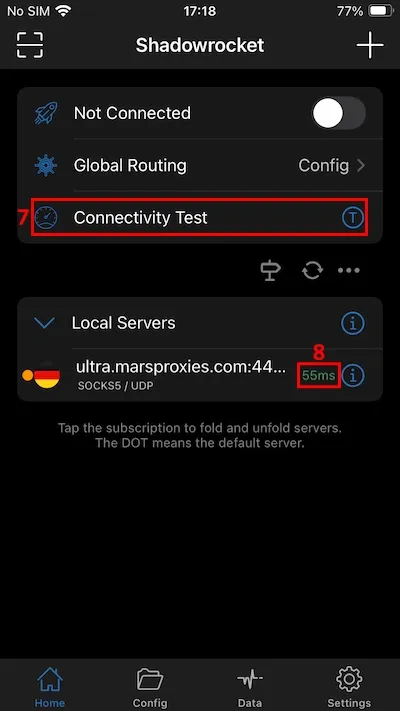
6. In the main window, tap on ‘Connectivity Test’ (7) to verify if your proxy server is responsive. You will see the response time (8) in milliseconds.
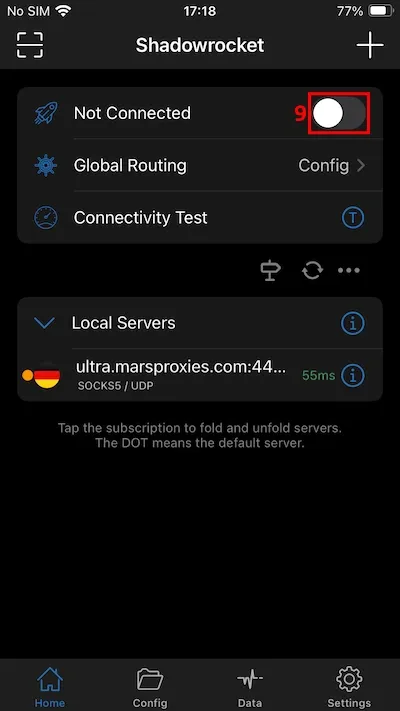
7. Tap the toggle (9) next to ‘Not Connected’ to start using your proxy.
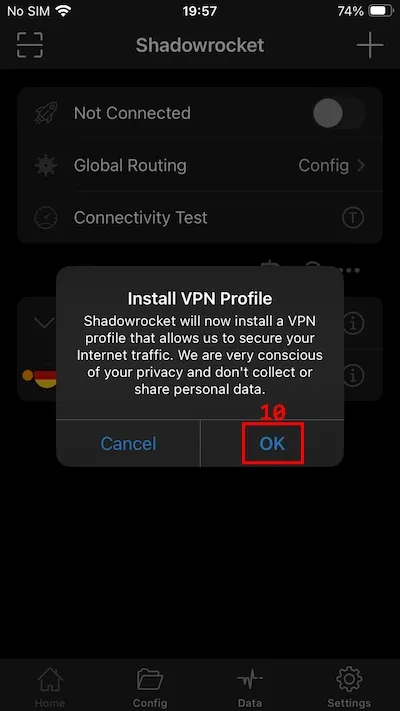
8. A pop-up message will appear, informing you that Shadowrocket wants to install a VPN profile. Tap ‘OK’ (10).
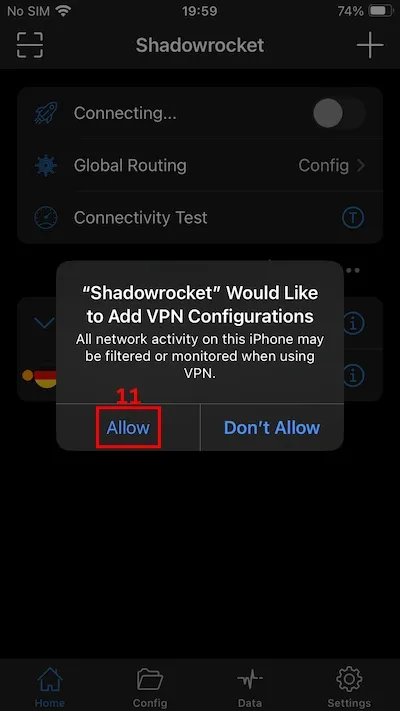
9. The second pop-up message will inform you that Shadowrocket wants to add VPN configurations. Tap ‘Allow’ (11).
With this setup, the Shadowrocket app now forwards all of your iOS traffic through a proxy server. Remember that you can split the traffic between the proxy and the standard mobile connection using its routing customization options.
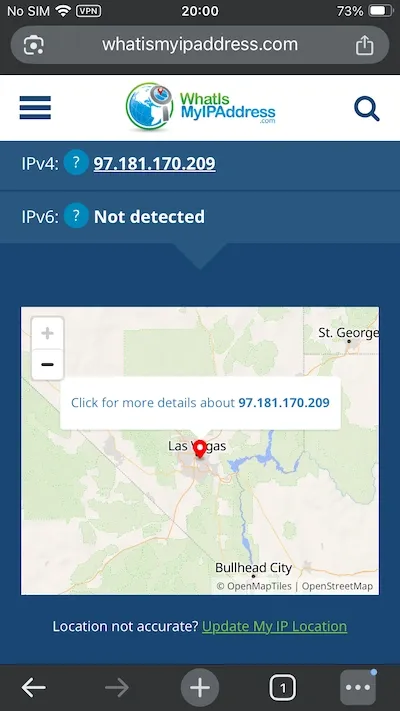
To check whether it works, you can visit sites like WhatIsMyIP and verify your IP address. If it displays the proxy’s IP address and location, then the connection is successful. The picture below shows we are in the US, although geographically we are far from there.
How to set up MarsProxies in Shadowrocket on Android
1. Open Shadowrocket on your Android device.
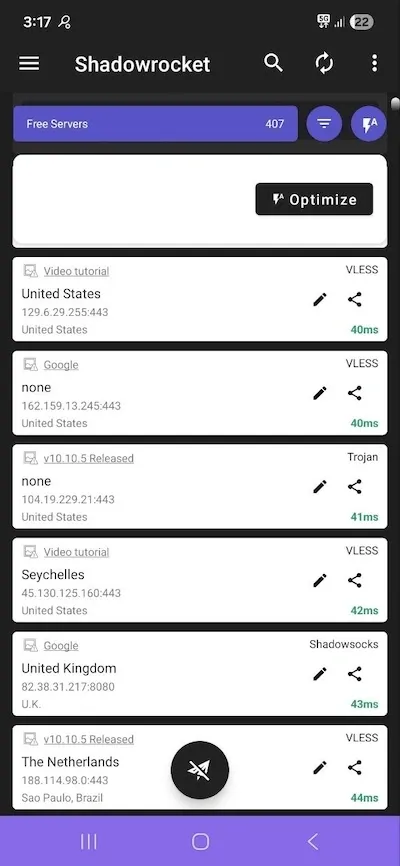
2. Tap on the three vertical dots (1) in the top right corner.
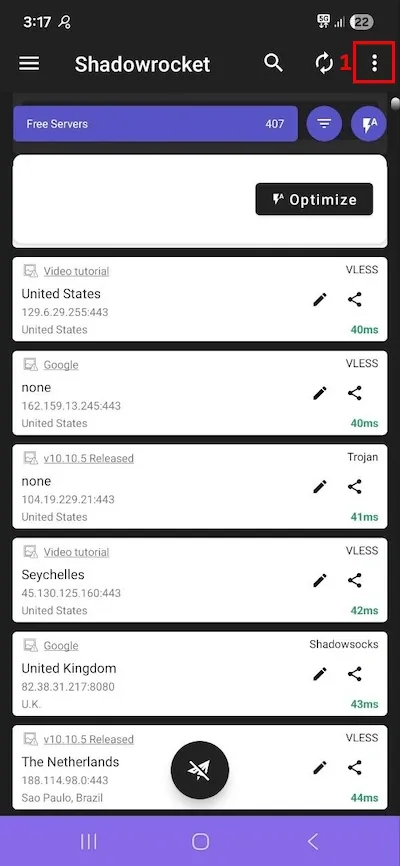
3. Select the desired proxy protocol (2). We will use HTTP proxy as an example (‘Type manually[HTTP]’).
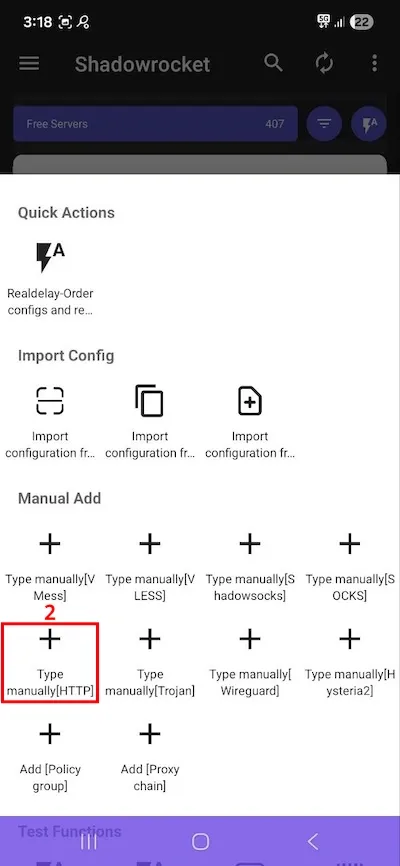
4. Fill in the proxy server address, port, username, and password fields (3). Tap the checkmark (4) on the top right side to save server settings.
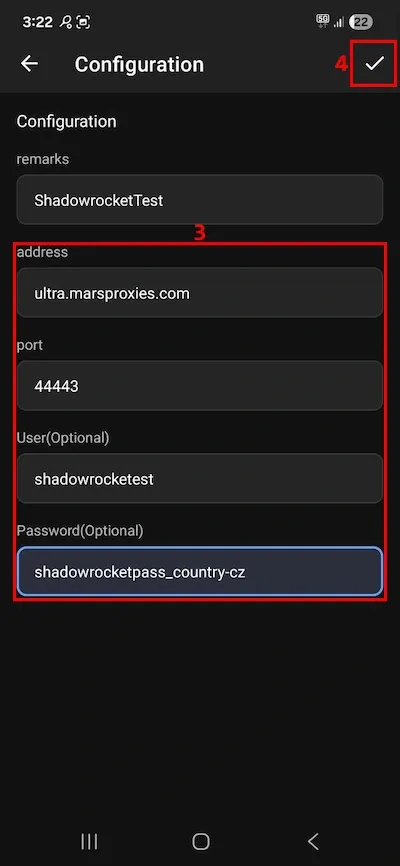
5. Tap on your new proxy connection (5) at the very top of the list.
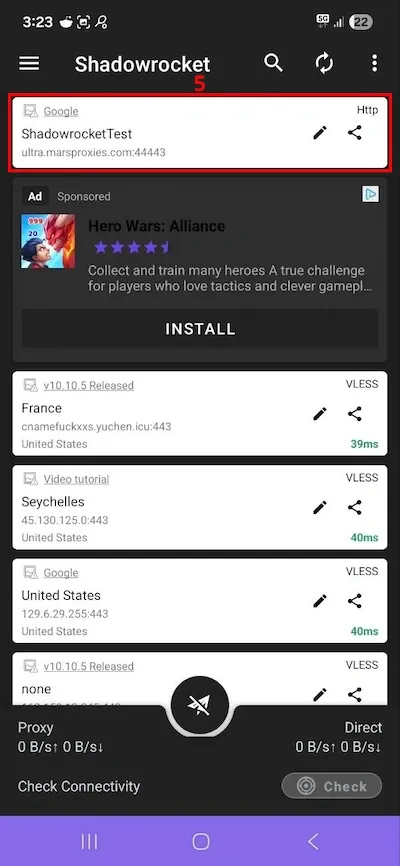
6. Tap on the arrow sign (6) below to connect to the proxy server.
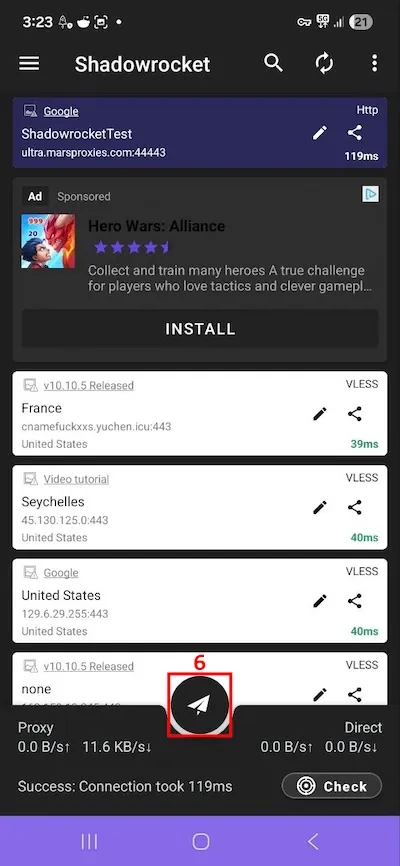
Again, verify the connection on IP lookup sites.
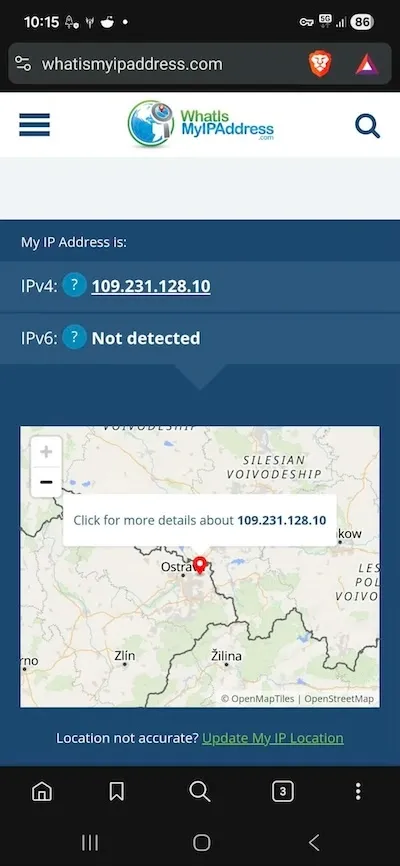
The site shows we have an IP address in the Czech Republic, which is how we set our proxy up. That's it, just remember that this version is a clone of the original, and you will likely see some ads while using it.
Best Shadowrocket proxy settings
Shadowrocket is all about customization, so let's go over a few options that are essential for secure browsing and bypassing geo blocks efficiently.
Choosing the right protocol (HTTP(S) vs SOCKS5)
HTTP and HTTPS proxies are designed to manage web traffic, the most common internet traffic type. If you are looking to bypass simple network-level restrictions or light geo-blocks, these proxy servers are sufficient. It is also the preferred proxy type for web scraping.
The SOCKS5 protocol works differently, and it can handle a variety of other internet traffic protocols. It doesn't inspect data, but simply routes it between the client and the server. It is optimized for gaming, torrenting, and real-time app transfers.
When to use rotating vs sticky sessions
Both rotating and static IPs have their benefits and setbacks.
If you use Shadowrocket to log in to some services, for example, a social network that is only available in another region, you should choose sticky sessions. A static IP address resembles a genuine user browsing, while switching IPs often may raise an alarm. That also applies to e-commerce, banking, and similar platforms.
A rotating IP address is beneficial whenever you need to hide your online activity. You should choose rotating proxies if you are web scraping, comparing prices, monitoring competitors, or verifying your ads are displayed correctly.
Rules vs global mode
Global mode and rule-based data trafficking are two of the key Shadowrocket features.
Global mode applies to all traffic. If you use a proxy protocol that supports encryption, like Shadowsocks or V2Ray, all of your traffic is secured from third-party inspection. It is perfect for hiding your activities from Internet Service Providers and data mining agencies.
It is highly recommended on public Wi-Fi networks and for bypassing firewalls that inspect all outgoing traffic. However, apps that require a local connection, like taxi or food delivery services, may not work properly if they rely on the IP address to determine location.
Rule mode is where you can customize freely. You can upload a .conf configuration file that controls data routing. Depending on the target destination IP address, URL, or domain, you can:
- Route it through a proxy server
- Use a direct connection
- Block the connection altogether
Shadowrocket has all the benefits of the split-tunneling feature. You can forward your international streaming through a secure SOCKS5 proxy tunnel, while banking apps use the original connection.
Common Shadowrocket errors & fixes
Changing mobile device networking settings and using proxies on iOS or Android devices can sometimes introduce unintentional errors. Here are four common Shadowrocket app error scenarios and their solutions.
Proxy not connecting
If you turn on the connection switch but cannot access the internet, tap on your proxy connection in the app and check if it shows “Timeout”. If it does, switch to a different proxy server and try again.
If the same keeps happening, go to your iOS settings and locate the VPN & Device Management option. Then, delete the Shadowrocket profile and set the new proxy connection in the app again.
Authentication failed
In this case, carefully verify your proxy credentials. Double-check that the username and password are written correctly, including case sensitivity, numbers, letters, and symbols.
You may also need to whitelist your IP address with your proxy provider. At MarsProxies, you can do so if you use the IP:AUTH option found on our dashboard.
Slow speed issues
If you're using Shadowrocket Global mode, all of your device traffic goes through the proxy. It's best to utilize rule-based routing, which may save proxy bandwidth and increase overall connection speed.
If you keep experiencing low performance, set up a proxy that supports the UDP protocol, like SOCKS5. This protocol is developed for fast data exchange, which is particularly important over long-distance connections.
IP not changing
If your IP does not change even though the proxy connection is established, check the Rule mode first. You may have misconfigured it, and the app traffic that is supposed to go through a proxy server is routed directly. You may also switch to global routing that sends all of the traffic through a proxy server.
Last words
Starting with the Shadowrocket app is easy. Using our guide, it won't take long to set up your first proxy connection. After a few tries, you will be able to set up new proxies within a few minutes.
Shadowrocket is often praised for its global and rule-based routing modes. Instead of manual setup, you can import configuration files that define global routing rules. Once you turn on the Shadowrocket connection switch, it will automatically determine which traffic utilizes the proxy connection and which the standard mobile tunnel.
FAQ
What is Shadowrocket used for?
Shadowrocket is used to manage proxy connections and control traffic routing on iOS and Android devices. Using its global or rule-based modes, users can specify which apps use the proxy tunnel and which ones utilize the original mobile connection.
Is Shadowrocket safe to use?
Yes, Shadowrocket for iOS is safe to use and very popular among proxy users. However, Shadowrocket for Android is a clone created by a different team and is open about sharing some user data, so it's best to be cautious about it.
How to get proxies for Shadowrocket?
The best way to get proxies for Shadowrocket is to sign up with a premium proxy service provider. At MarsProxies, we offer four proxy types fully compatible with the Shadowrocket app on both platforms.
Can I use rotating proxies with Shadowrocket?
Yes, you can use rotating proxies with Shadowrocket. You can create proxy groups in Shadowrocket, and it will rotate IPs on the round-robin or balanced load rules. Alternatively, you can choose MarsProxies residential proxies and configure IP address rotation in the dashboard.