SOCKS5 proxies have robust advantages over their older SOCKS4 type, and they differ from HTTP proxies. You can authenticate them via proxy credentials for enhanced security. SOCKS5 also supports both TCP and UDP traffic, so you can scrape apps that rely on it.
Like all proxies, they mask your original IP address to protect personal information on networks like public Wi-Fi. You can use them to bypass geographical restrictions and access content that is available in selected regions but blocked in your country.
However, you cannot set them directly in an iOS device's network settings, since it only supports HTTPS and HTTP proxies. But there are many third-party proxy apps you can rely on to connect to a SOCKS proxy.
In this guide, we will show you how to use SOCKS5 on iPhone with the MarsProxies iOS app.
Set up SOCKS5 on iPhone using MarsProxies iOS app
To set up a SOCKS5 proxy server connection, you have to download the MarsProxies proxy client and input the required proxy settings. Here's how:
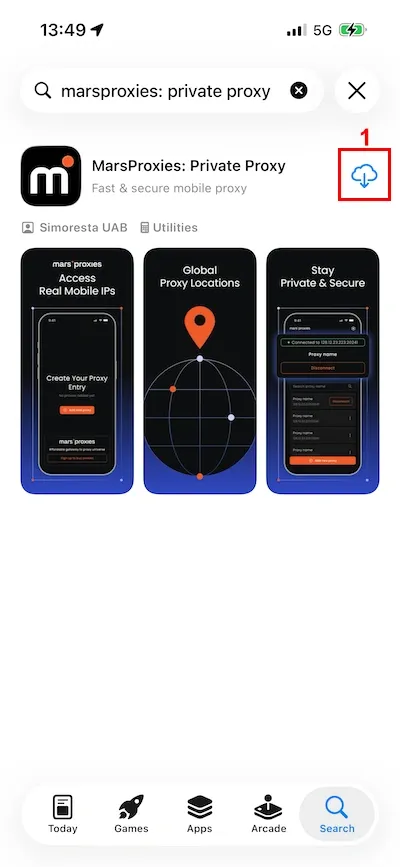
1. Install (1) the MarsProxies iOS app from the App Store.
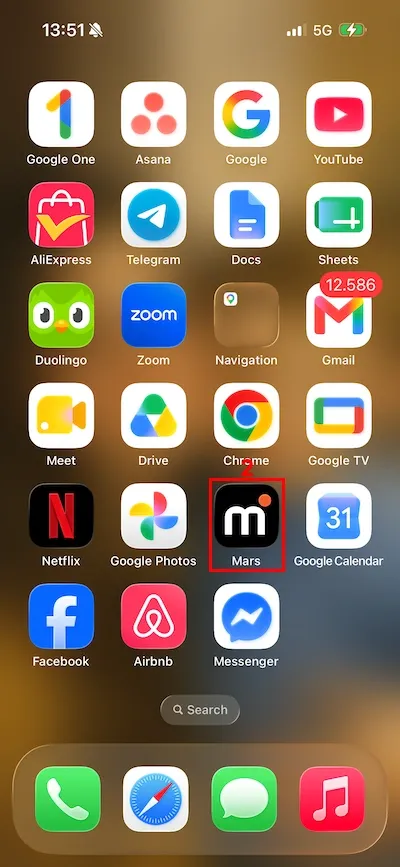
2. Locate and open (2) it from the home screen.
3. Tap the 'Add New Proxy' (3) button.

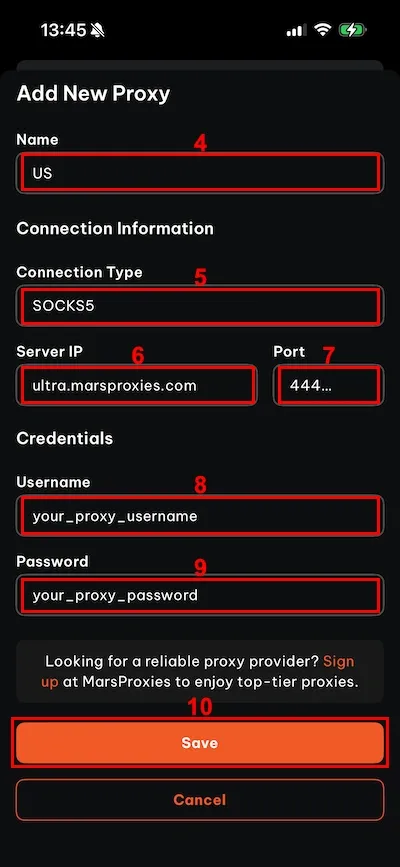
4. Name (4) your proxy server connection, choose the SOCKS5 (5) connection type, input the server IP (6) and port (7), and write down the proxy credentials in the username (8) and password (9) fields. Tap the 'Save' (10) button at the bottom.
5. Allow (11) MarsProxies to set up a VPN connection when prompted.
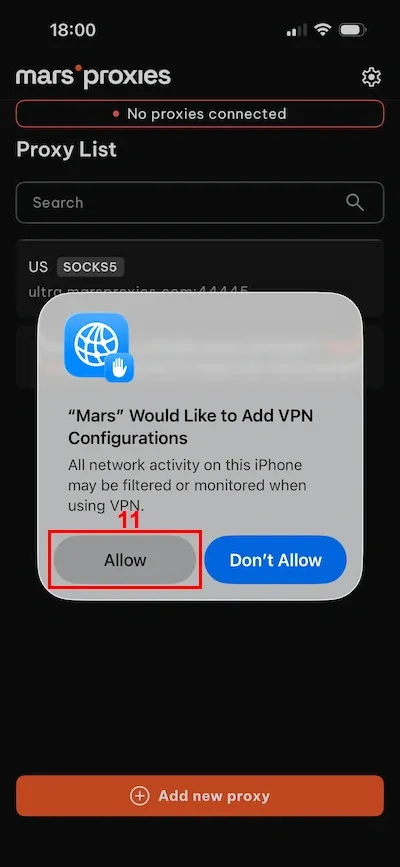
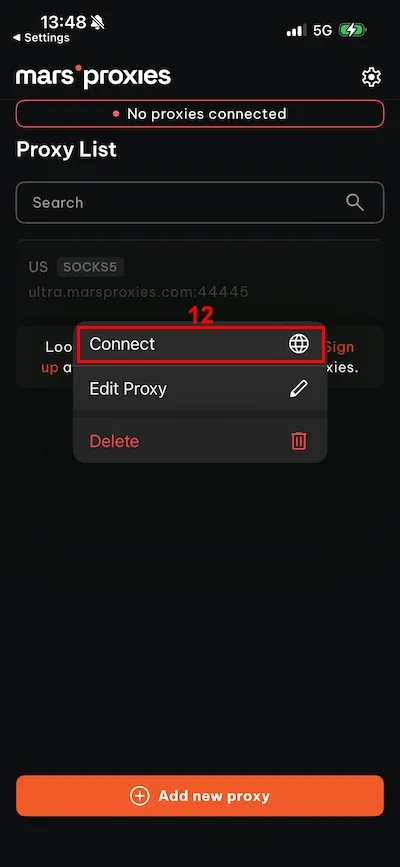
6. Tap on the newly created proxy and then on 'Connect' (12).
That's it! You should see a green box indicating you are connected to a proxy server, which means you input all proxy settings correctly.
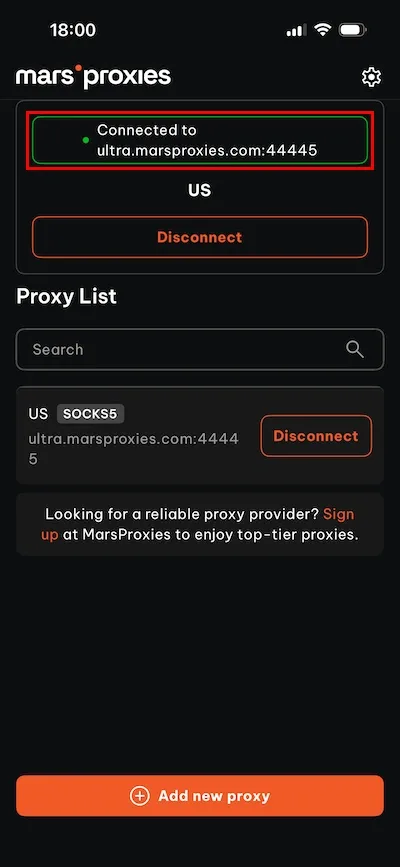
Keep in mind that this method sends all web traffic from your iPhone through a proxy server. This way, you route all iOS app traffic through a proxy server, instead of just web browsing activities.
How to check if SOCKS5 proxy on your iPhone is working
If you need additional verification, that's easy. Simply visit IP lookup websites like IP Leak.
If you see a proxy server IP address, it means that the iPhone network settings have been successfully changed and you have correctly entered all proxy settings.
How to fix SOCKS5 proxy issues on iPhone
Three common issues may prevent you from connecting to a SOCKS proxy server on your iOS device.
Incorrect credentials
Writing down incorrect proxy credentials is a very common mistake. Carefully check that your username and password are correct, don't have any typos, and that you have included all numbers and symbols.
Server downtime
If you have written down the proxy credentials correctly and all network settings are as they should be, you can still experience issues during proxy downtime. In this case, simply pick another SOCKS5 proxy from your list and try again.
Network restrictions
If you connect to a proxy and lose all internet access, your network may be blocking all proxy connections. You may try switching to a different type, like mobile or HTTP proxies, but the result depends entirely on the configuration of that network.
Final thoughts
As you can see, connecting to SOCKS5 proxies via the MarsProxies iOS app is effortless. We developed it with simplicity in mind, so you only have to enter proxy credentials, hit the connect button, and you're good to go. This way, all traffic from your iOS device goes through a secure proxy tunnel first.
Lastly, not all proxy providers offer the same quality. We continuously monitor our proxies to meet high standards, like speed, uptime, and geographical server diversity. If you want to learn more about this market, visit our ranking of the best SOCKS5 proxy providers.
FAQ
Can I use SOCKS5 on an iPhone without an app?
No, iOS devices do not have built-in support for the SOCKS5 proxy type. You must rely on third-party apps, like the MarsProxies iOS app.
Why use SOCKS5 proxy on iPhone?
You can use it for web scraping, especially when it comes to apps that use UDP traffic. You can also bypass geographical restrictions for more content or verify ads in selected regions. Lastly, proxies mask your original IP address so you benefit from an additional layer of online privacy.
Is SOCKS5 better than HTTP proxy on iPhone?
No, these are two distinct proxy types, so it's not a better or worse comparison. HTTP and HTTP(S) proxies are best when dealing with this internet protocol, while SOCKS5 proxies work with multiple protocols.
What is the best app to use SOCKS5 on an iPhone?
Numerous apps allow SOCKS5 connection on iOS. However, we developed our MarsProxies iOS app to be fast and simple, so that you can make a connection within a few minutes.