Running into Cloudflare error 1010 can be confusing at first. The message usually appears out of nowhere, blocks access to a site, and gives very little context beyond “Browser Signature Banned.” For regular users, that can feel like a random mistake. For developers, testers, and teams doing web scraping, it can stop an entire workflow.
In simple terms, Cloudflare error 1010 means a website has decided that your browser's signature looks suspicious. That does not always mean you did something wrong. It may happen because of a VPN, proxy, odd browser configuration, aggressive privacy tools, or traffic patterns that resemble automated tools rather than a real visitor.
The good news is that Cloudflare error 1010 is often fixable. Once you understand what the system is reacting to, you can usually narrow down the cause and adjust your setup. In this guide, we’ll explain why Cloudflare error 1010 happens, how regular users can fix it, and what developers can do to reduce it during web scraping.
What is Cloudflare error 1010?
Cloudflare error 1010 is a block page that appears when a site denies access based on the browser's signature. The message often shows “Browser Signature Banned,” which means the site does not trust how your browser or automation stack appears.
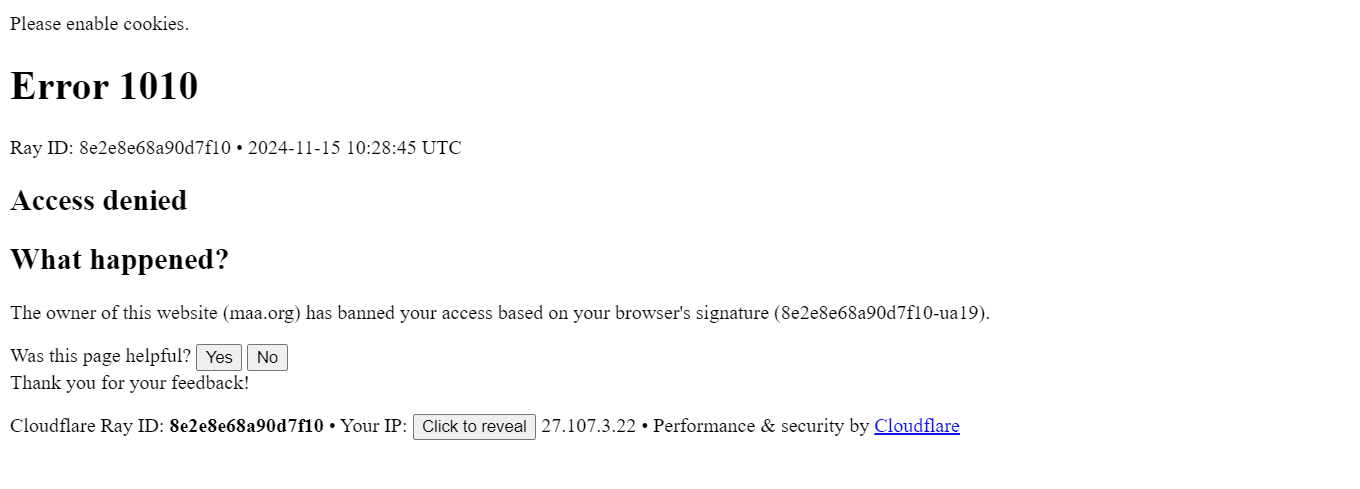
A browser's signature includes more than a user agent string. It can also involve browser behavior, cookie support, JavaScript behavior, header consistency, and other traits that help websites distinguish real visitors from suspicious traffic. If those signals do not match what the site expects from standard browsers, Cloudflare error 1010 may appear.
This matters because Cloudflare error 1010 is not limited to an IP problem. You can change networks, but you may still get blocked if the browser profile itself looks suspicious. In other cases, the IP, the user agent, and the traffic pattern all combine to trigger the block.
The website owner makes the final decision. Cloudflare provides the protection layer, but the site’s rules determine what gets challenged or denied. That is why Cloudflare error 1010 may appear on one website while everything else works normally.
Why Cloudflare error 1010 happens
There is no single cause behind Cloudflare error 1010. Most of the time, it happens because one or more signals indicate that your session does not appear to be coming from a normal web browser.
Your browser fingerprint looks suspicious
One common trigger is browser fingerprinting. Modern bot protection does not just examine IP addresses. It also checks browser features, supported APIs, rendering behavior, and other traits to determine whether the session is coming from a real browser.
That is why Cloudflare error 1010 often shows up when the browser's signature is incomplete or inconsistent. For example, your user agent might claim to be a recent Chrome build, while the rest of the environment behaves nothing like Chrome. That kind of mismatch is easy to detect.
These inconsistencies are especially common in web scraping, where automated tools may try to imitate real browsers without fully matching their behavior.
Traffic patterns look automated
Even if the browser profile looks acceptable, your behavior may still trigger Cloudflare error 1010. Websites monitor how visitors move through pages, how often they refresh, how quickly they submit forms, and how predictable their requests look.
If your activity is too fast, too repetitive, or too consistent, it can look like automated tooling rather than human browsing. In web scraping, this happens when scripts hit the same endpoints repeatedly, follow the exact same path every time, or exhibit unrealistic request timing.
Sites often treat these patterns as suspicious, even when the browser setup itself looks decent.
Your IP or proxy is low quality
Proxies and VPNs are another major reason for Cloudflare error 1010. If the IP address you use has already been associated with spam, bot traffic, or abuse, a site may distrust the session before it even loads the page.
That does not mean every proxy causes issues. It means poor-quality proxies, heavily reused datacenter IPs, and flagged VPN exits make Cloudflare error 1010 more likely. In web scraping, weak proxy pools are one of the fastest ways to get blocked.
Sometimes the problem is not the proxy alone, but the combination of the IP, the browser's signature, and suspicious behavior.
Browser integrity check or custom protection flags you
Some sites use browser integrity checks to screen visitors before granting access. These checks look at request quality, browser signals, and header consistency. If something seems off, the site may deny access and return Cloudflare error 1010.
The site may also use stricter security settings or custom firewall rules (as would be the case with Cloudflare error 1020). In practice, that means the same browsing setup may work on one Cloudflare-protected site and fail on another. The differences often come down to how strictly the website owner has configured their protection.
Automation frameworks are too easy to detect
Default setups in Selenium, Puppeteer, Playwright, and similar automated tools are often detectable. They may expose automation flags, skip normal browser behavior, or fail to behave like an actual web browser under real conditions.
That is why Cloudflare error 1010 is so common in web scraping and browser automation. The browser may technically load pages, but the browser’s overall signature still doesn’t look natural enough to pass.
How to fix Cloudflare error 1010 for regular users
If you are just trying to open a website normally, the fix is usually simple. Start with the easiest possibilities first.
Disable your VPN or proxy
VPNs and proxies are frequent triggers for Cloudflare error 1010. Turn them off and reload the site. If the page opens normally, the problem was likely tied to IP reputation or the network you were using.
Switch browsers or devices
Sometimes the issue is isolated to one browser profile. Try another browser, another device, or a private window. If your usual browser has unusual settings, conflicting extensions, or a broken session state, that may affect the browser's signature enough to cause a block.
Clear cookies and cache
Stored cookies and old site data can occasionally keep a flagged session alive. Clearing cookies and cache for the affected site may resolve Cloudflare error 1010, especially if the problem started after repeated failed attempts or unusual browsing behavior.
Disable browser extensions
Privacy extensions, ad blockers, script blockers, and tools that alter request headers can interfere with how a site evaluates your session. If you keep seeing Cloudflare error 1010, turn off extensions temporarily and test again.
Update your browser
Older browsers may behave differently from current standard browsers and can fail some site checks. Updating to the latest version improves compatibility, enhances JavaScript support, and reduces the risk of appearing suspicious.
Check IP reputation or change networks
If your home network or current IP has a poor reputation, try switching to mobile data or another connection. This is a quick way to test whether your IP is contributing to Cloudflare error 1010.
Contact the website owner
If nothing works, contact the website owner. Since the block is ultimately tied to the site’s configuration, the website owner is the only one who can review the rule, adjust access, or remove your session from the website's ban list.
How to fix Cloudflare error 1010 for developers & scrapers
For developers, QA teams, and scrapers, fixing Cloudflare error 1010 requires a more technical approach. You need to make the whole session look natural, not just change one setting and hope for the best.
Rotate IPs intelligently
If you are scraping at scale, a single IP address is rarely enough. Rotate IPs to spread traffic and reduce repeated requests from the same address. In many web scraping scenarios, residential proxies perform better than datacenter proxies because they better mimic real-user traffic.
Still, IP rotation alone will not solve Cloudflare error 1010 if your browser profile remains easy to detect.
Build a better proxy setup
A good proxy setup matters as much as the proxy type. Use clean IPs, reasonable concurrency, and session behavior that matches the target site. Sticky sessions can help with logins and multi-step flows, while rotating sessions are useful for large-scale collection.
When proxy quality is poor, Cloudflare error 1010 tends to return no matter how many times you retry.
Use realistic browser profiles
Your user agent should match the rest of the browser environment. If you claim to be a modern desktop browser, your browser behavior should support that claim. Sites compare many signals, including cookies, features, and rendering behavior.
The more realistic the profile, the less likely your browser's signature will stand out. This is one reason anti-detect browsers are often used in advanced web scraping setups.
Rotate headers with care
Many scraping projects fail because they focus only on proxies and ignore header quality. You should rotate headers when needed, but do it carefully. Randomizing values without consistency creates even more suspicious traffic.
Good setups believably rotate headers. Accept-Language, encoding, fetch metadata, and client hints should align with the browser you claim to be using. In other words, rotate headers, but keep them realistic.
Keep user agents believable
The user agent is still one of the first things sites inspect. Old, fake, or mismatched values can make Cloudflare error 1010 much more likely. Use modern browser versions and keep the rest of the environment aligned with that user agent.
In large web scraping workflows, teams often rotate headers and user-agent values together so the full request profile remains coherent.
Handle JavaScript properly
Some sites require rendering, script execution, and client-side checks before granting access. If your stack does not support proper JavaScript execution, you may get blocked before the page content even loads.
This is why browser-based web scraping often works better than raw HTTP clients against protected targets. Strong JavaScript support helps the session behave more like a real browser and less like a bot.
Use stealth tools for headless browsers
Default headless browsers are often easy to spot. Stealth plugins, patched browser builds, and anti-detection configurations can reduce obvious automation signals in Selenium, Puppeteer, and other automated tools.
They are not magic, but they can lower the chance of Cloudflare error 1010, especially when combined with good proxies and realistic behavior.
Slow down your scraping behavior
Fast scripts create obvious patterns. If you request pages too quickly, repeat the same flow, or never perform actions that a human would, the site may treat you like one of many low-quality automated tools.
In web scraping, pacing matters. Add reasonable delays, vary navigation paths, preserve session state, and avoid acting like a script in a hurry.
Review the full signal chain
If Cloudflare error 1010 keeps appearing, stop looking for one magic fix. Review the entire stack: IP quality, cookies, user agent, request flow, browser behavior, and whether your browser integrity check profile looks believable.
The block usually comes from a combination of weak signals, not a single mistake.
Final Thoughts
All in all, Cloudflare error 1010 occurs when a site determines that your session does not appear trustworthy. For regular users, that may be caused by a VPN, an extension, or a broken browser profile. For developers and teams doing web scraping, it usually points to a broader detection problem involving proxies, headers, automation signals, and behavior.
The best way to reduce Cloudflare error 1010 is to make your traffic look consistent, realistic, and technically sound. Use clean IPs, keep your user agent believable, rotate headers carefully, support rendering when needed, and avoid patterns that expose your setup as one of many noisy automated tools.
In short, the more your session resembles genuine human browsing, the less likely Cloudflare error 1010 becomes.
How do I bypass Cloudflare Error 1010 for scraping?
Use clean residential proxies, realistic browser profiles, a believable user agent, proper rendering, and slower web scraping behavior. Most failures happen when the browser's signature looks automated.
Is Cloudflare Error 1010 permanent?
No. Cloudflare error 1010 can disappear if you change your IP address, browser settings, or automation profile. But if the website owner intentionally blocks your traffic, it may continue.
Why does the 1010 error keep appearing?
It usually means the site still detects suspicious signals in your IP, user agent, cookies, headers, or behavior. Repeating the same setup often leads to the same result.
Can proxies cause error 1010?
Yes. Low-quality or overused proxies can trigger Cloudflare error 1010, especially during web scraping. Poor IP reputation, combined with detectable automated requests, is a common combination.