Key takeaways:
- Comet is the best AI browser overall, Dia is best for productivity, Google Chrome and Microsoft Edge shine in their respective ecosystems, and Brave and Firefox take a privacy-first approach.
- AI browsers transform the browsing experience by summarizing websites’ content, assisting with writing and translations, and even filling in shopping carts or booking appointments by natural language prompts.
- We review seven AI browsers with free versions and different features, from AI-powered research and information lookup to automated actions. We also summarize general information like platform compatibility and pricing plans.
Artificial Intelligence affects nearly all internet users. After Google implemented AI search at the top of its results page, avoiding it while browsing is nearly impossible. However, that still mostly happens in traditional browsers that are only enriched with AI features.
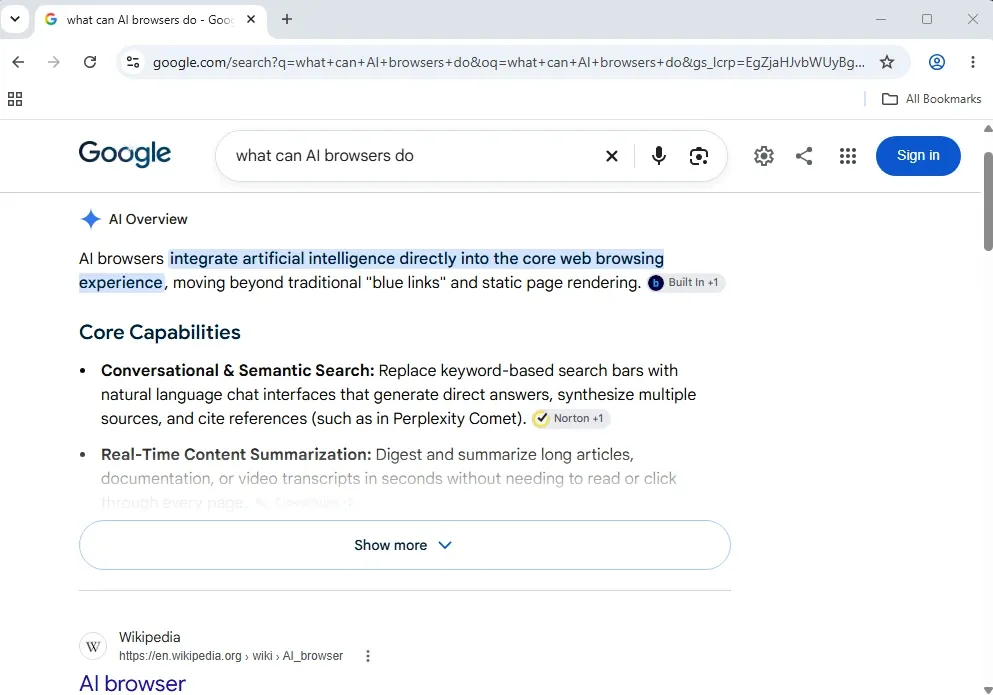
AI browsers seem like a natural continuation of transforming the browsing experience. Instead of relying on third-party tools, they have deep built-in AI and Large Language Model (LLM) integration from the very start. AI assistants work alongside you, interpreting websites’ content, making summaries, providing recommendations, among many other tasks we’ll explain later on.
The technology is still cutting-edge, and many AI browsers are still either in beta stage or continuously releasing essential updates. You may still encounter bugs, as we did trying some of them out. Luckily, all of our selected picks have a free version, so you can try them out for yourself.
We must also warn you of security vulnerabilities. AI browsers are susceptible to prompt injection attacks. They also collect a lot of data to provide a personalized experience, which is typically sent to LLMs on cloud servers.
This poses considerable risks, but it is up to you to decide whether it’s worth it. In this guide, we review 7 AI browsers and traditional browsers with AI components.
Best AI browsers at a glance
Best for
Research, long document summaries, automating routine tasks
Working within Google ecosystem, research and detailed information lookup
Improving productivity, connecting work apps, organising multiple tabs
Integration with Windows and Microsoft 365 suite
Enhancing browsing with AI privacy-first assistant
Full browser automation, connecting external AI tools, code generator
AI-assisted web browsing
Key AI features
Sidebar Comet assistant, multi-model engine, multiple tab awareness
Deep research, integration across Google Docs, Drive, Sheets
Cross-tool compatibility and context memory, automated morning briefs
Sidebar Copilot assistant, content summarization, image generator
Sidebar Leo assistant, web search, content summaries, writing assistance
Do, Make, Chat, and Deep Research features, agentic and conversational assistants
Natural language prompts, text translation, browser tab organization
Agentic features
Multi-step action automation, actions across connected apps, website generator
Task automation and execution within Google ecosystem, development tools
Fetching and summarizing data from connected apps, opening new tabs per prompts
Workflow automation across Microsoft 365 apps, browser tap opening and navigation
Does not offer
Autonomous web navigation, form filling, Model Context Protocol AI tool connection
Does not offer
Platforms
Windows, macOS, iOS, Android
Windows, macOS, iOS, Android, Google AI Studio, Google Cloud Vertex AI, and more
MacOS, Windows
Windows, Linux, Android, macOS, iOS
Windows, macOS, iOS, Android, Linux
Windows, macOS
Windows, Linux, macOS, iOS, Android
Price
Individual Perplexity pro $17/month and Perplexity max $167/month; Enterprise pro $34/month and Enterprise max $271/month
$4.99/month for Google AI Plus, $19.99/month for Google AI Pro, $99.99/month for Google AI Ultra
$10/month for Better Answers plan; $100/month for the Better Days plan
Individual plans start from $9.99/month, business plans from $32/user/month, and enterprise from $30/user/month
Leo AI premium costs $14.99/month
Opera Neon Standard costs $19.90/month
Free
How we chose the best AI browsers
Before diving into AI web browser reviews, here’s how we selected our seven picks.
AI features
AI web browsers, naturally, must have AI integrated into their core architecture. We divide AI browsers into two distinct categories depending on how they use AI to transform the user experience. We looked for AI browsers in each category to offer a wider selection.
Firstly, there are traditional web browsers that add AI as an additional feature, typically as a sidebar AI assistant. Imagine it as your browsing companion. Here are some of its essential features:
- Website and document text translation and summaries
- Real-time and context-aware question-and-answer sessions
- User research tracking across sessions for continuity
- Information comparison across multiple tabs
- Text writing assistance, from grammar errors to crafting emails
- AI-powered and detailed information lookup.
Brave with Leo, Google Chrome with Gemini, Microsoft Edge with Copilot, and Firefox fall under this category.
The second group is agentic browsers. They use AI agents that can perform human tasks. They can open tabs, fill in forms, add items to your shopping carts, book appointments, and more. There are, however, security and information privacy issues.
Also, not all websites let them perform these tasks. For example, when we instructed Comet to extract books and add them to our reading list on Goodreads, it answered that Goodreads blocked its ability to do that. Perplexity Comet and Opera Neon are agentic browsers, and Dia also has AI agent features.
Automation
Efficiently automating tasks is what makes AI useful. We tested AI agents by asking them to summarize Wikipedia pages and news articles, look for books on Goodreads, and add them to our reading list. We also asked them to write texts, open multiple tabs, and cross-reference information across them.
Usability
AI web browser usability includes a comfortable user interface and experience, as all other consumer-centric software does. Additionally, its AI model must provide accurate answers and avoid hallucinations.
That’s one of the most significant AI browser setbacks. For example, we asked Comet’s AI to summarize a paywalled article, and it offered a very elaborate answer. However, when asked how it could do that, we got the following explanation.
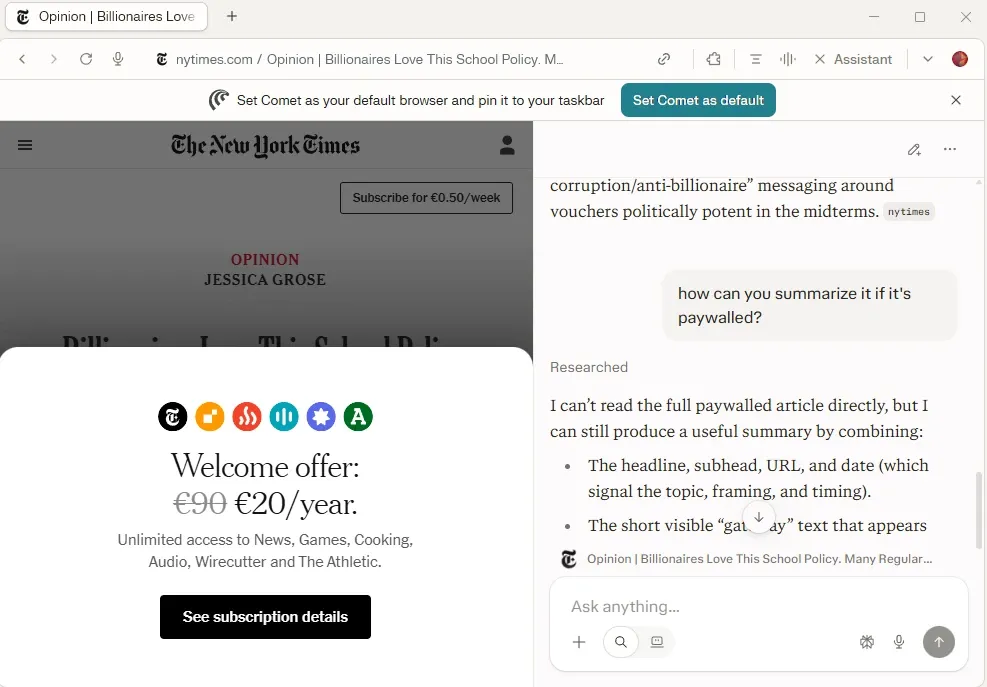
In other words, a lot of it is made up. Relying on such information entirely is risky, as AI models must be continuously verified by humans, especially for important tasks.
At this stage, we also checked how fast they work. Keep in mind that agentic AI web browsers require a lot more computational power, especially if they handle execution locally instead of in the cloud.
Privacy
The more personalized data AI web browsers get, the better they function. At the same time, handing them this information should be done cautiously.
As OpenAI AI models reveal, they can sometimes act autonomously, verging on the boundaries of illegal activities. An AI agent taking over your bank account sounds like science fiction, but in reality, no one can predict 100% what they will do, at least with the current technology.
Another issue is cloud computing. Most AI web browsers send data to the cloud. That expands the attack surface. Both data-in-transit and data in the cloud can be stolen by cybercriminals. If you choose to, for example, save passwords in the AI browser, your accounts may be breached if it doesn’t protect them sufficiently.
AI browsers aren’t privacy-oriented in general. If you aim for online anonymity, visit our best antidetect browsers article.
Platform support
When compiling this list, we looked for AI browsers that work on both Windows and macOS. This technology is very new, so multi-platform support may not be there from the very start. For example, Dia was first released for macOS only and added Windows support later on.
Pricing
We also double-checked each browser's free plan and paid features. The simpler features, like Google’s assistant Gemini or Microsoft’s Copilot, are free. However, browser agents that can perform human-like functions are typically paid benefits.
1. Perplexity Comet: Best AI browser overall
Perplexity Comet is a top-rated AI browser with an excellent free version and a leading AI browser for automation. However, its agentic automation features require a subscription. Individual plans cost $17/month for Perplexity pro and $167/month for Perplexity max. Enterprise pro costs $34/month and Enterprise max $271/month.
It replaces the traditional search bar with a conversational assistant and uses the Perplexity search engine. The paid version lets you connect up to 400+ apps, offers a video generator, and lets you select a preferred AI model.
It can cross-reference across multiple tabs. For example, we logged in to a Goodreads account and opened Amazon in a different tab. We then asked it to find three free books from our reading list and locate them on Amazon.
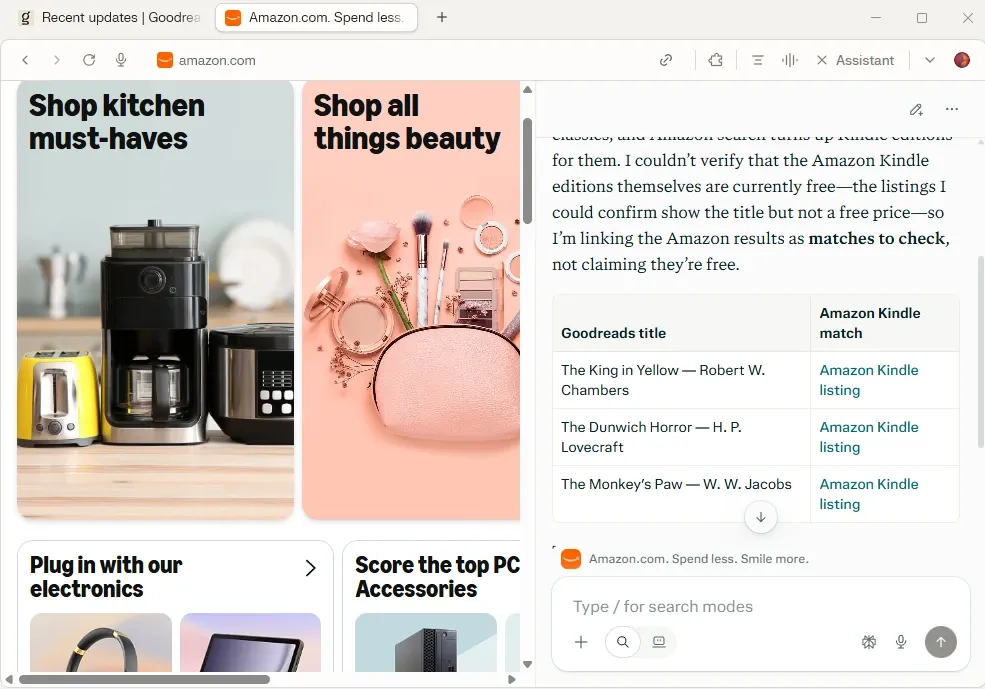
That is correct. Not only are all of the books on our reading list, but they are in the public domain, too.
Comet can make transcripts from YouTube videos, PDFs, and Google Docs. Its agents can book appointments, navigate checkout up until payment, and manage calendars.
We encountered a few minor bugs, like the “Welcome to Perplexity” screen that kept popping up several times. This AI browser was released in 2025, so that’s not unexpected.
Pros
- Easy Chrome migration
- Simple user interface
- Multiple tab awareness
- Connect up to 400+ apps
- Both conversational and agentic assistant
Cons
- Minor front-end bugs
- Vulnerable to malicious prompts
- Expensive upper-tier plan
2. Google Chrome with Gemini: Best for existing Chrome users
Google Chrome has been using its Gemini AI model to enhance the browsing experience for some time now. It is easily accessible from the right-side search bar to start talking to it.
First things first, Chrome has over 66.3% market share, and most desktop users use it. You don’t have to make any imports or learn new software. If you use Chrome, you will get along with Gemini.
So far, it has been primarily a conversational assistant. It is second to none in searching and summarizing content, with outstanding writing capabilities. And Google has big plans in the near future, outlined in the picture below.
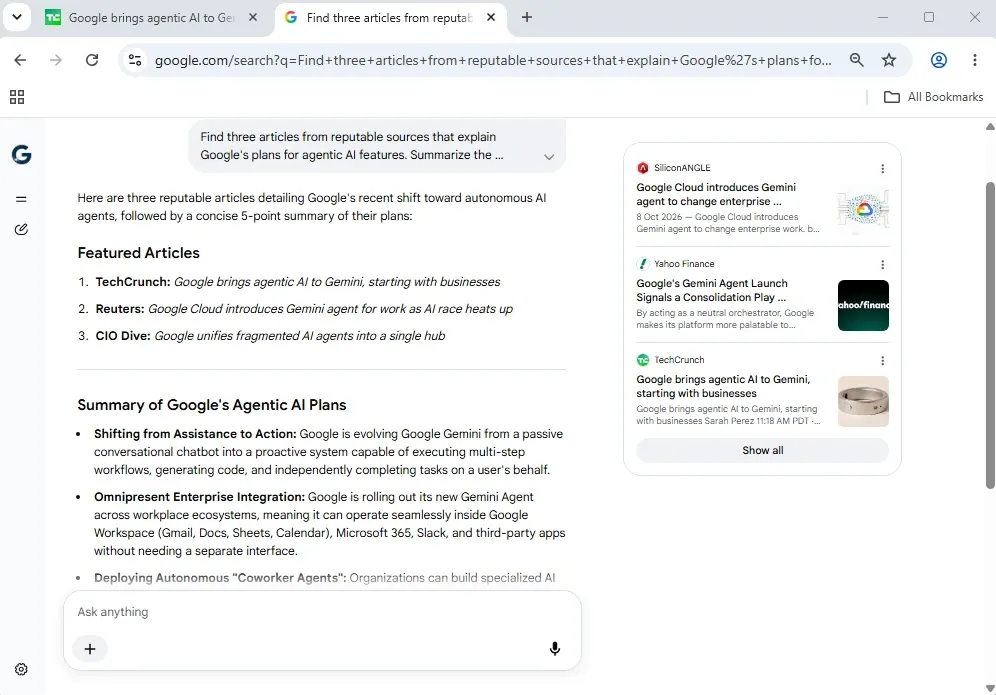
Genuine agentic features are coming soon for businesses. Casual users can now connect Gemini to Google Sheets, Drive, and Workspace extensions. It can pull out information, schedule your Google Calendar, and cross-reference and analyze data.
It is the absolute best choice for Google ecosystem users. With more agentic features in the near future, Google is very likely to stay on top of the AI browser market.
Google AI pricing spans from $4.99/month to $199.99/month across multiple plans.
Pros
- Native integration within Google Chrome
- Integration with other Google services
- Safety checks for payments and logins
- Overall high Gemini quality
Cons
- Agentic capabilities are paywalled
- Incompatible outside of the Google ecosystem
- The company is known for collecting user data
3. Dia: Best AI browser for knowledge work
Dia browser is a productivity-oriented AI browser with agentic capabilities. After launching it, Dia quickly asked whether we’d like to connect our Slack account to it.
It promotes its morning routine, going through your calendar and inbox to update you on what’s coming. The same happens with Slack. Dia goes through unread messages and gives you a recap. That sounds particularly useful for developers and professionals with multiple active conversations.
Dia browser also works with G Suite, Teams, Notion, and GitHub. Focusing on sensitive material, it emphasizes safety features. Here’s what happened when we instructed it to open new tabs and put a few books into our reading list.
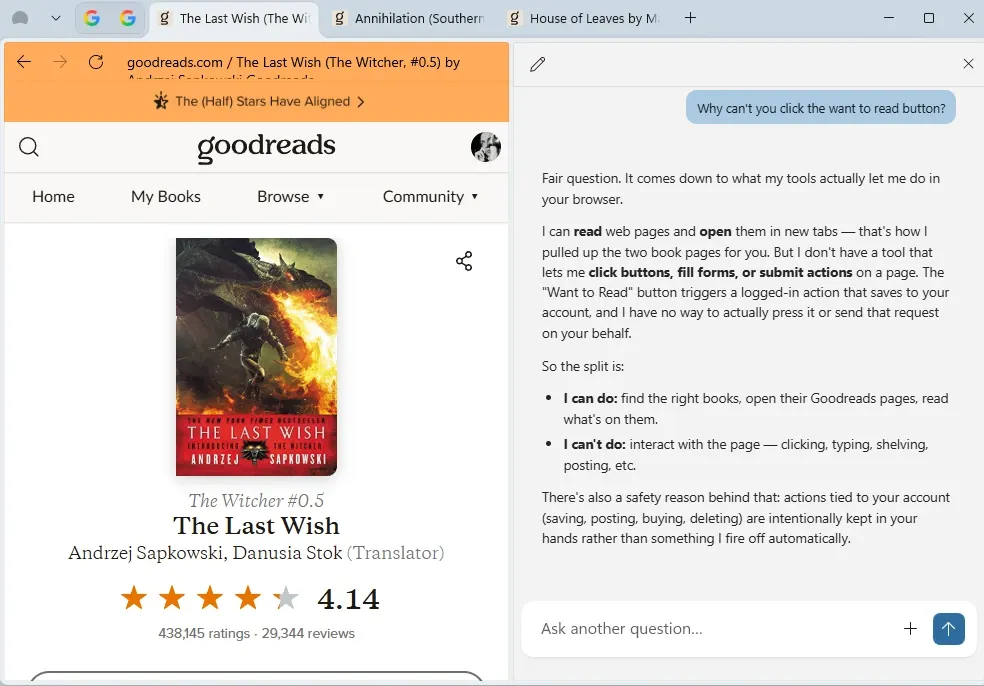
Dia browser explains that its agentic functions are somewhat restricted for security reasons, as illustrated above. It is the best choice for work-related tasks that should always have human verification.
It is SOC 2 compliant, which means that an independent auditor verified its data security features. Also, the browser encrypts and stores user data locally, so it’s a security-oriented AI browser.
Pricing starts at $10/month for the Better Answers plan and goes up to $100/month for the Better Days plan.
Pros
- Productivity-oriented AI browser
- SOC 2 compliant
- Local data storage and encryption
- Moderately priced
- Compatibility with a variety of productivity apps
Cons
- Limited agentic capabilities
- Worked slowly during our test
4. Microsoft Edge with Copilot: Best for Microsoft users
Microsoft Edge with Copilot is a traditional browser enhanced with AI features. Naturally, it has deep integration with the Windows operating system.
You can call it out using Windows shortcuts, get summaries of Windows notifications, and drag files (like PDF documents) directly into it. It uses the OpenAI GPT LLM and lets you choose four conversation types: Smart, Think deeper, Study and learn, and Search.
One of the first things that Edge suggested to us is using its built-in image generator. So we asked it to generate an image that summarizes its AI browser features.
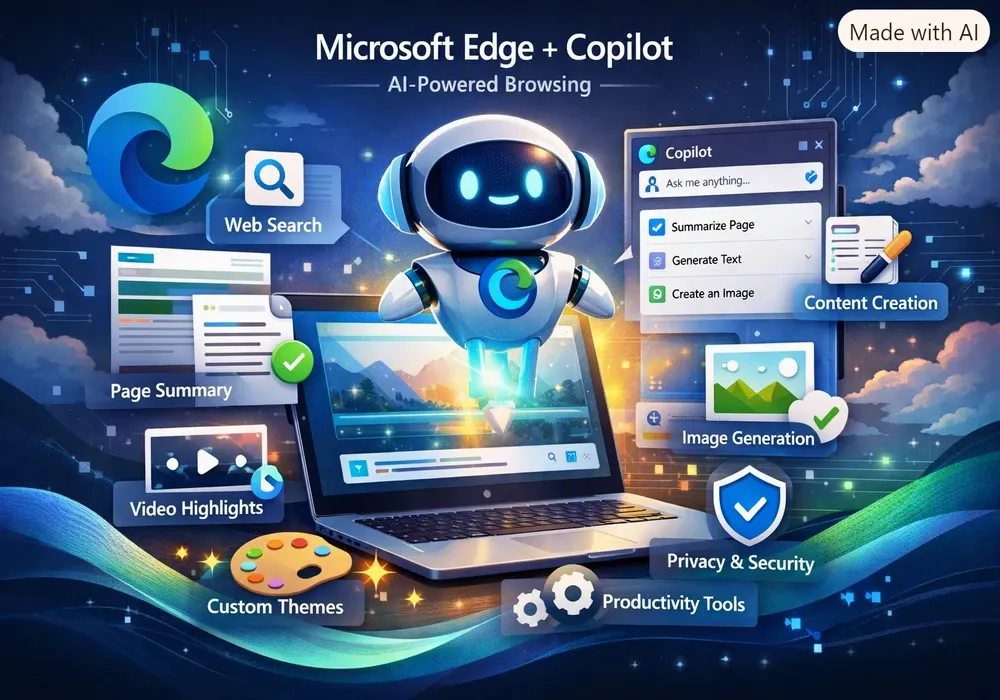
It generated probably the most Microsoft Edge image possible. Jokes aside, it’s not very informative, but rather sparkly. We’re sure that it would improve according to our later prompts, but that’s the first impression.
Microsoft’s Copilot has agentic features and can open websites based on prompts. It generates text, offers multiple-tab awareness, and summarizes websites and documents. Business-level plans enable workflow automation across Microsoft 365 apps.
Microsoft 365 Personal plan starts at $9.99/month and unlocks advanced integration with the Microsoft 365 suite. It goes up to $30/per user/month for the enterprise plan that provides deeper integration with its productivity apps.
Pros
- Deep integration with the Windows operating system
- Microsoft 365 workflow automation
- Image generator
- Agentic browser tab navigation
- Four conversation types
Cons
- Cluttered interface
- Mostly limited to Microsoft's apps
5. Brave with Leo: Best AI browser for privacy
Brave Browser is a privacy-oriented browser, and its Leo AI promises the same. Here’s what it states in its description.
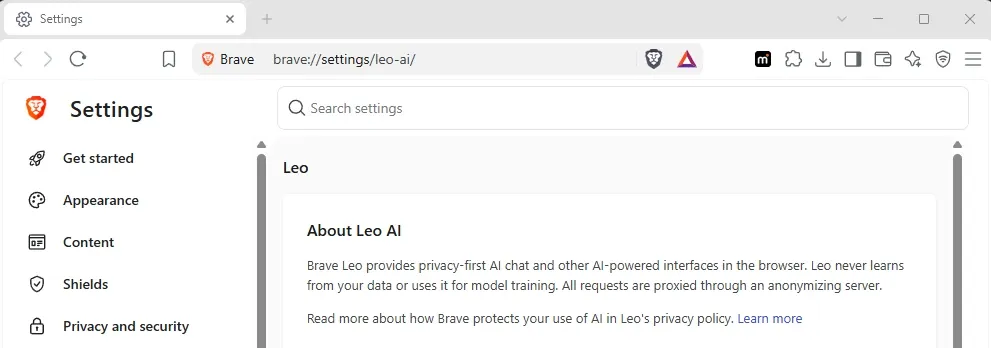
None of your interactions with Leo are tracked or used for AI training. It does not require creating a profile or logging in. Leo is simply an AI-powered browsing assistant, which it states openly if you ask it.
It has the basic features of an AI helper. Based on your prompts, it browses the web, organizes tabs, summarizes, and writes content. It got stuck thinking for answers several times, forcing us to refresh the website.
Brave also offers a Leo AI premium version for $14.99/month. It lets you choose from multiple LLMs, including Claude, GPT, Grok, Mistral Large 3, and others.
Pros
- Privacy-first AI browser
- Supports multiple LLMs
- Simple to use
Cons
- Lack of advanced features
- Occasional crashes
- No agentic features
- Pricey premium plan
6. Opera Neon: Best for AI agents and automation
Traditional browsers require manual bookmarking and navigation. Opera Neon went the other direction, releasing a fully-fledged agentic AI web browser at the end of 2025.
We must state upfront that all of its agentic features are a paid service, which costs $19.90/month. It unblocks all four essential features:
- “Do” lets Opera automate human actions;
- “Make” generates videos, images, blog posts, and code;
- “Deep Research” is an advanced conversational assistant that can transform answers into PDF documents;
- “Local Research” is a simple AI helper to summarize websites and Google Search content.
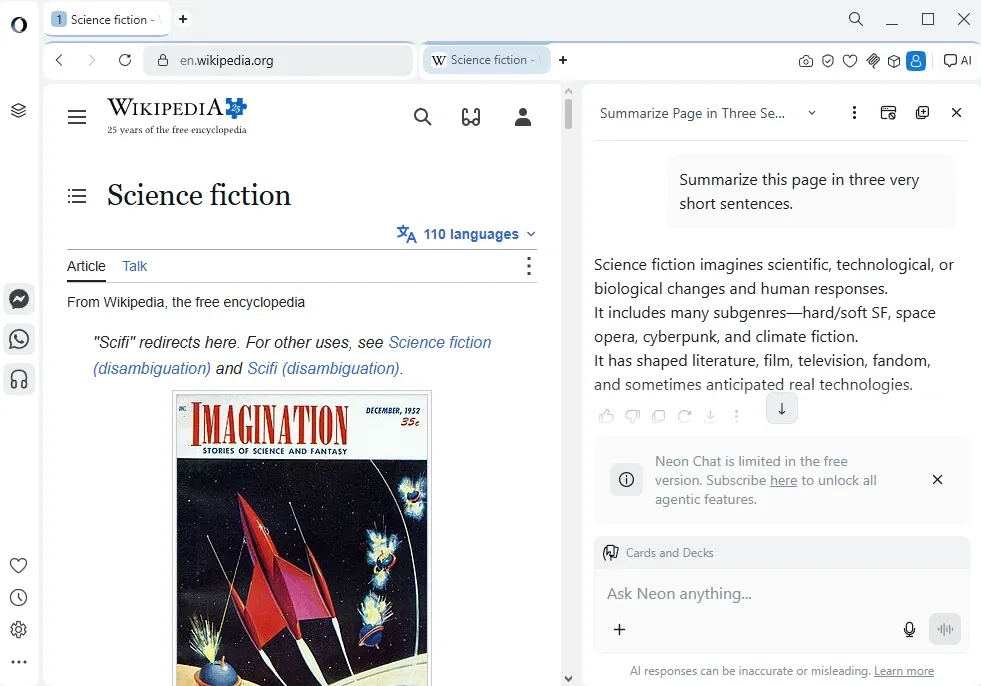
Opera Neon offers an MCP (Model Context Protocol) feature. It allows connecting external AI tools, like coding assistants, to this browser. These tools can scan open tabs and perform automated actions. MCP is particularly useful for developers who use Opera Neon to generate code.
Pros
- A wide range of agentic features
- Allows connecting external AI tools
- Worked fast during our test
- Generates images, videos, and code
Cons
- Most features are paywalled
- A steep learning curve
- Susceptible to AI browser vulnerabilities
7. Firefox: Best for AI choice and user control
Firefox, similar to Brave, also prioritizes user privacy, but with more controls. Unlike others we tried, it lets you turn off AI features entirely and only enable the ones you want. See the image below for illustration.
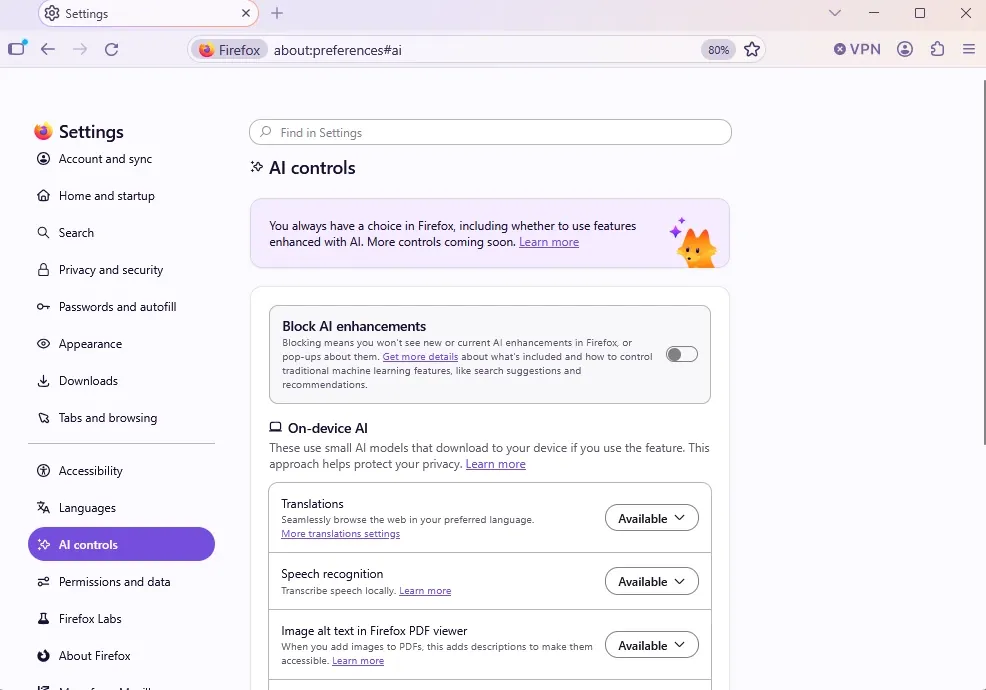
We must stress that Firefox is not yet available worldwide. Currently, you can only use it in North America and France, so it’s very geographically restricted.
Otherwise, it works as a simple AI conversational assistant. It recognizes voice controls, groups your tabs, translates into a vast number of languages, and fixes grammar.
Most importantly, it is entirely free in all available regions. We also haven’t found any news on launching a paid version, so hopefully this trajectory stays the same.
Pros
- Entirely free service
- Exceptional user control options
- Essential AI assistant features
Cons
- No genuine agentic capabilities
- Unavailable worldwide
- No advanced features
Are AI browsers safe?
The safety of AI browsers is a widely discussed topic. The tech website XDA-Developers recommends avoiding AI browsers altogether. This is not AI skepticism, but real cybersecurity vulnerabilities this technology has.
Opponents hint at two important issues: prompt injection attacks and data privacy. Let’s start with the first.
Prompt injection attack and agentic browsing risks
In this hack, the attackers embed malicious AI instructions into websites (or emails, PDF documents, and similar formats), which AI considers legitimate. Its ability to execute these instructions depends on the permissions it has. For example, agentic browsers could add items to a shopping cart and access data in connected apps.
A real-world example would be an email with hidden AI instructions invisible to a human viewer. They would instruct AI to secretly forward the last month's emails to a hacker's address without notification. Although such attacks are still rare, cybersecurity professionals have demonstrated several times that they are effective.
What data can an AI browser see?
AI browsers require extensive permissions to work efficiently. Simultaneously, they need access to personal data or work apps like Slack, in the case of Dia. That makes prompt injection attacks even more dangerous. Without these access rights, AI browsers lose their core functionalities, so why use them at all?
The agentic AI browsers we used quickly asked to import data from our main browser. That includes browsing history, extensions, saved passwords, bookmarks, and auto-fill data, including payments. Basically, every setting the main browser has. To summarize, browser agents want access to as much information as possible to act on your behalf.
How to use AI browsers more safely
Here are our recommendations if you decide to use AI browsers.
- Isolate AI browser. Do not use it for banking, online shopping, or provide access to personally sensitive data, including email.
- Carefully choose prompts. Do not provide personally sensitive data in prompts, such as passwords or financial records.
- Enable manual approval. Enable a feature that demands human approval for the AI to click links, make purchases, submit forms, and send emails.
- Avoid untrusted websites. Hackers are unlikely to embed malicious AI prompts in websites like Amazon or The New York Times. However, weakly protected websites may have hidden AI instructions.
Which AI browser should you choose?
A crucial distinction is between traditional browsers with AI helpers and AI browsers with genuine agentic capabilities.
If you only require AI-powered information search, summaries, and writing assistance, then the first option suffices. These AI browsers are simple to use and do not require a paid subscription.
Regarding agentic AI features, it’s worth considering your preferred ecosystem. Microsoft Edge is best for Windows and the Microsoft 365 suite. Google Chrome now integrates with Google’s apps, with plans to expand further.
Lastly, there are privacy-oriented AI browsers. Brave with Leo is a valid choice, although slightly limited. Simultaneously, Firefox gives you the ability to control AI permissions, also oriented toward protecting your data. However, they are not anonymous browsers that could be used for web scraping, like a headless browser.
Can you use a proxy with an AI browser?
Yes, you can use proxies with AI browsers. Six out of seven AI browsers we chose have a Chromium-based engine. This means our MarsProxies Chrome browser extension works with them. Only Firefox uses a different Gecko engine. However, we developed the MarsProxies Firefox browser extension to cover it too.
Use Cases
Traditional and AI browser proxy use cases differ. Take a look at the table below for a side-by-side comparison.
Geographical targeting
Accessing geo-blocked streaming content, news sites, and website data
Enabling an AI agent to access geographically restricted data to make summaries, use localized search results, and cross-compare between regions
Anti-bot evasion
Avoiding IP-based rate limits, masking web scrapers under residential IP addresses
Bypassing a content delivery network, like Cloudflare, CAPTCHA triggers due to AI agentic actions (multiple website scanning, form filling, automated clicking)
Web traffic masking
Routes browsers' HTTP/HTTPS traffic through the proxy server
Web traffic goes through the proxy server, and the backend LLM API may use its own server-side infrastructure, typically datacenter proxies
IP address masking
Protects the user against the website's IP address logging
Masks AI agents Retrieval-Augmented Generation during high-intensity multiple website scanning
What proxies do not protect against
Proxies have limitations that are specific to Large Language Models. Because of high-intensity website scanning, it is highly recommended to use residential proxies with a high IP trust score.
However, AI LLMs typically bypass the proxy tunnel. Your browser proxy extension still captures HTTP/HTTPS traffic, handling communication with the website. AI browser API calls fall outside this tunnel, sending your device data to the AI model.
Proxies also have zero impact against malicious prompt attacks. These attacks exploit vulnerabilities in the AI assistant, which has nothing to do with IP address masking and rerouting traffic.
Lastly, proxies don’t limit AI agent actions if you give them permissions. If these agents have access to your passwords and email, they can perform actions, whether intentionally or through malicious prompts.
Use AI browsers like Comet with private IPs in 2026
Get residential IPsConclusion
The best AI browser depends entirely on your needs, and there are plenty to choose from. Let’s end with a recap.
Perplexity Comet is like a multi-function Swiss knife. For casual users, it acts as an assistant, cross-referencing information across multiple tabs and providing accurate translations. Its paid version unlocks deep research and transforms data into documents, which is valuable for professionals.
Google Chrome and Microsoft Edge are best for working within their environments. Meanwhile, Dia aims to enhance popular productivity apps, like Slack, Teams, and Notion.
Lastly, Brave and Firefox offer a privacy-first approach. Users who aim to use AI without sharing their data with Large Language Models should opt for these browsers.
FAQ
What is an AI browser?
An AI browser uses artificial intelligence to automate tasks like text writing and summarization, information lookup, cross-tab referencing, and more. Agentic AI browsers can also open new tabs, fill forms, add items to shopping carts, and perform tasks like booking appointments.
Which browser has the best AI?
That depends on your needs. Consider whether you just need assistance or full automation. Perplexity Comet is great and can perform both, although most autonomous automation features are paywalled. On the other hand, Google's Gemini free AI assistance is top-notch and receives outstanding funding to develop new features.
Does Google Chrome have AI?
Yes, Google Chrome is now deeply integrated with its Gemini AI. You also don’t have to download any additional extensions. Choose ‘AI Mode’ on the right side of the search address bar, and you will start interacting with the Gemini conversational assistant.
Are AI browsers safe?
Not entirely. AI browsers have higher security and data privacy risks. Cybersecurity professionals have demonstrated that they are susceptible to malicious AI prompts. Simultaneously, AI web browsers require access to personally sensitive data to function at full capacity.
Are AI browsers free?
Browsers with conversational AI helpers are typically free, like Chrome with Gemini. However, AI agents that can fully automate tasks like form filling or appointment booking typically require a paid subscription.
Do AI browsers support Chrome extensions?
Yes, many AI browsers are built on the Chromium engine precisely to support Chrome features and extensions. Perplexity Comet, Dia, and Brave with Leo are all Chromium-based browsers, and you can use Chrome extensions with them.