Key takeaways:
- Selenium supports cross-browser testing and multiple coding languages.
- Puppeteer is faster but narrowly focused on Chromium and Firefox using JavaScript.
- Both are open-source with active communities and learning documentation.
Selenium and Puppeteer are efficient and widely used tools for web automation and web application testing. They have some overlapping use cases, like web scraping, headless browser control, and screenshotting.
But their significant differences determine which is best for your needs. Released 14 years apart, they have different browser and programming language support, speed performance, learning curve, and setup complexity. However, both are open-source with active communities.
In this article, we will outline their differences and explain when to use which.
What is Puppeteer?
Puppeteer is a Node.js library that streamlines Chromium-based browser automation. Node.js is a widely deployed runtime environment that expands JavaScript capabilities to the backend. By running JavaScript code on servers, it makes creating dynamic websites easier than just using a front-end programming language.
Puppeteer allows testing such applications throughout. It is also an amazing web scraping and web crawling tool that supports headless mode. That makes Puppeteer resource-friendly, significantly improving web scraping speeds. Also, Node.js lets Puppeteer target complex websites, waiting for all elements to render to expand the scope of web scraping.
Google developed Puppeteer and launched version 1.0 in 2018. For a long time, it was only Chromium-compatible, but a stable Firefox support rolled out in late 2024, and Microsoft Edge after it transitioned to Chromium.
Setting up Puppeteer is simpler than setting up Selenium. It comes bundled with Chromium and does not require separate driver installations. However, Puppeteer only works within the JavaScript ecosystem, though it supports TypeScript. It is an essential factor when choosing between it and Selenium.
What is Selenium?
Selenium is a suite of tools for web browser automation launched in 2004. Apart from technological advantages, many developers are simply more used to it, having worked with Selenium for over 20 years.
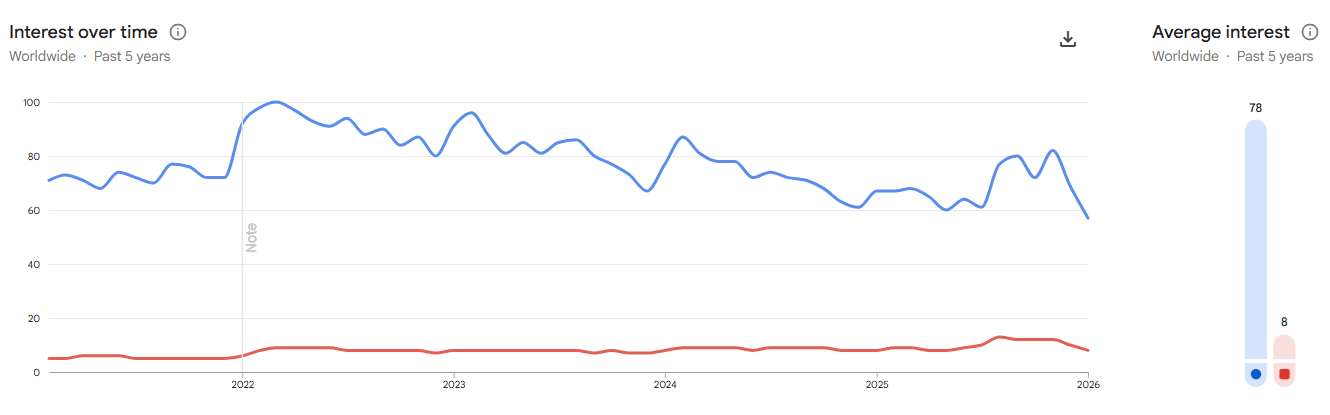
As you can see, Selenium has kept a continuous interest advantage over the last five years, according to Google Trends data. But it's best not to treat it as a better-or-worse comparison. Windows has just as big an advantage in terms of interest over Linux, but ask any software developer which is better, and you'll see the difference.
Getting back to Selenium, you can write its commands in multiple programming languages, including Ruby, Python, C#, Java, and JavaScript. You can run those commands on a variety of browsers, including Safari, which Puppeteer does not support.
But because of this, it is also harder to learn. Previously, with Selenium, you had to install the Selenium library and drivers for various browsers and ensure compatibility, but that's no longer the case. It now has a Selenium manager that automatically detects the browser version and downloads the required driver.
It also offers a Selenium integrated development environment (IDE) and Selenium Grid for parallel testing. Now, let's take a look at the essential differences in the Puppeteer vs Selenium comparison.
Puppeteer vs Selenium: Core differences
The most important difference between these two tools is at their very core. Puppeteer uses a direct connection using Chrome DevTools Protocol (CDP). It was primarily built for Chrome and Chromium. Selenium must pass each command through a driver first, which translates it into the browser's language.
There are many more differences, so let's put them in a table for a better view.
Universal
Chromium-focused
WebDriver bridge (W3C)
CDP protocol
JavaScript, Python, C#, and others
JavaScript and TypeScript only
Slower
Faster
Built-in via Selenium Grid
Requires manual or third-party setup
Yes (using Appium)
No (only emulates mobile screen size)
Basic PDF generation
High-quality screen capture for UI tests
2004
2018
Automated via Selenium Manager
Comes bundled with Chromium
Has bigger latency
Highly scalable
To summarize, Selenium is way more versatile. Its performance testing encompasses numerous browsers and programming languages. It's not constrained to browser automation - it also supports mobile automation. Parallel testing is excellent for scaling it across multiple environments.
Puppeteer is a lot about performance. It includes a Chromium high-level API to translate your commands into messages for the browser. It handles headless mode amazingly well, supporting significantly faster web crawling and web scraping, including dynamic web pages.
Performance and speed comparison
Speed is one of the most significant differences and an essential deciding factor. Let's go over it in more detail.
The core difference is in how both tools utilize the browser's architecture. Puppeteer doesn't require any transaction. Using CDP, it communicates with the browser via a WebSocket connection. Your commands are executed nearly instantly.
Although Selenium is slower, it has made significant improvements in this regard. But it still requires translation because of the need to translate commands via WebDriver. The latency overhead is up to 50ms per single command, but that becomes palpable for scaling automation testing.
If you want to learn more, we strongly recommend checking the recent Selenium and Puppeteer end-to-end web testing analysis analysis on ResearchGate. It reveals how Puppeteer is roughly 45% faster and consumes less device resources.
A particularly tricky part is scaling. At first glance, the asynchronous Node.js core allows hundreds of simultaneous processes. Scraping with Selenium has outstanding advantages. However, if you're using Chrome or a Chromium-based web browser, it's unlikely that Selenium would outperform Puppeteer.
On the other hand, Selenium Grid outperforms it "in the long run." You can use different machines and operating systems to run hundreds of tests simultaneously. If you have a large network of speedy devices, Selenium's advantages will push through.
Puppeteer vs Selenium for web scraping
Regarding web scraping tasks, we've got to award this one to Puppeteer. But that doesn't mean Selenium is insufficient - it is still a very effective web scraping tool and more versatile.
However, because Puppeteer skips the translation step, it is significantly faster. And scraping is a lot about speed. Puppeteer controls a Chromium headless browser perfectly via its high-level API, making it more accessible to junior-to-mid-level scraping.
Selenium also leaves a more easily detectable fingerprint. It sets the navigator.webdriver value to true, which triggers Cloudflare's or other CDN's anti-bot algorithms. On the other hand, you can spoof the negative value to bypass it with a few manual configurations.
However, Puppeteer will find it much harder to scrape websites optimized for Safari, whereas Selenium handles them without issues. If you also need to manage very proxies directly on a mobile device while testing, our Android Proxy App lets you switch proxies with a single tap. Selenium also works very well with Python, the most popular programming language for coding scrapers. Once again, choosing between the two is a matter of circumstance.
Puppeteer vs Selenium for test automation
Testing web applications is a primary use case for each tool. Let's review it before wrapping up.
Selenium is a better choice for cross-browser testing. Not being tied to the Chromium architecture means it supports multiple browsers. Also, Selenium Grid allows testing multiple browsers across multiple environments simultaneously, which is highly beneficial for many apps with large user bases.
Puppeteer, on the other hand, benefits from Chrome DevTools Protocol. It doesn't just simulate button clicks or interactions with other elements. It actually listens to network signals and verifies API calls.
However efficient, it's worth noting that Selenium now competes with Playwright. Playwright is recommended as a modern alternative that combines Puppeteer's speed with Selenium's cross-browser capabilities.
Pros and cons of Selenium
Pros:
- Multi-language support
- Cross-browsing testing compatibility
- Automatic Selenium Manager setup
- Over 20 years of development
- Very engaged community support
- Supports iOS and Android automation
- Selenium Grid-powered scaling
- Open source
- Offers an IDE
Cons:
- Palpable speed overhead
- Mandatory WebDriver translation
- Steep learning curve
- Limited screenshotting capabilities
- Easier to detect by anti-scraping protection
When to use Selenium
So, when should you use Selenium? Let's quickly summarize:
- If your application uses Safari or a non-Chromium-based architecture
- For mobile application testing and automation
- If your application uses a programming language other than JavaScript
- If you plan on serious scaling
- If you require legacy browser support
- If you want to reduce detection risks
- If you want to customize your scraper with Python commands
- If you need flexibility in bypassing CAPTCHA and anti-bot protection
Pros and cons of Puppeteer
Pros:
- Best for Chromium-based browser control
- Easy setup
- Fast scraping speed
- Screenshot management
- Supports Firefox
- Built by Chrome veterans
- Skips WebDriver translation
Cons:
- JavaScript and TypeScript only
- Lmited support outside Chromium
- No built-in parallelization
When to Use Puppeteer
Here are scenarios where you'll get the most out of Puppeteer:
- If you need fast, headless control of Chrome or Chromium
- For scraping dynamic websites that rely on JavaScript
- For testing Chrome extensions or browser automation tasks
- If you plan to scale data gathering using Chromium automation
Conclusion
In 2026, comparing Selenium and Puppeteer is not a better-or-worse task. Both of them have strong points and aspects where one outperforms the other. The decision is circumstantial and entirely dependent on your setup.
To summarize, Selenium is a top choice for cross-browser testing and web automation that encompasses smartphones. However, Puppeteer controls Chromium headless mode much more smoothly, because it was built for that. After considering all their similarities and differences, both are outstanding pieces of software in their own fields.
Still deciding on the language to pair with your automation tool? Our Go vs Python comparison breaks down which one suits different workflows best.
Do you have any more questions or want to share your experience with Selenium or Puppeteer? Join our Discord server where we regularly discuss all the technicalities of the modern internet.
Which is better: Selenium or Puppeteer?
Both Selenium and Puppeteer excel in their own fields. Selenium offers cross-browser testing support and works with programming languages other than JavaScript. Puppeteer is second to none in web automation within the Chromium and JavaScript ecosystems.
Which is faster: Selenium or Puppeteer?
According to the Selenium vs Puppeteer in-depth comparison on ResearchGate, Puppeteer is 45% faster than Selenium. However, Selenium Grid-supported parallel scaling outperforms Puppeteer whenever you need automated testing across different devices and operating systems.
Which is better for web scraping: Puppeteer or Selenium?
That depends. Regarding speed and performance, Puppeteer takes the lead in most cases, and it does not require WebDriver translation. However, Selenium's compatibility with the Python programming language has significant advantages outside of the JavaScript ecosystem.