
 Sign up with Google
Table of contents
- What is Tor Browser and how does it work?
- What is a Tor proxy?
- Tor network and onion routing
- Tor relays vs traditional proxy servers
- Proxy connection before entering Tor
- Hiding Tor usage from the local network
- How to set up a proxy in Tor Browser
- Common Tor proxy issues and troubleshooting
- Proxy server refusing connections
- Incorrect proxy address or port
- Authentication errors
- SOCKS5 vs HTTP compatibility
- Slow connections and timeouts
- Tor pros and cons
- Conclusion
- FAQ
- Which is better for privacy: VPN, proxy, or Tor?
- Can you use Tor for web scraping?
- Can I use SOCKS5 proxies with Tor Browser?
- Can I use residential proxies with Tor?
- Can I use Tor as a proxy server for other applications?
Tor (The Onion Router) Browser is an anonymity-oriented software with at least three million daily users. It is used by whistleblowers, political activists, journalists, and even military intelligence agencies. It uses the Tor network, a volunteer network that reroutes user traffic through its relays, similar to proxy servers.
Tor Browser does not provide complete anonymity and has its pros and cons. It is possible to strengthen it by using proxy servers within the built-in browser proxy settings.
In this guide, we will show you how to do that and troubleshoot proxy issues at the end.
What is Tor Browser and how does it work?
Tor network was officially launched in 2002. The browser came several years later, in 2008. But the very beginning dates back to the mid-1990s, when the US military intelligence required a tool to safeguard online communication from third-party surveillance.
To achieve that, Tor Browser uses three relays to route user traffic. They are called the guard relay (entry), the middle relay, and the exit relay.
First, the Tor Browser encrypts the user data traffic three times and sends it to the guard relay. It strips the first layer of encryption, which reveals the middle relay address. This relay strips the second layer of encryption, revealing the exit relay address. The final relay strips the final layer of encryption and sends the traffic to its destination.
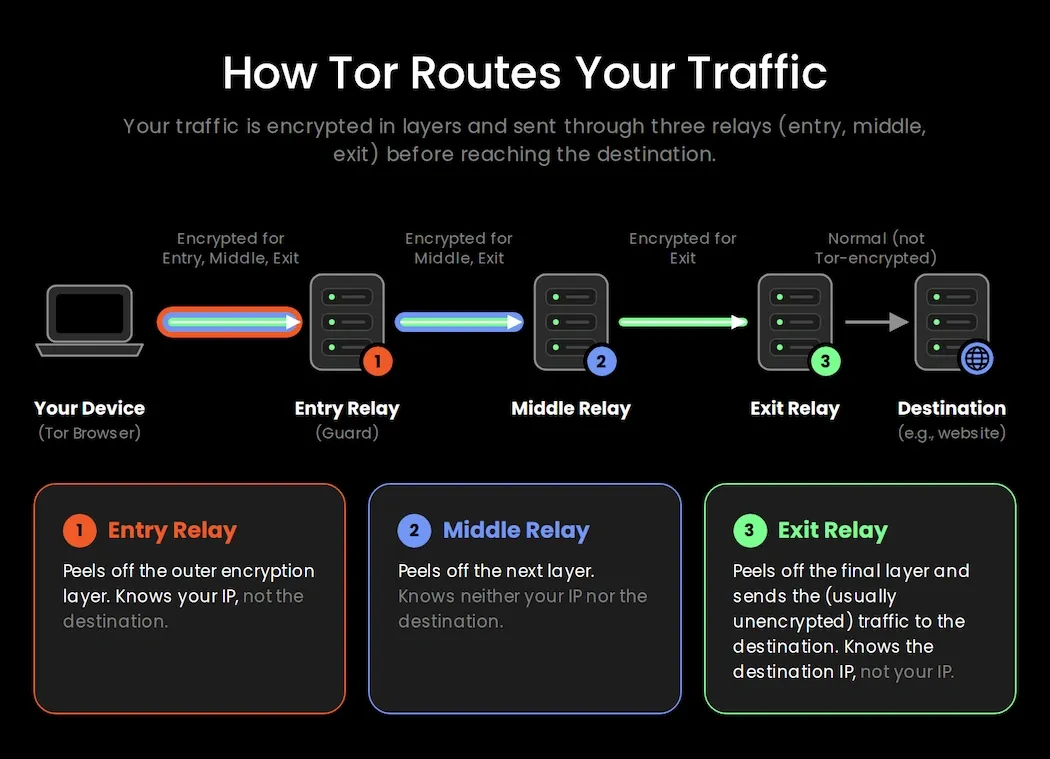
Each relay assigns an alternative IP address. Most importantly, only the entry relay knows the user’s IP address, but not the traffic destination. Simultaneously, the exit relay does not know where it came from.
The destination server only sees the exit relay's IP address. This is the essence of Tor Browser’s anonymity layer, which standard proxies and Virtual Private Networks (VPNs) lack.
What is a Tor proxy?
A Tor proxy is a SOCKS5 proxy that runs as a background process locally on the user's device. By default, it listens on TCP port 9050. It is used when Tor is installed as a standalone daemon system service.
Tor SOCKS proxy port accepts unencrypted traffic from your applications. You can connect applications that support the SOCKS protocol, like private messaging apps, peer-to-peer file-sharing software, and web scraping tools. The Tor Browser uses its own bundled processes, listening on port 9150.
Tor network and onion routing
Tor network consists of approximately 10,000 volunteer servers worldwide. The number regularly changes and is public information, displayed on the Tor project website. Although Tor relay operators do not sign a formal contract, they follow very specific Tor software rules that define their functionality and security.
Onion routing is a networking technique that defines data encryption and movement through the onion network. We have explained the core logic in the previous chapter.
It’s worth adding that the relays are chosen (partially) randomly and that no single relay ever has both the user's IP address and the target destination.
Tor relays vs traditional proxy servers
Tor relays and traditional proxy servers have similarities, but their differences are significant.
Firstly, a traditional proxy only accepts user traffic and forwards it to the target destination. Typically, such proxies do not handle encryption and decryption. They can be located in data centers. They can also be another person’s device, in the case of mobile or residential proxies.
Tor relays handle Tor traffic and route it through the Tor network. They decrypt a layer of encryption, moving it to the target destination. And vice versa, each Tor relay applies a layer of encryption, sending it back to the user.
Geographical targeting is another difference. Users can choose the traditional proxy country they want to use, browsing the internet as if they were physically there. In contrast, Tor exit relays are typically chosen for them. Lastly, you cannot rotate IP addresses with Tor the way traditional proxies do.
Proxy connection before entering Tor
One of Tor Browser's setbacks is that, without additional tools, your Internet Service Provider (ISP) can see that you are using it. Your traffic is heavily encrypted, but the very fact that you are using Tor is visible.
Using Tor in most countries is perfectly legal, as long as it is not used for criminal activities. However, five countries have blocked Tor. Online privacy proponents also don’t like sharing their software habits with ISPs.
One way of solving this is to use a traditional proxy to connect to the Tor network. Encrypted Tor traffic will first be sent to the proxy, which forwards it to the network. Your ISP only sees that you are using a proxy service, not the Tor Browser.
Hiding Tor usage from the local network
Universities, libraries, or even public Wi-Fi’s may be configured to block Tor access. Tor Browser offers three built-in tools to bypass local (and nationwide) network restrictions, called bridges.
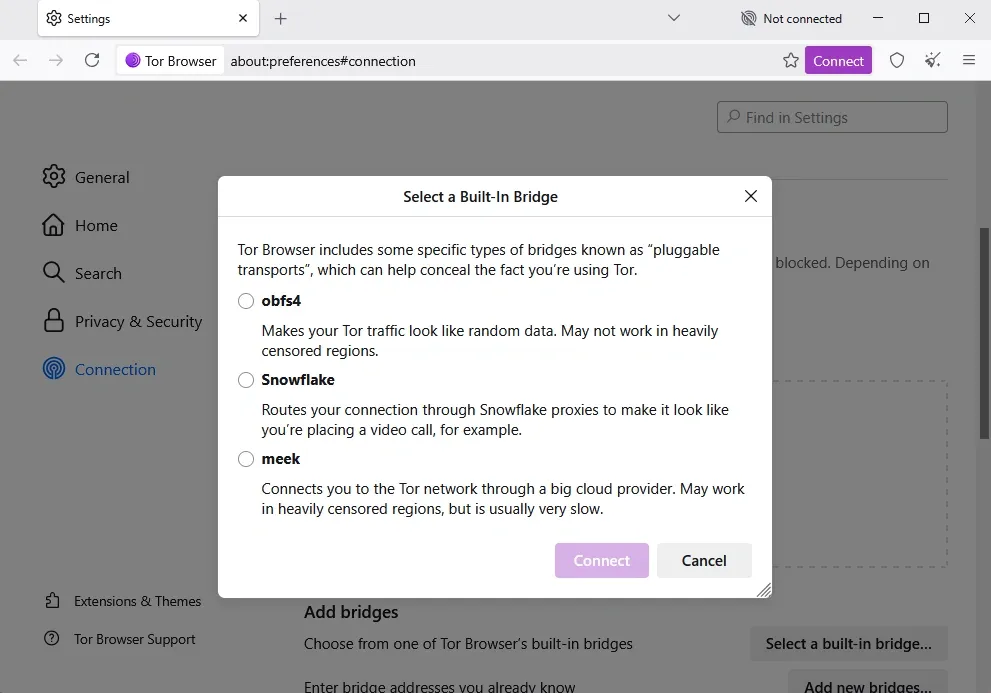
Let's go over each in more detail.
- obfs4
The obfs4 method is traffic obfuscation. Standard Tor traffic has distinguishable elements, like a specific handshake and packet size patterns. Methods like Deep Packet Inspection can identify it. The obfs4 protocol scrambles these details to make it look like a random data flow.
- Snowflake
This method is a specific way of using proxies. It relies on WebRTC, a tool that is widely used for peer-to-peer communication within apps and browsers. Using Snowflake, the Tor Browser connects to a volunteer proxy to make it look like standard WebRTC communication.
- meek
In this case, Tor makes it look like user traffic goes to an allowed public cloud service. However, the HTTP header within the encrypted HTTPS traffic contains information to reach the Tor network. The ISP or network administrator only sees the connection to the cloud service.
Another alternative is to use a VPN with Tor integration. A VPN establishes an encrypted tunnel to one of its servers. Then Tor Browser uses this private tunnel to connect to the Tor network. However, VPNs typically use data center IP addresses, which may also be blocked by network firewalls.
How to set up a proxy in Tor Browser
One of Tor Browser’s vulnerabilities is that the entry guard relay still sees the original user's IP address. Connecting to it via a proxy server solves it. Here is a step-by-step guide on how to do it.
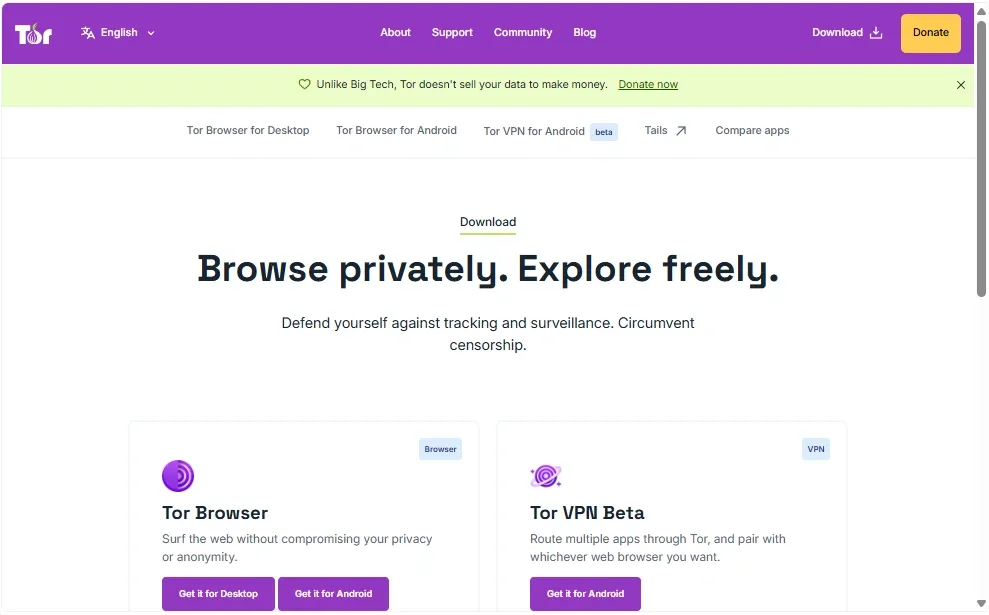
- Download Tor Browser for your operating system from its official website and install it.
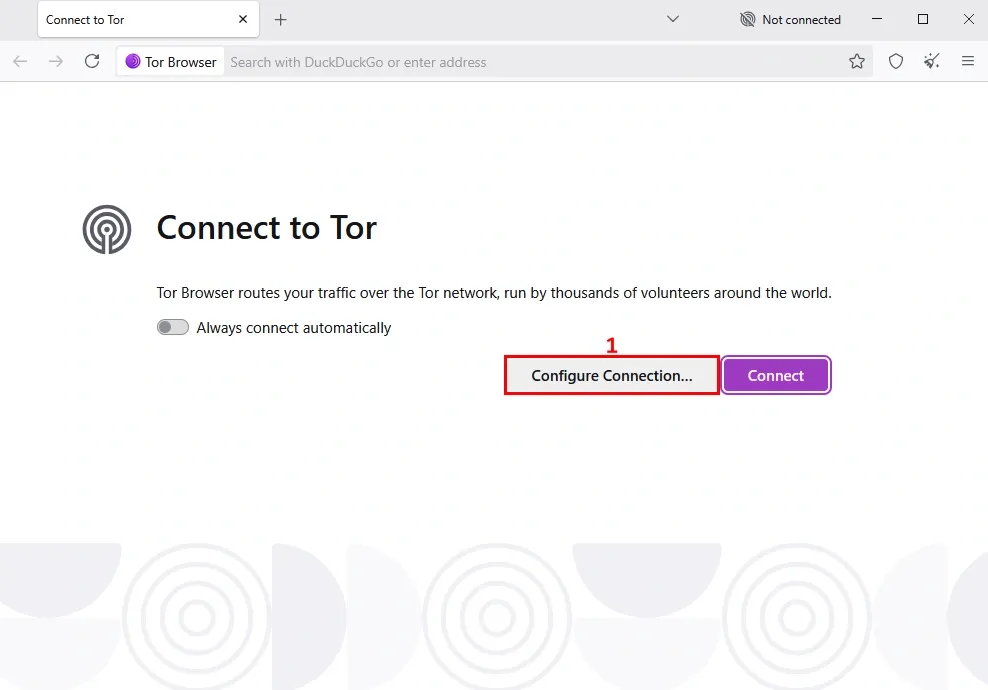
2. Click the ‘Configure Connection…' (1) button.
3. Scroll down to the ‘Advanced’ section and click on ‘Settings…’ (2).
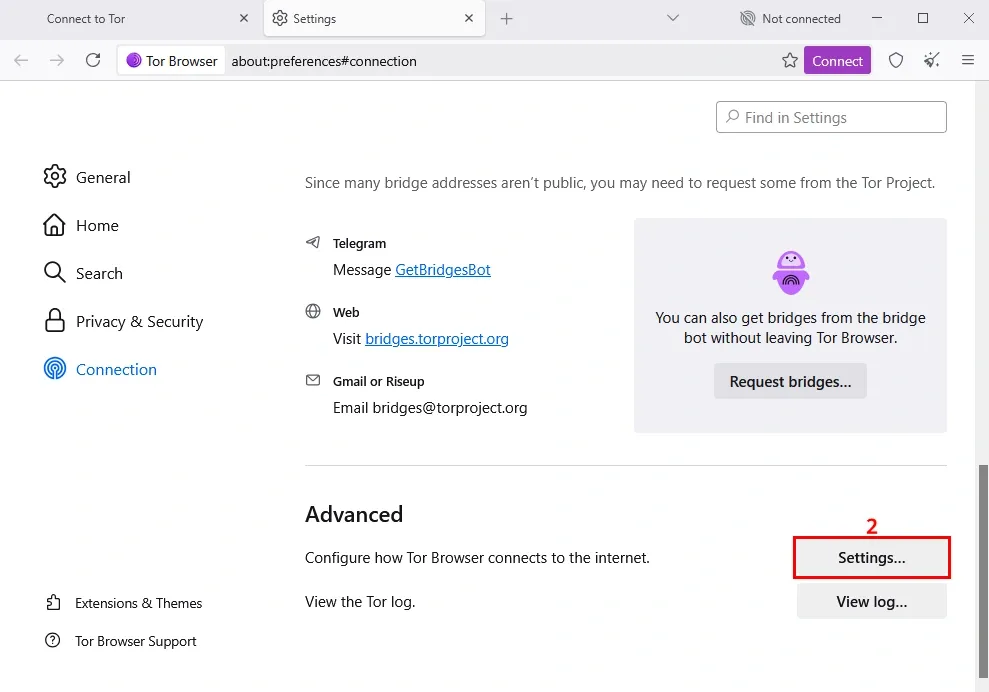
For now, we will leave Tor Browser and fetch proxy credentials from the MarsProxies dashboard. For this example, we will use a SOCKS5 United States residential proxy in New York with a 24-hour sticky IP address.
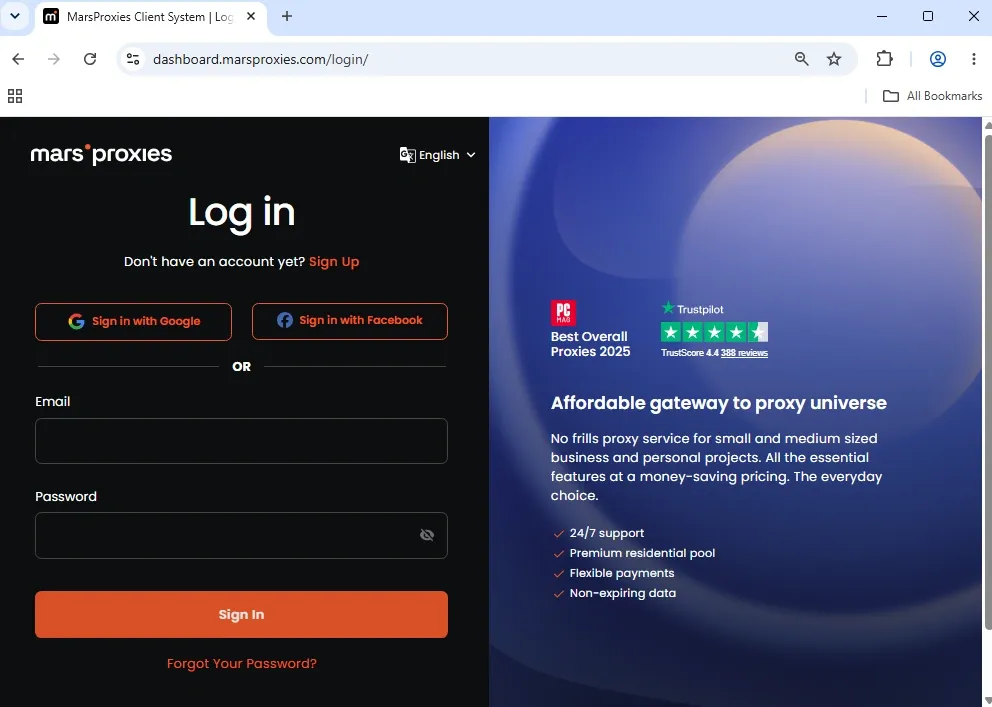
4. Log in to the MarsProxies dashboard using your email and password.
5. Select ‘Residential’ (3) on the left-side menu. Select the country (4), state/region (5), rotation (6), duration (7), and type (8). Your proxy credential string (9) is below, as you can see in the following image.
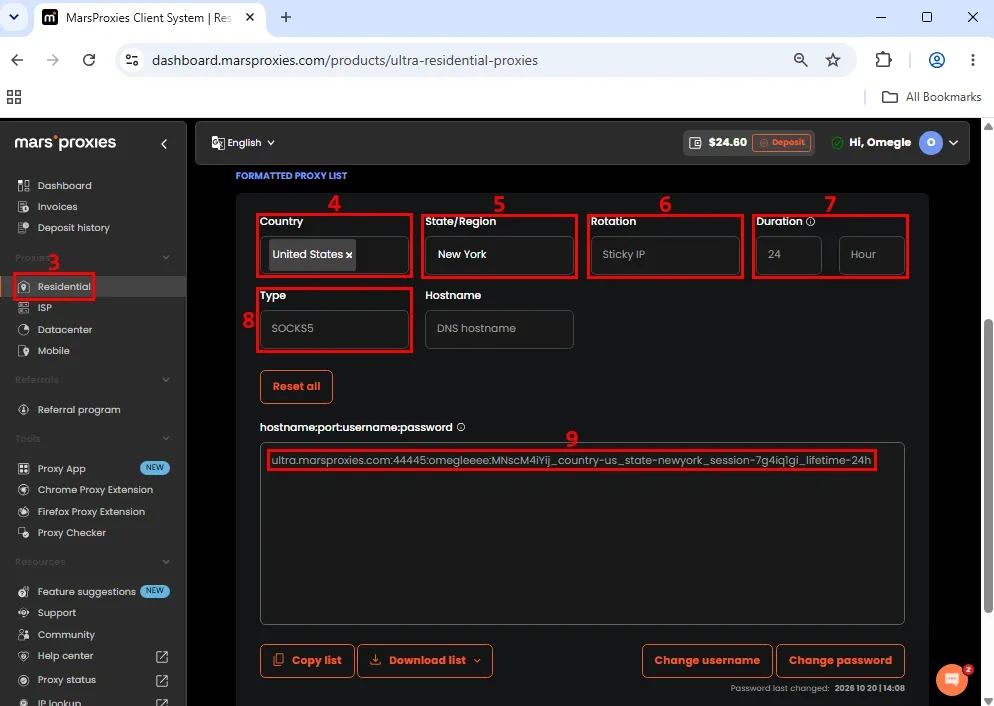
Let's break the string down to make it clearer.
Host name: ultra.marsproxies.com
Port: 44445
Username: omegleeee
Password: MNscM4iYij_country-us_state-newyork_session-7g4iq1gi_lifetime-24h
6. Go back to the Tor Browser (Step 3). In the opened connection settings window, click the ‘I use a proxy to connect to the internet’ (10) checkbox. Select a ‘Proxy type’ (11) according to your chosen proxy protocol. Enter the hostname (address), port, username, and password (12), as shown in the image below. Click ‘OK’ (13).
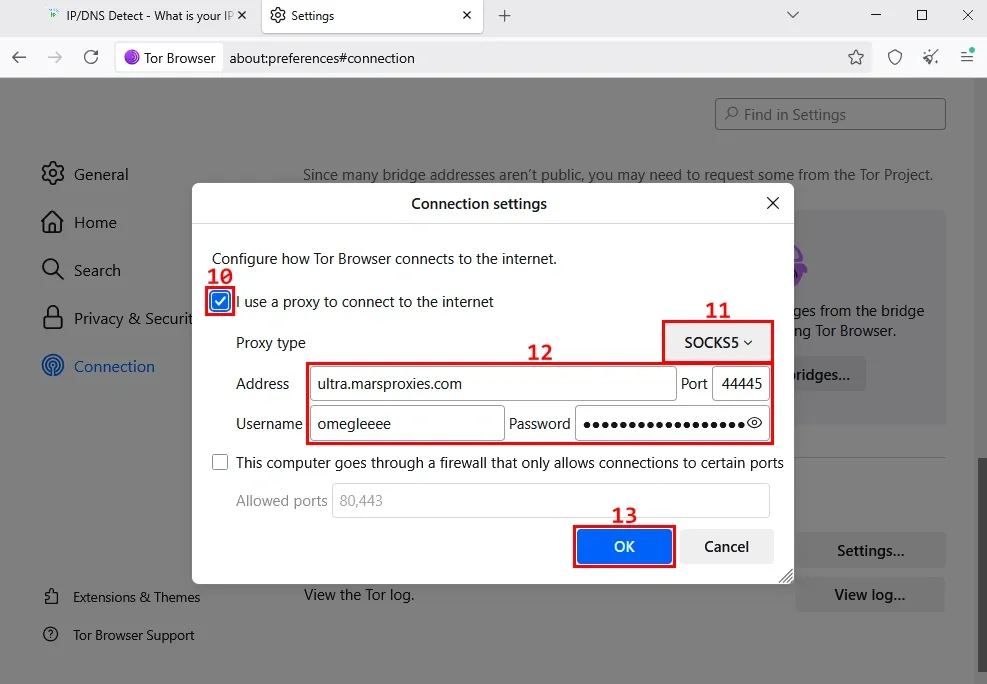
7. Open a new tab and click ‘Connect’. Lastly, visit P Leak to check your IP address.
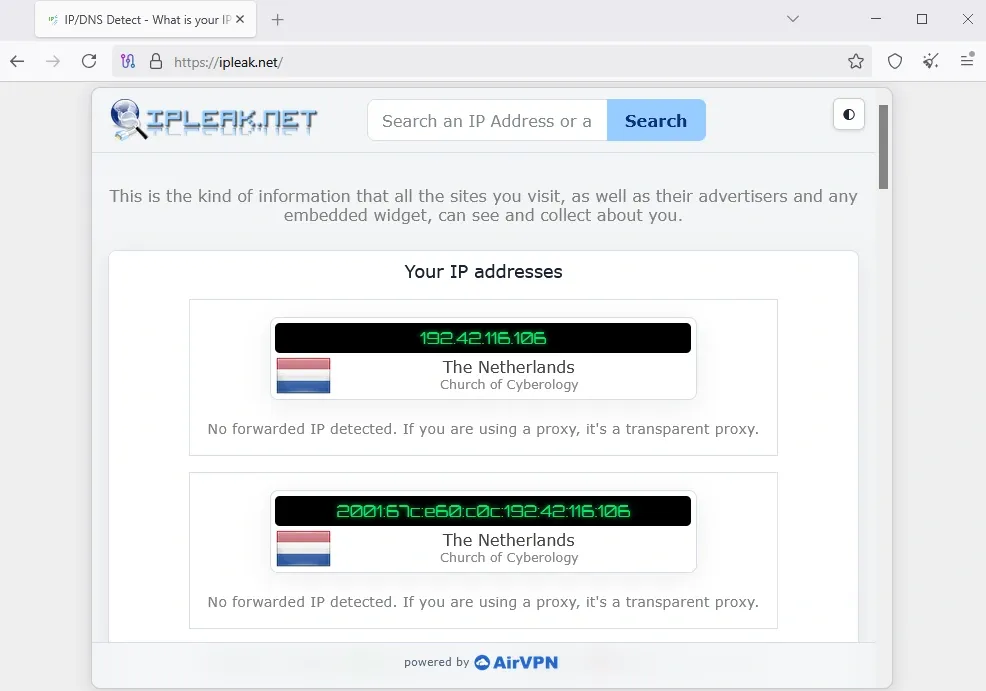
You will see an IP address different from your own. Keep in mind that it will not correspond to the chosen proxy IP address. This proxy is used to connect to the Tor network, but your public-facing IP address will be that of the exit Tor relay.
Common Tor proxy issues and troubleshooting
There are several reasons that may prevent Tor from working with a traditional proxy. Here are five common issues and their solutions.
Proxy server refusing connections
Firstly, your proxy server might simply be experiencing downtime. Reconnect to a different proxy server and connect to the Tor Browser again. Second, your firewall or antivirus may also be blocking proxies. Double-check that they do not block ports that Tor and proxy servers use.
Incorrect proxy address or port
A single wrong symbol or letter can break the connection to a proxy server. Verify that you have entered the proxy hostname, port number, username, and password correctly.
Authentication errors
There are two ways to authenticate a proxy connection. First, you must enter the correct username and password. The second method is IP whitelisting. If your proxy service provider requires it, you must whitelist your original IP address on their dashboard.
SOCKS5 vs HTTP compatibility
SOCKS5 and HTTP(S) proxies work on a different level of the OSI model. HTTP(S) works at Layer 7, which is the application layer. SOCKS5 functions at Layer 4, which is the transport layer. Ensure you have selected the right protocol type. Otherwise, the proxy will not route your traffic.
Slow connections and timeouts
Tor introduces three additional hops, which make it much slower compared to a standard browser. An additional proxy server may slow it down to an almost unusable level. Consider whether you actually need a proxy server, and try Tor Browser’s built-in bridges to bypass network restrictions instead.
Tor pros and cons
Before concluding, let’s summarize Tor Browser's strong points and setbacks.
Pros
- A highly anonymous browsing software
- Three layers of encryption
- Minimizes browser fingerprint
- Offers network bypass features
- Effortless to install and use
- Provides access to .onion websites
- It is open source and free
- Compatible with proxies and VPNs
Cons
- Many websites block Tor Browser
- Malicious exit nodes may intercept unencrypted traffic
- Exit nodes are public and easily identifiable
- Tor requests are significantly slower than a direct connection
- It does not provide complete online anonymity
- Does not route traffic system-wide (unlike VPNs)
Conclusion
Tor Browser is a very powerful online privacy protection tool. But no software can provide complete anonymity. It will not protect your identity if you log in to Gmail, Facebook, or other personal accounts.
It may also prove too slow for many users. If you seek simply to hide your IP address, high-quality proxy servers are much faster. Tor exit nodes are also easier to block. It’s best to use it to browse .onion websites that hide the server’s IP address from users.
To summarize, Tor is meant for a specific audience. Journalists, whistleblowers, and political activists depend on it to hide their online identities. But casual internet users can safely rely on more traditional online privacy protection tools.
FAQ
Which is better for privacy: VPN, proxy, or Tor?
Tor is widely considered the most robust online privacy and anonymity tool. Its three-relay rerouting structure makes it especially hard to link online activities to a specific user. But it is also much slower and easier to block. Proxies are much better for web scraping, and VPNs add a separate layer of encryption without such a big speed drop.
Can you use Tor for web scraping?
Yes, you can use Tor for web scraping, but it comes with significant setbacks. Firstly, Tor exit relays are public information, and many websites block them. Also, onion routing is very slow compared to commercial scrapers. You can scrape more efficiently using them, because Tor is simply not developed for that.
Can I use SOCKS5 proxies with Tor Browser?
Yes, Tor Browser is compatible with SOCKS5 proxies. You can find the proxy section in its advanced connection settings. Select the SOCKS5 protocol and input proxy credentials that use it.
Can I use residential proxies with Tor?
Yes, Tor Browser is fully compatible with residential proxies. It is an excellent solution if you want to hide from your ISP the fact that you are using this browser. Also, residential proxies can unblock Tor Browser access on restricted networks.
Can I use Tor as a proxy server for other applications?
Yes, you can use Tor as a proxy for all applications that support proxy connections. You must configure them to route traffic through the Tor proxy on (in most cases) port 9050. It is a widely used method to anonymize private chat applications or peer-to-peer file-sharing software.
Other integrations
-
 Learn more
MarsProxies and BitBrowser: Integration Tutorial
The anti-detect browser BitBrowser allows you to run many unique browsers from one device. Here's how to integrate it with MarsProxies.
-
 Learn more
MarsProxies and Accovod browser: Integration Tutorial
Follow our step-by-step guide to integrate residential proxies and stay one step ahead of bans and detection. 🛡️
-
 Learn more
MarsProxies and Vision: Integration Tutorial
Learn how to boost your privacy, manage multiple profiles, and configure proxies like a pro. 🔒