Key Takeaways:
- AI web scraping tools don’t rely solely on hard-coded XPath and CSS selectors, but use computer vision, optical character recognition, and semantic context analysis to adapt to website changes.
- No-code Artificial Intelligence scrapers are suited for non-developers and often offer point-and-click workflow builders. API-first AI scrapers offer more customization and integrations into existing data scraping pipelines.
- Compared to traditional methods, AI scrapers are typically slower and more expensive, but use machine learning to improve the accuracy of the collected data.
AI web scraping tools automate crucial web scraping tasks, such as identifying correct elements in complex and dynamic websites. Some are built for non-developers and extract structured data following natural language prompts or even mouse clicks.
You will find inexpensive AI scrapers suited for individual projects, like Thunderbit or some Apify actors. Others, like Oxylabs, are business-oriented, but seamlessly handle large-scale projects. The technology is still cutting-edge, so you can expect a bug here or there, but it is developing at a rapid pace.
We have selected 10 AI web scraping tools with various use cases. Individuals and businesses that aim to streamline structured data collection will find their features, pricing, and test examples.
However, it is unlikely they will replace traditional web scraping tools entirely. To learn more about them, visit our best data collection service list.
Best AI web scrapers at a glance
Before diving into a detailed list, here’s a side-by-side AI scrapers comparison.
Firecrawl
API-first scraping platform
Deep research, website design cloning, AI agent crawling and scraping
Yes
Yes via Cloud
Yes
$16/month
Browse AI
No-code platform
Website change monitoring, automatic data element detection, automated workflows
Yes
Yes via Cloud
Yes
$19/month
ScrapeGraphAI
API-first scraping platform
Natural language prompts, Markdown pruning
Yes
Yes
Yes
$20/month
Crawl4AI
Open-source Python library
Markdown cleaning, LLM-powered web scraping
Yes (with Playwright)
Yes, custom routing
Yes
Free
Apify
Cloud marketplace and scraping ecosystem
Web scraper recommendations, no-code scraping, vast LLM integration
Yes
Yes, automated handling
Yes
$29/month
Thunderbit
Chrome browser extension
One-click extraction, pagination handling
Yes
Yes via Cloud
Yes
$9/month
Octoparse
Desktop app and web interface
Automatic data element detection, no-code workflows
Yes (Chromium engine)
Yes, automated handling and stealth
Yes
$69/month
ScrapingBee
API-first scraping tool
Scraping code generation, contextual analysis, natural language prompts
Yes (headless Chrome execution)
Yes (classic, premium, and stealth proxies)
Yes
$19/month
BrightData
Enterprise data analytics platform
Natural language prompts, bot protection bypass, proxy handling, and more
Yes
Yes, offers its own infrastructure
Yes
$1.50/1K page loads
Oxylabs
Enterprise data analytics platform
MCP support, bot protection bypass, contextual analysis, and more
Yes
Yes, offers its own infrastructure
Yes
$30/month
How we evaluated the best AI web scrapers
All AI scrapers have been tried out firsthand using each free tier. We have tested how accurately they capture data elements, extraction speed, user interface, and AI assistants.
In most cases, we launched AI scrapers on our websites to extract elements such as pricing data, blog posts, or summarized data. Other times, we looked at how AI agents search for information on the internet.
Lastly, we verified and evaluated objective criteria, such as pricing, feature availability, online user reviews, and proxy support.
The 10 best AI web scrapers compared
Below is a list of AI web scraper tools that all use artificial intelligence for data collection. However, this is not a better-or-worse ranking. All selected tools excel in their own fields and have as many differences as similarities.
1. Firecrawl: Best for developers and LLM workflows
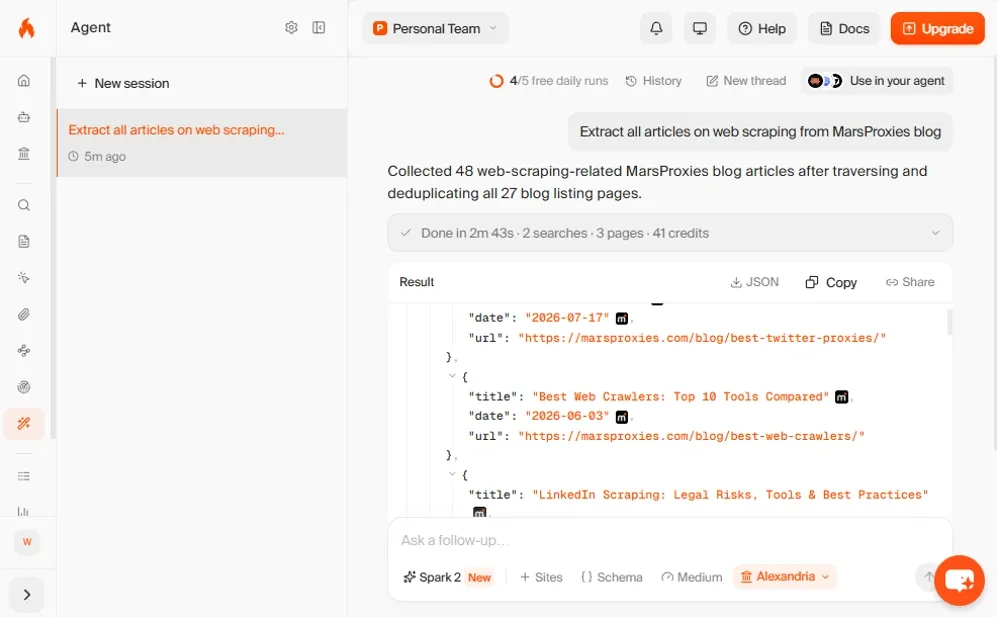
Firecrawl is an API-first scraping engine primarily built for developers. You can get data in formats like JSON and Markdown, ready for LLMs. We asked its agent to crawl our blog and extract all articles about web scraping.
It took 2 minutes and 43 seconds and consumed 41 credits out of the 1000 we had on our free version. Firecrawl extracted articles that were directly linked to web scraping, but also those that only contained chapters.
It has 18 integrations, including Claude, ChatGPT, Grok Build, and Zapier. You can ask it to perform SEO audits, clone website designs, carry out deep research, among other useful workflows.
The pricing plans range from $16/month (Hobby) to $599/month (Scale) on a credit-based system. Enterprises can negotiate for bulk discounts.
Pros
- No credit card needed for the free plan
- Multiple integrations and workflows
- Token-efficient output
Cons
- Scaling with tokens can get pricey
- Has a learning curve
2. Browse AI: Best no-code AI web scraper
Browse AI is a very beginner-friendly, no-code data extraction platform that also lets you monitor website changes. It can build custom AI web scraper tools, which it calls robots.
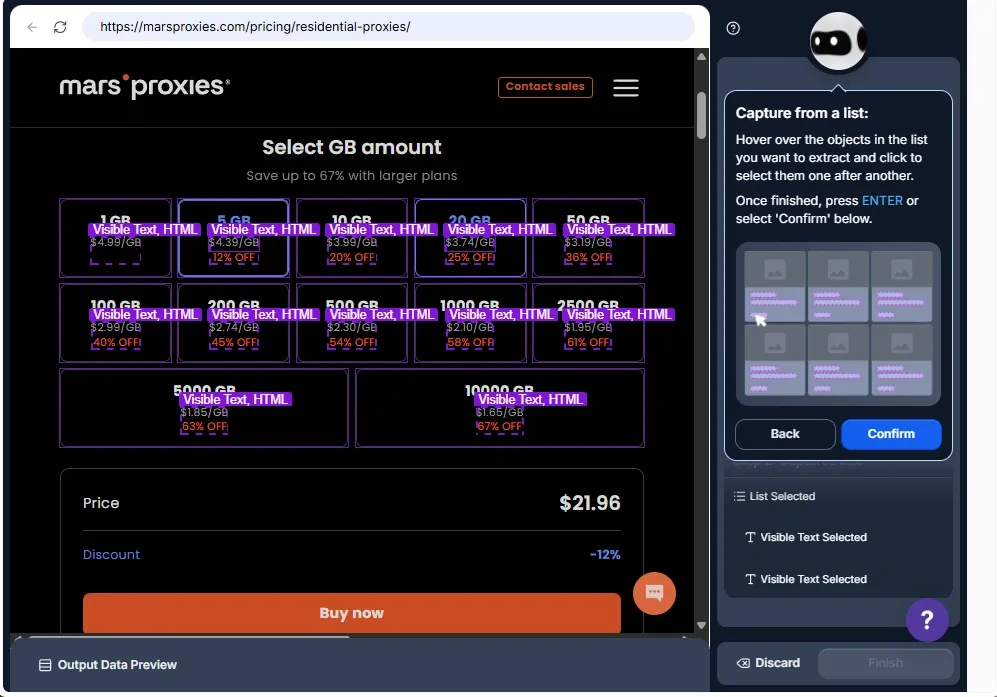
We chose to extract our residential proxy data, and you can also select whether the website requires logging in. This represents Browse AI's automation focus, making things much easier for scraping newcomers.
You simply move the cursor over the desired data, and the robot provides further instructions to create an automated workflow.
Browse AI claims to serve over 770,000 users and is able to extract data from 500,000 pages at once. It offers a Chrome extension (rated 3.9 out of 5 stars) and 250 pre-built robots.
The Personal plan costs $19/month, Professional $69/month, and Premium for enterprises $500/month. There is a free tier and paid add-ons like credit top-ups and assisted onboarding.
Pros
- No-code beginner-friendly
- Point-and-click data extraction
- Chrome extension
Cons
- Limited customization
- Reported customer support issues
3. ScrapeGraphAI: Best for AI-powered structured extraction
ScrapeGraphAI is an API-first web scraping platform with a similar interface to Firecrawl’s. It offers five endpoints: scrape, search, monitor, extract, and crawl.
You can integrate it with Python and JavaScript SDKs, n8n, Zapier, and other options that developers will find useful for customization. The actual platform settings are very limited, basically to add collaborators and change the color scheme.
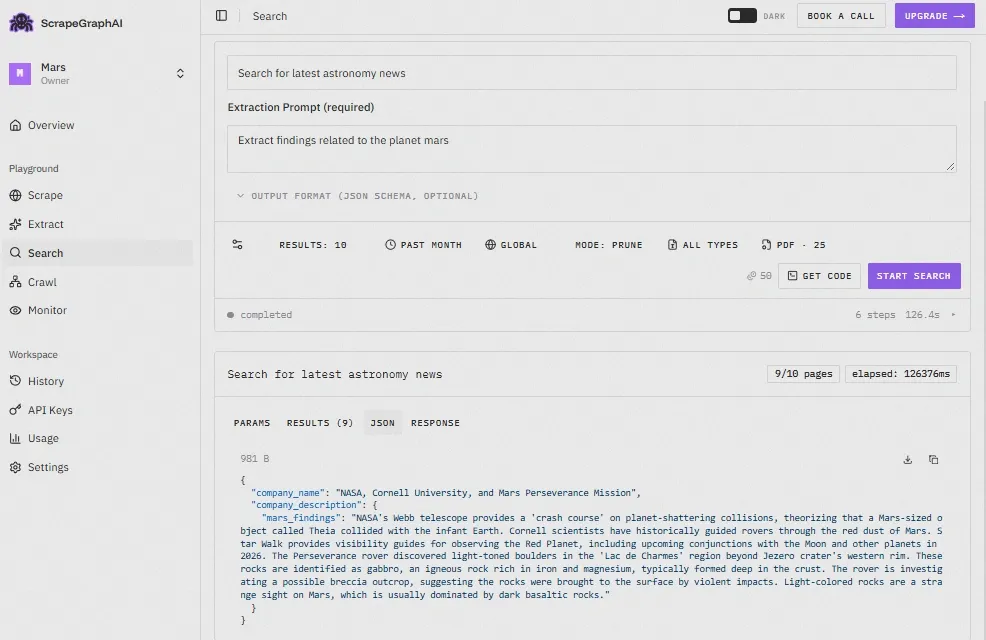
We asked ScrapeGraphAI to search for the latest news on planet Mars.
Using natural language prompts is as easy as with any AI tool. It returned the results in JSON-structured output, so this is one of many ways you can use ScrapeGraphAI to make data extraction faster.
This web scraping tool has a free tier. Starter Plan costs $20/month, the Growth Plan $100/month, and the Pro Plan $500/month. Enterprises can contact for custom pricing.
Pros
- Easy prompt-to-JSON data extraction
- Prune Markdown option to save credits
- Customizable website monitoring timespan
Cons
- Occasional scraping requests fail
- Unsuited for complex human-like simulations
4. Crawl4AI: Best open-source AI web scraper
Crawl4AI is a fully open-source web scraping tool. First things first, it’s not beginner-friendly. It does not provide a browser dashboard or any point-and-click interface. You will install it on your device using the terminal. You must also have Python and Git installed.
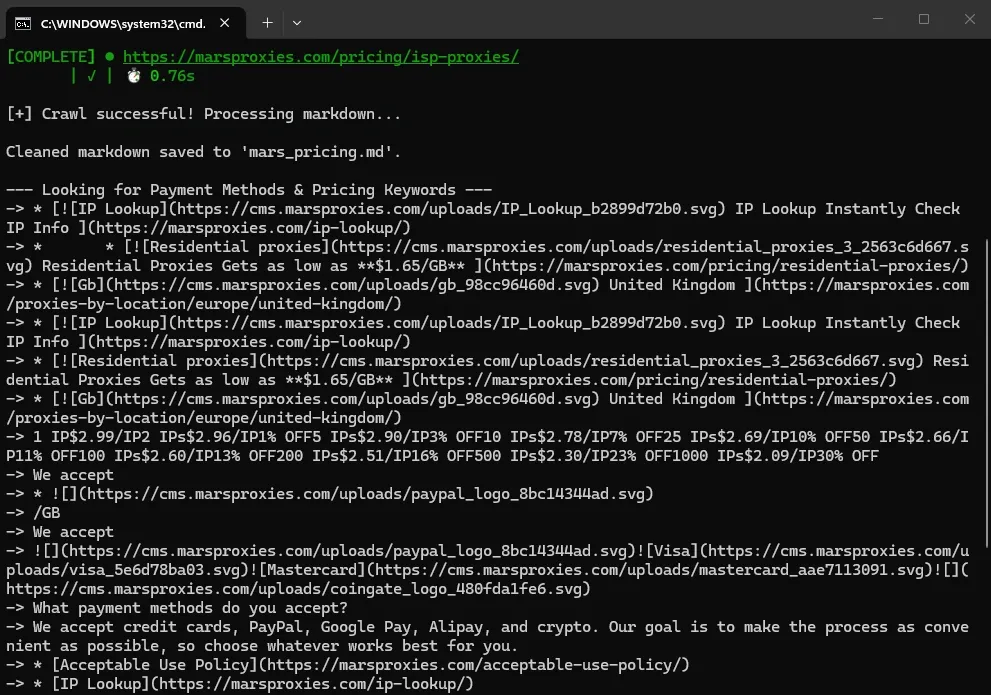
This tool extracts structured data stripped of HTML boilerplate. It supports traditional web scraping with XPath and CSS selectors, or you can use AI-powered web scraping. We have extracted our proxy pricing for free using Crawl4AI with the Playwright library.
The output looks a bit messy, but we wanted to show you the successfully completed task in the terminal. The pricing data is there, and you can parse it into numbers. Playwright handles JavaScript rendering, and we easily ran this scraper locally.
Did we mention it’s completely free? It has data extraction guides to get you started, and the rest is up to you.
Pros
- Completely free
- Entirely open source
- Highly customizable
- Supports self-hosting
Cons
- High learning curve
- No built-in anti-bot measures
5. Apify: Best scraping and automation ecosystem
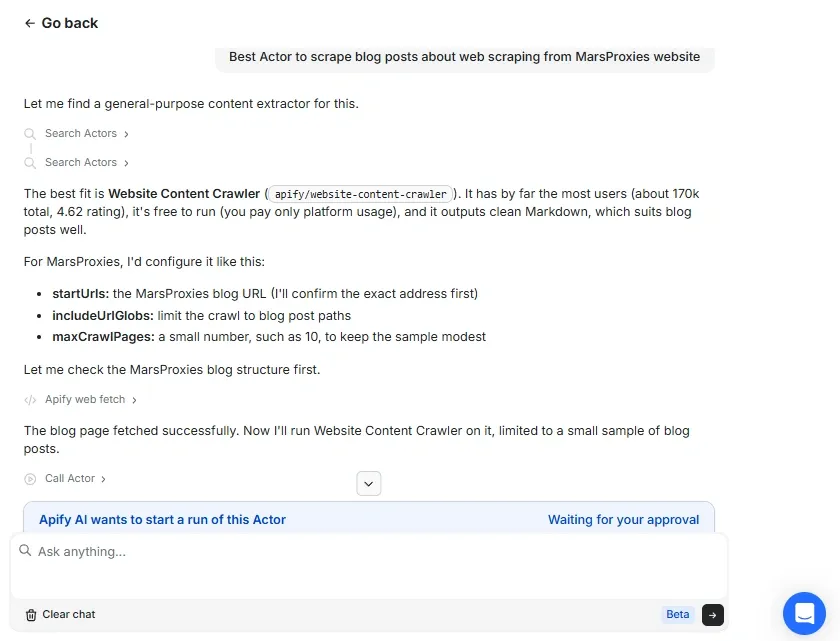
Apify is a massive marketplace with thousands of web scraping tools, called actors. Developers can find highly customizable scrapers for specific tasks. Simultaneously, non-developers can use AI scrapers without writing a single line of code.
Apify also integrates AI outside of its actors. Take a look at the image above for an example.
We didn't have to look for actors suited for our task. Apify uses its tools to analyze our website structure and recommends the best choice, which is extremely helpful for web scraping beginners.
The Website Content Crawler tool it recommended handles JavaScript rendering, cleans data, and downloads it in PDF, DOC, DOCX, XLS(X), and CSV formats. It costs $2-3 per 1,000 summarized pages, but the price can go up depending on the task complexity. Also, it varies by actor.
Pros
- Suited for developers and casual users
- Thousands of pre-built actors
- Recommends the best actor for the task
Cons
- Hard to predict total costs
- Locks you in within the Apify platform
6. Thunderbit: Best for quick browser-based scraping
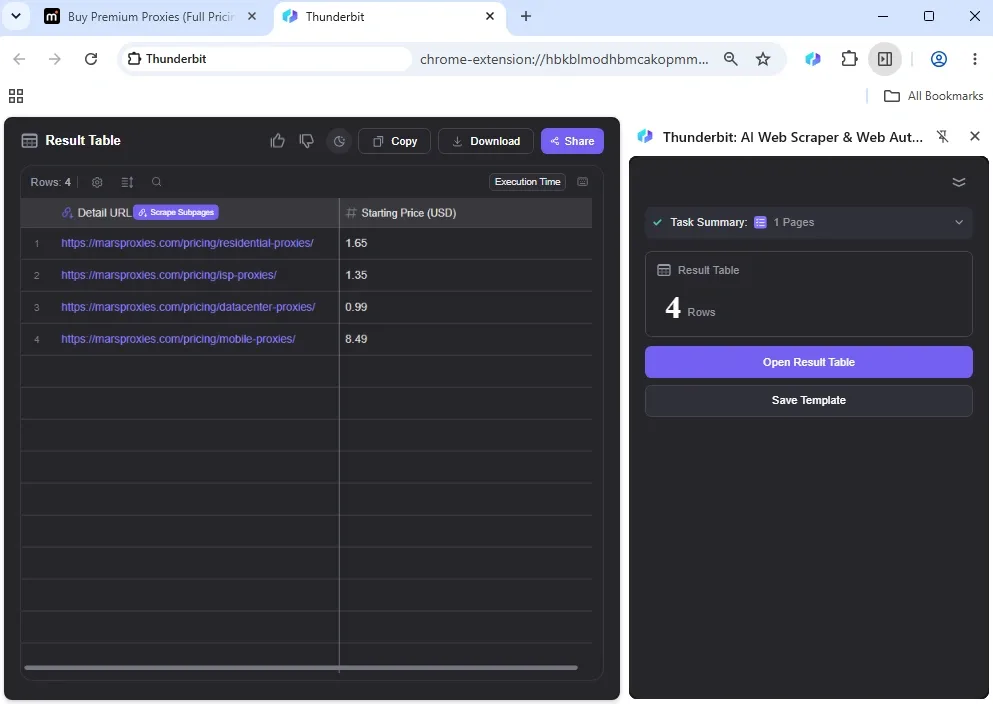
Thunderbit is the most beginner-friendly AI scraper on this list. It claims to scrape web pages with one click, which worked during our test. However, this tool fails with more complex website structures, which we also encountered.
Let's dive straight to the results. We instructed it to extract pricing data from MarsProxies proxy pricing list.
Thunderbit completed the task within one minute. However, when we launched it on our datacenter proxy pricing page, which is more complex, it incorrectly returned all zeros.
This web scraping tool receives mixed user reviews. We recommend trying its free tier first before opting for the paid version. The Starter plan costs $9/month, and the Pro plan costs $16.5/month.
Pros
- One-click data extraction
- Handles pagination
- Beginner-friendly
Cons
- Fails at complex websites
- Reported customer support issues
- Basic customization
7. Octoparse: Best visual scraper for complex workflows
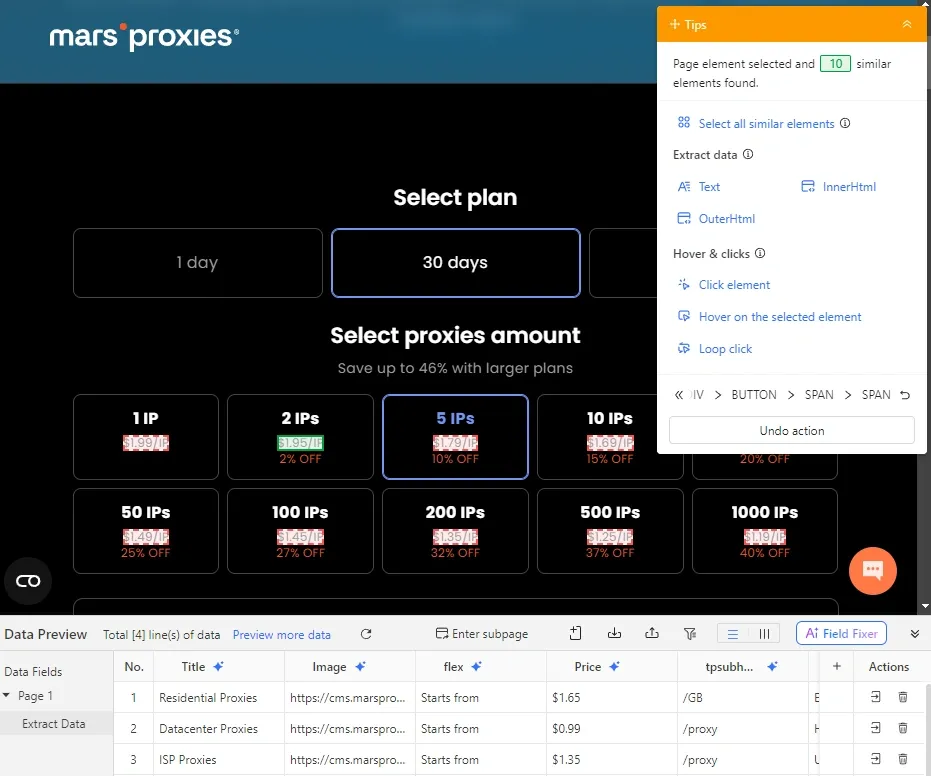
Octoparse is a powerful web scraping platform that has both a desktop version and a browser interface. It is business-oriented and can extract structured data from challenging sources. Octoparse offers pre-built templates fit for a variety of scraping tasks.
The example above shows its desktop visual workflow builder. In its app, we entered our datacenter proxy URL, which Thunderbit failed to scrape.
We hovered over the pricing element, and Octoparse immediately located all 10 pricing elements. Notice that below it, it also scraped the title, image, and other related information, so this AI web scraping tool is highly efficient.
You can also schedule tasks to run in its cloud with custom time intervals. Although Octoparse introduces all its platforms through a guided tutorial, it has a steep learning curve and will overload beginners with rich data.
Octoparse has a free tier. The Standard plan starts at $69/month, and the Professional plan costs $249/month. Enterprises should contact sales for custom pricing.
Pros
- Scrapes challenging sources
- Handles IP rotation
- Offers no-code workflow builder
Cons
- Steep learning curve
- High pricing
8. ScrapingBee: Best simple scraping API
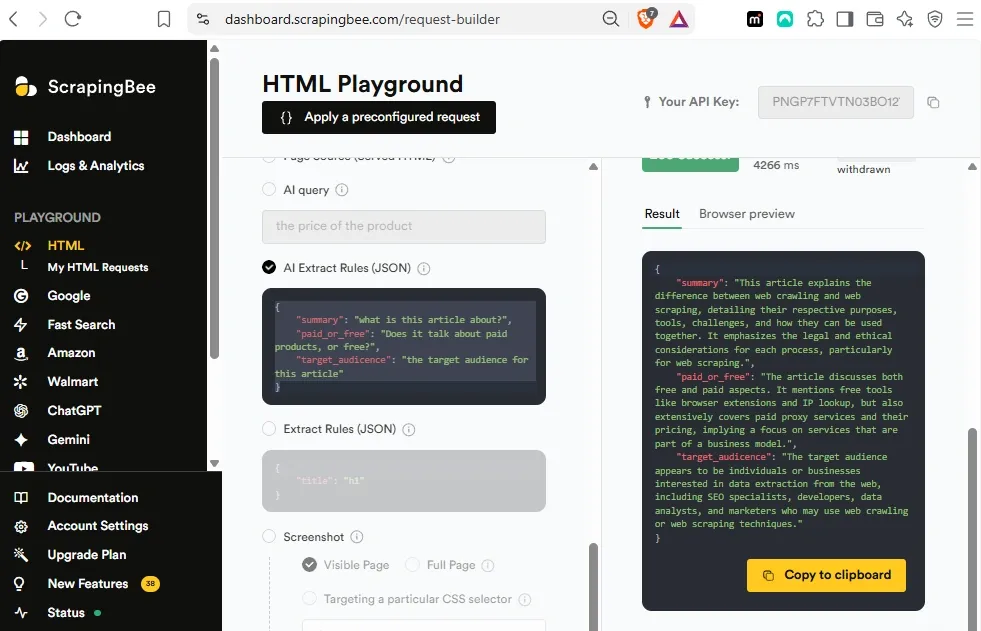
ScrapingBee is an AI web scraping tool you can use on your terminal or its browser platform. It uses a simple API that lets you set parameters, such as proxy types (classic, premium, or stealth), JavaScript rendering, wait intervals, and more.
It offers APIs to scrape Google, Amazon, Walmart, as well as ChatGPT and Gemini LLMs. Its browser platforms generate code snippets, which developers can use to write their own AI scrapers.
We tried how the ScrapingBee AI scraper handles contextual analysis. We asked it to analyze our web crawling vs. web scraping guide according to three questions, as seen in the image above. ScrapingBee completed the task very quickly and just as accurately.
The free tier offers 1,000 API credits. Standard plans range from $19/month (hobby) to $599/month (Business+). Enterprise plans range from $999/month to $5,799/month.
Pros
- Suited for individuals and enterprises
- Easy API integration
- Easy prompt-to-output feature
Cons
- No point-and-click data extraction
- Limited monthly API caps
9. Bright Data: Best for enterprise-scale scraping
Bright Data is a business-oriented data analytics company. It manages several products, including proxy services, pre-made datasets, AI scrapers, and APIs. On Trustpilot, it has a 4.4 out of 5-star rating from 1000+ reviews.
The service is highly scalable, able to make thousands of concurrent requests using its proxy infrastructure. Its Web Unlocker API is designed to bypass anti-bot protection, including CAPTCHA challenges.
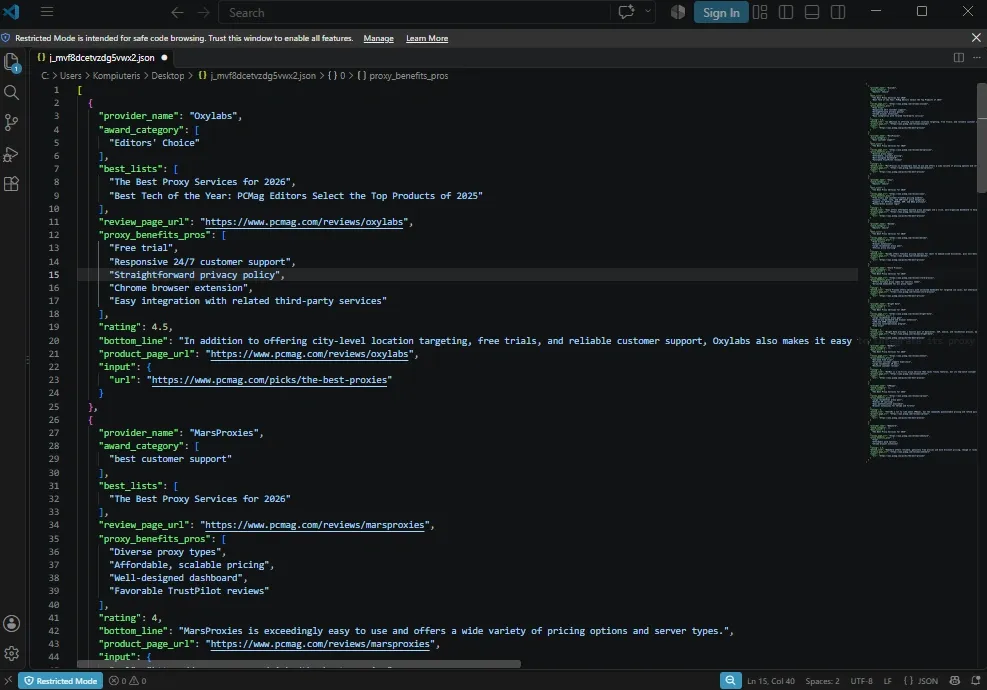
We wanted to give it a more ‘business-like’ task, as much as the Bright Data free tier allows. We asked it to scrape PCMag's best proxy listing article using a natural language prompt. Additionally, we asked it to list all winners in selected categories and extract additional strong points.
Bright Data exceeded expectations because it also scraped web pages that review each winner, which is 10 in total. We saved structured data in JSON format, as you can see in the image above.
You can choose a pay-as-you-go plan for $1.50/1K page loads. The Scale plan starts at $499/month, and large enterprises should contact sales.
Pros
- Offers anti-bot bypasser
- Handles proxy infrastructure
- Top-notch prompt-to-JSON output
Cons
- Unsuited for individual use
- Expensive service
10. Oxylabs: Best for enterprise AI scraping and unblocking
Oxylabs, similar to Bright Data, is also a business-oriented data analytics service with multiple products. Its Web API branch offers structured data extraction tools. It supports MCP (Model Context Protocol), which allows connecting AI assistants to Oxylabs scrapers.
Its AI web scraper tools include an API with AI-powered OxyCopilot, Fast Search API, AI-crawler, and a headless Agent Browser. We will use the Oxylabs Web API Playground to try its web scraping capabilities.
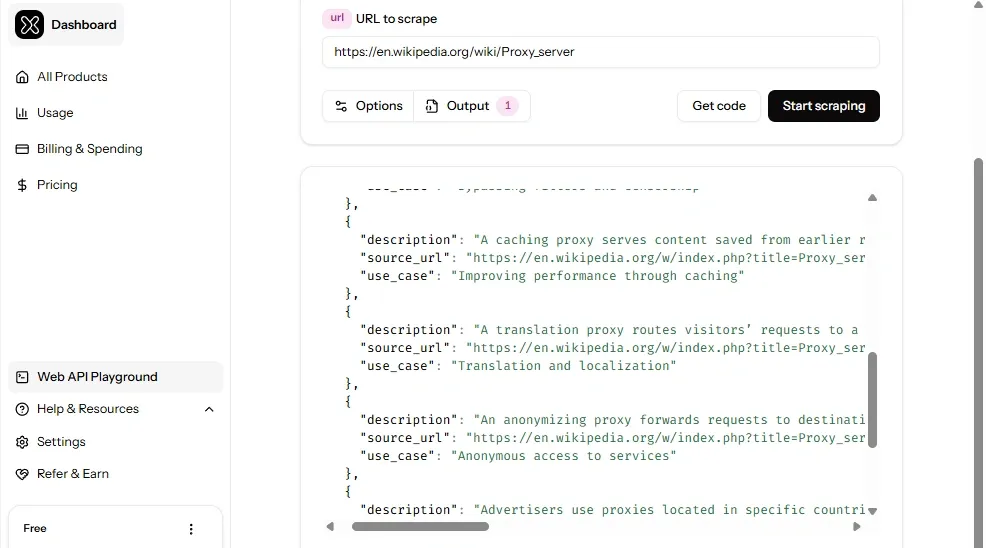
We asked it to scrape the Wikipedia proxy server page and extract data on forward proxies. We also instructed it to visit related links and extract structured data on the main use cases and benefits in JSON format.
Oxylabs AI scraper quickly carried out the task on a complex contextual web page. It returned a description with the main benefits, a use case, and the source URL.
Oxylabs Scrape service Starter plan costs $30/month, Basic costs $100/month, and Flexible costs $500/month. For large-scale plans that exceed $2,500/month, enterprises can contact sales.
Pros
- Offers a large proxy network
- Supports Model Context Protocol
- Offers bot-bypassing tools
Cons
- Limited free tier
- Steep learning curve
Which AI web scraper is best for your use case?
To summarize all ten reviews, here’s how all AI web scraper tools fall into three use case categories.
Firecrawl, ScrapeGraphAI, Crawl4AI, ScrapingBee
Developer and open-source plus APIs
Browse AI, Thunderbit, Octoparse, Apify
No-code and beginner-friendly
Bright Data, Oxylabs
Enterprise-scale and advanced unblocking
AI web scrapers vs traditional web scrapers
AI web scraping tools definitely make web scraping easier. They do not depend on rigid, hard-coded XPath and CSS selectors that easily break the moment the website structure changes.
AI scrapers understand natural language prompts. They use computer vision, optical character recognition, and semantic analysis. That allows them to adapt to website changes, scrape multimodal data, and make sure it is up-to-date.
But that does not mean they are pushing out traditional web scraping techniques completely. Traditional web scraping is faster and independent of AI computational requirements.
It is also cheaper. Custom-built scrapers with internal proxy network infrastructure cost only maintenance. Meanwhile, AI scrapers' token costs can skyrocket on large-scale projects.
Do AI web scrapers still need proxies?
AI-powered web scraping requires proxies the same way that traditional web scraping methods do. Moreover, websites implement protection methods that identify such scrapers, especially if they use datacenter proxy IPs or don’t rotate them at all.
If you aim to scrape data from a website using automated AI tools, it is best to rely on high-quality residential or mobile proxies.
When you may not need external proxies
You don’t need to manage a proxy infrastructure if you use services that provide it. In our list, many services (like Oxylabs and Bright Data) offer it.
But relying on a third-party proxy network also has its risks. It may not use the best proxy endpoints, resulting in scraping blocks and incomplete datasets. If you can afford it and have sufficient tech know-how, managing your own proxy pool gives you more control over structured output.
When external proxies make sense
You should use external proxies to avoid anti-bot protection and scrape challenging sources. Most massive retail websites, like Amazon and Walmart, block scrapers. Such enterprises scrape competitors, but limit access to their own data to maintain an advantage.
In reality, scraping requires proxies in the vast majority of cases. Web crawling for backlinks or cloning website designs will be blocked if all HTTPS requests come from the same IP address.
Keep Your AI Web Scrapers Unblocked in 2026
Get residential IPsConclusion
Artificial Intelligence is transforming scraping, but it does not eliminate traditional methods. During our tests, we had to use Playwright with Crawl4AI, and most listed tools use built-in Python libraries that are not AI-powered.
On the other hand, these tools proved exceptionally capable of automating tasks. You can extract vast amounts of data using Octoparse. Apify covers hundreds of use cases, and Oxylabs and Bright Data provide anti-bot evasion.
Human supervisors must verify all AI output. These tools are susceptible to AI hallucinations, and the current technology does not have a 100% solution for it. To summarize, it’s best to use traditional web scraping software alongside AI.
Frequently Asked Questions
What is the best free AI web scraper?
Crawl4AI is the best free AI web scraper. It is entirely open source, highly customizable, and handles JavaScript-rich websites via Playwright seamlessly. Although it requires good technical know-how to manage, Crawl4AI offers informative guides to start using it.
Can ChatGPT scrape websites?
ChatGPT is a Large Language Model and not a web scraper, but it can help scrape websites. ChatGPT is capable of generating code that developers and web scraping enthusiasts can use in their online data-gathering tools.
Is AI web scraping legal?
AI scraping is legal, but it must adhere to national and international data protection laws. In Europe, the General Data Protection Regulation (GDPR) outlines what you can and cannot scrape. In the US, the California Consumer Privacy Act governs it across many states. And the Personal Information Protection and Electronic Documents Act (PIPEDA) protects user privacy in Canada.
Do AI web scrapers hallucinate data?
Yes, AI hallucinations are one of the most significant setbacks of AI scraping tools. For example, during our AI browser tests, we asked an Artificial Intelligence scraper to summarize a paywalled article.
It provided an elaborate summary and later added that it could not access the original text and made assumptions. That’s why traditional web scraping methods are still relevant, giving developers much more power over structured output.
Do you need coding to use an AI web scraper?
Not necessarily. Developers who write proprietary code can adapt scrapers to their business needs. However, marketing specialists, SEO, HR, outreach, and numerous other professions can rely on artificial intelligence to gather data for them.